
Yes—compliance automation software is worth it for a small business in 2026 when you have a clear certification goal and repeat evidence work that takes people away from their main jobs. It is not worth buying simply to replace a tidy spreadsheet with a dashboard. You still need people to approve policies, fix security gaps and make decisions; software does not take those responsibilities away.
Is compliance automation software worth it for a small business in 2026?
Buy automation when it removes repeat work you can identify and measure. Wait when you cannot name the requirement, the owner or the evidence you need.
Start with the work, not the feature list. If your team repeatedly gathers records from different systems, chases approvals and rebuilds evidence packs, use the guide to automate evidence collection for audits to identify a workflow worth testing.
You have several ways to manage that work. Choose the approach that addresses your actual bottleneck.
| Approach | Best for | Practical advantage | Limitation |
|---|---|---|---|
| Spreadsheets and shared folders | A narrow, stable programme with a named owner | You control the structure and use familiar tools | You must maintain records, reminders and links manually |
| Compliance automation software | Recurring evidence work across people and systems | Suitable software can organise and automate repeat tasks | You must configure it, validate evidence and handle exceptions |
| Specialist support | Unclear scope or decisions requiring expertise | You get help interpreting requirements and planning action | You still need internal owners and access to business records |
These approaches are not mutually exclusive. Software handles repeat tasks; people handle judgement. A specialist can help you decide what to do before you automate how you record it.
Why this matters
For a small business, the useful outcome is less administrative work without losing control of your security programme. A dashboard is not that outcome. A record that your team can find, explain and maintain is.
Your 2026 decision should start with a business requirement: a customer asks for certification, you need to maintain an existing programme, or management wants a consistent process. Record the requirement before you compare suppliers.
Keep the software decision separate from the certification decision. Choosing ISO 27001, Cyber Essentials or SOC 2 determines the work you need to manage; choosing software determines how you organise parts of that work.
Do not assume every small business needs every framework. Ask which requirement applies to your business and which evidence the intended customer or assessor expects.
When compliance automation software earns its place
Best for recurring evidence collection
Automation has a clear job when you collect the same kinds of records repeatedly. Examples include access records, policy approvals and evidence that security tasks were completed.
The advantage is repeatability. Instead of rebuilding the process each time, you establish a source, an owner and a review step.
The limitation is evidence quality. A collected file does not prove that it covers the right systems or that someone acted on a problem.
Recommendation: automate collection only after you know what the record must demonstrate. Keep a human review for relevance, completeness and exceptions.
Best for shared responsibility across a lean team
A compliance programme can involve IT, operations, HR and management even when nobody has a dedicated compliance role. Your process needs to show who owns each task and who approves its completion.
Software is useful here if it supports the assignment and follow-up process you need. Test that workflow rather than accepting a demonstration of a populated dashboard.
The limitation is ownership. An automated reminder cannot decide which person is accountable when your team has not made that decision.
Recommendation: name the owner before configuring the workflow. Use automation to support responsibility, not to hide the absence of it.
Best for maintaining an ongoing programme
Compliance work does not end when you assemble an evidence pack. People join and leave, systems change, and policies need to reflect how your business operates.
Automation is relevant when those changes create repeat tasks. It is less useful when the underlying process changes so often that you must keep rebuilding the workflow.
Recommendation: automate stable tasks first. Keep unusual events and new requirements under direct review until you understand how to handle them.
When you should wait
Wait if the problem is unclear scope rather than repeated administration. Software cannot choose your business priorities for you.
You are not ready to buy when:
- You cannot explain why you need the certification or assessment.
- Nobody owns the programme internally.
- You have not identified the systems, people and activities in scope.
- You expect software to fix security settings without checking what it actually does.
- You cannot describe the records that an assessor or customer will need.
- You have no plan for reviewing evidence after it is collected.
Waiting does not mean doing nothing. Write down the requirement, appoint an owner and organise your existing records.
A spreadsheet remains a valid working tool if your process is small, controlled and maintained. Replace it when you can show where it creates repeated work or makes records difficult to manage—not because spreadsheets look less sophisticated.
Why the value of compliance automation varies
The value depends on the work you give the software. Use these factors to assess fit, rather than looking for a universal small-business threshold.
- Evidence repetition: recurring collection gives automation a defined task; isolated requests offer less repeat work to remove.
- Framework scope: check whether the software supports the actual programme you need, not just a framework name on a website.
- System coverage: confirm which sources it can use and what remains manual.
- Process maturity: a documented process is easier to configure than one that exists only in people's heads.
- Internal ownership: someone must review exceptions, approve changes and coordinate action.
- Evidence portability: check whether you can retrieve usable records when you need them, including when you stop using the platform.
Do not turn these factors into a made-up return percentage. Use them to decide what to test.
For your 2026 shortlist, ask each supplier to show the same business workflow. A consistent test makes the comparison useful; different demonstrations do not.
How do you check whether the software is worth buying?
Test a real task from your own business. Keep the scope small enough to follow from start to finish, but include the difficult part—not just successful collection.
1. Define the outcome
State what needs to happen. For example, your team needs to retrieve evidence of an access review and show who approved it.
Define success before the demonstration. Success means you can find and explain the evidence, not simply see a completed status.
2. Record the baseline
Record the work your current process requires. Include collection, checking, chasing, correcting and filing.
Use actual staff time and task records. Do not reconstruct a favourable baseline from memory after seeing the software.
3. Test the workflow
Ask the supplier to demonstrate the task using the sources and responsibilities you expect to use. Check permissions, manual inputs and any configuration required.
Follow an exception as well as a successful task. Ask what happens when evidence is missing, a connection stops working or a record needs correction.
4. Review the evidence
Inspect the resulting record. Check its source, scope, date and approval history where those details matter to your requirement.
Ask the person responsible for the programme whether the output is usable. Technical collection and compliance usefulness are different tests.
5. Decide the next step
Compare the baseline with the tested process. Include the work that remains manual and the effort needed to maintain the setup.
Buy when the tested workflow removes useful work without weakening your records. Wait when the demonstration leaves the hard part untouched.
This sequence keeps the purchasing decision tied to your process. It also gives you a repeatable way to assess another supplier without changing the test to suit its features.
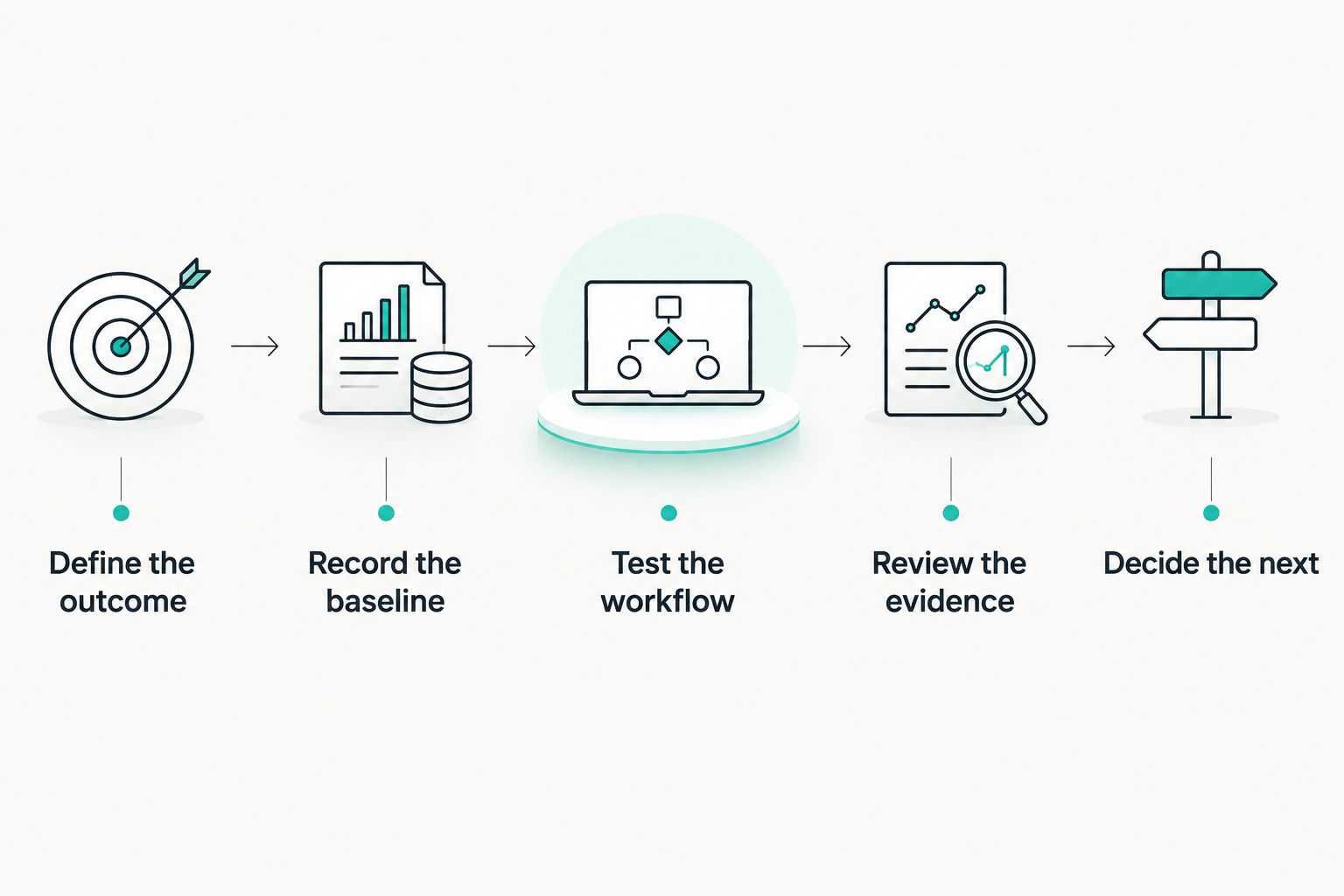
Test the complete workflow, including evidence review, before deciding to buy.
What should you include in the business case?
Your business case needs a requirement, a baseline and a tested outcome. Keep assumptions separate from measured results.
Use a short decision record:
- Business requirement: what certification, assessment or customer request are you addressing?
- Current work: which tasks consume staff time today?
- Proposed change: which of those tasks will the software handle?
- Remaining work: who reviews evidence, handles exceptions and fixes gaps?
- Implementation work: who configures the platform and checks the initial records?
- Success measure: what result will justify keeping the software?
Include setup and ongoing administration when evaluating the commercial proposal. Do not treat subscription spend as the whole commitment.
Avoid counting the same benefit twice. If faster preparation comes from reduced evidence collection, those descriptions refer to overlapping work rather than separate savings.
Do not count a prospective customer contract as a completed return. Record it as a business driver until the outcome exists.
For a 2026 approval, use your own workflow results rather than an unsourced industry average. A measured reduction in repeat work is a stronger justification than a promised certification shortcut.
Where does OneClickComply fit?
OneClickComply is a fit for growing businesses seeking software to automate and manage cyber security compliance end-to-end. Its stated scope includes ISO 27001, Cyber Essentials and SOC 2.
Assess OneClickComply against the same workflow test you use for other suppliers. Confirm the coverage, evidence sources and human responsibilities for your particular programme.
The relevant advantage is its focus on compliance automation. The boundary is equally clear: choosing software does not remove your responsibility to operate security controls or approve business decisions.
Ask for a demonstration that follows your evidence from its source to a usable record. That is more useful than a tour of features you do not need.
Does automation replace a compliance manager or adviser?
No—automation does not replace accountability or specialist judgement. It supports tasks that follow a defined process; your business still decides its scope, accepts risks and approves policies.
If your bottleneck is interpretation, resolve that question before configuring software. If your bottleneck is repeated administration, test automation against that work.
Can software guarantee that you pass an audit?
No—software cannot guarantee an audit outcome. Certification or assessment depends on the applicable requirements and the evidence of what your business actually does.
Treat automated checks as inputs to review. Investigate a completed status if the underlying record is incomplete, outdated or outside scope.
Should a small business start manually before automating?
Yes—start manually when doing so helps you understand an undefined process. You do not need to preserve a manual workflow once its requirements and responsibilities are clear.
Document the source, owner and review step first. Then automate the stable work and retain oversight of exceptions.
Frequently asked questions
One last thing
Before you buy in 2026, ask to see a failed task—not just a successful one. Follow who receives it, who fixes it and how the corrected evidence is recorded.
That test exposes the difference between recording a problem and managing it. Choose the process your team can maintain. Seriously Simple Cyber Compliance.