GDPR compliance software is worth it for a small business in 2026 when it replaces repeated record updates, deadline chasing and evidence searches with a process your team actually uses. Keep a simpler system if you can maintain accurate records reliably, and budget staff time for setup and decisions: software does not take over your legal responsibilities.
Is GDPR compliance software worth it for a small business in 2026?
Buy software to fix a repeatable workflow, not to collect a compliance badge. Your decision should reflect how personal data moves through your business and who maintains the records.
Start with your record of processing activities. This identifies the work a platform must support before you compare features.
| Approach | Best for | Main benefit | Main drawback | Decision |
|---|---|---|---|---|
| Spreadsheets and shared documents | Straightforward processing with a clear owner | You control the structure and updates | You must maintain versions, reminders and evidence links yourself | Keep if records remain accurate |
| GDPR compliance software | Recurring privacy work shared across staff | A suitable platform organises tasks, records and deadlines | Setup and ongoing review still require your time | Buy when a demonstration proves the fit |
| Specialist advice | Difficult legal questions or unfamiliar processing | You get judgement on the specific issue | Advice does not maintain your daily records automatically | Use for decisions you cannot resolve internally |
These approaches are not mutually exclusive. You can retain a simple register, obtain advice on a difficult issue and introduce software only where coordination becomes a problem.
Why this matters
GDPR accountability means you must be able to demonstrate compliance, not simply say you take privacy seriously. A signed policy does not show whether you followed a retention rule or responded to a request correctly.
For a small business, the useful question is whether your process survives ordinary change. A new supplier, employee departure or product launch should trigger an update rather than leave your records behind.
Your 2026 buying decision should start with those changes. If your current process handles them reliably, a new platform needs another clear justification.
When should you keep spreadsheets and shared documents?
Best for: straightforward processing that a named owner can maintain. Keep your existing system when you know what personal data you hold, where it sits, who receives it and when you delete it.
A spreadsheet is not automatically inadequate. Its value depends on accurate entries, controlled access and a working review process.
Before buying software, check whether you can:
- Find the current version of each privacy document.
- Identify the person responsible for each processing activity.
- Track requests and their applicable deadlines.
- Record supplier checks and relevant agreements.
- Update records when business processes change.
- Retrieve evidence without searching unrelated inboxes.
The disadvantage is manual coordination. If several people edit separate copies or reminders depend on someone's memory, the process needs attention.
Fix ownership first. Moving unclear responsibilities into software leaves you with the same problem in a different format.
When should you buy GDPR compliance software?
Best for: recurring privacy work that crosses teams, systems or suppliers. Buy when a platform demonstrates that it reduces the specific administration you currently repeat.
Look for workflows rather than feature names. Ask the supplier to show how you update a processing record, assign a request, review a supplier and retain evidence of the decision.
Useful capabilities to assess include:
- Linked records that reduce duplicate updates.
- Task ownership and reminders for unresolved work.
- Version history for policies and decisions.
- Access controls for sensitive records.
- Exports that preserve usable information.
- Request tracking that matches your actual process.
These are buying criteria, not capabilities every product includes. Verify them during a demonstration and document any gaps.
The drawback is implementation work. You still need to clean existing records, decide responsibilities and teach staff how to use the system.
Buy only when the demonstrated workflow improves on your current process. A polished overview screen is not enough.
When should you get specialist advice instead?
Best for: decisions that require legal interpretation rather than better task tracking. Seek advice when you cannot confidently establish a lawful basis, assess a proposed use of personal data or determine your international transfer obligations.
Software can hold a decision and its supporting evidence. It cannot turn an unsupported answer into a justified one.
Separate questions about your process from questions about the law:
- Who updates the supplier register? That is an ownership question.
- Where do you record the review? That is a workflow question.
- Does the proposed processing have an appropriate lawful basis? That requires a legal assessment.
The disadvantage of advice alone is that someone still needs to implement it. Assign an internal owner to turn recommendations into working procedures and maintained records.
For your 2026 plan, treat software and advice as different purchases. Do not expect either to perform the other's role.
Why the value of GDPR compliance software varies
Headcount alone does not determine whether software is useful. Examine the work attached to your personal data.
- Processing complexity: Different purposes, data categories and retention rules create different recordkeeping needs.
- Rate of change: New services and suppliers create updates that a static document does not make itself.
- Shared responsibility: Work split across teams needs clear handovers and ownership.
- Request handling: Access, deletion and other rights requests need a process for assessment, action and evidence.
- Legal complexity: Sensitive information, unfamiliar processing or international transfers require careful decisions as well as records.
- Existing process quality: Software has less to fix when your current records are accurate and easy to maintain.
Use these factors to describe your requirements. Do not turn them into an invented score that claims to measure compliance.
Which GDPR deadlines and rules should software support?
For a UK small business assessing software in 2026, use the Information Commissioner's Office guidance and the applicable UK GDPR rules to define requirements. A reminder is useful only if it reflects the correct obligation and exceptions.
Subject access requests: ordinarily 1 calendar month
The ICO's guidance on the right of access states that you ordinarily respond without undue delay and within 1 calendar month. Applicable extensions and rules concerning clarification or identity checks need to be handled correctly.
Ask how the platform records receipt, verification, searches, review and the response. Do not assume a fixed countdown handles every request correctly.
Reportable breaches: 72 hours where feasible
Under UK GDPR Article 33 and the ICO's breach-reporting guidance, you must notify the ICO of a reportable personal data breach without undue delay and, where feasible, within 72 hours of becoming aware of it. Not every breach requires notification.
Software should support recording the facts and assessment. Your team still decides whether notification is required and documents that decision.
Processing records: fewer than 250 employees is not a blanket exemption
UK GDPR Article 30 provides a qualified recordkeeping exemption for organisations with fewer than 250 employees. Exceptions include processing that is not occasional, specified higher-risk processing and certain sensitive data.
Do not choose a platform on the assumption that being small removes recordkeeping duties. Identify the processing activities for which you need records.
How do you check whether software saves useful work?
Use an actual workflow from your business. Compare the current process with the demonstrated alternative, including the work needed to keep either system accurate.
Map the work
List the privacy tasks you repeat and who completes them. Include updating records, finding documents, checking supplier information and handling requests.
Measure the effort
Record the staff time each task takes in your own process. Separate useful assessment from avoidable searching, duplicate entry and chasing.
Test the workflow
Ask the supplier to run the same task using representative sample information. Use anonymised examples rather than disclosing personal data unnecessarily.
Check the result
Confirm that the output is accurate, understandable and retrievable. Faster completion has no value if the record needs extensive correction.
Assign ownership
Name the person who will maintain the system and review unresolved tasks. Include training, corrections and administration in your assessment.
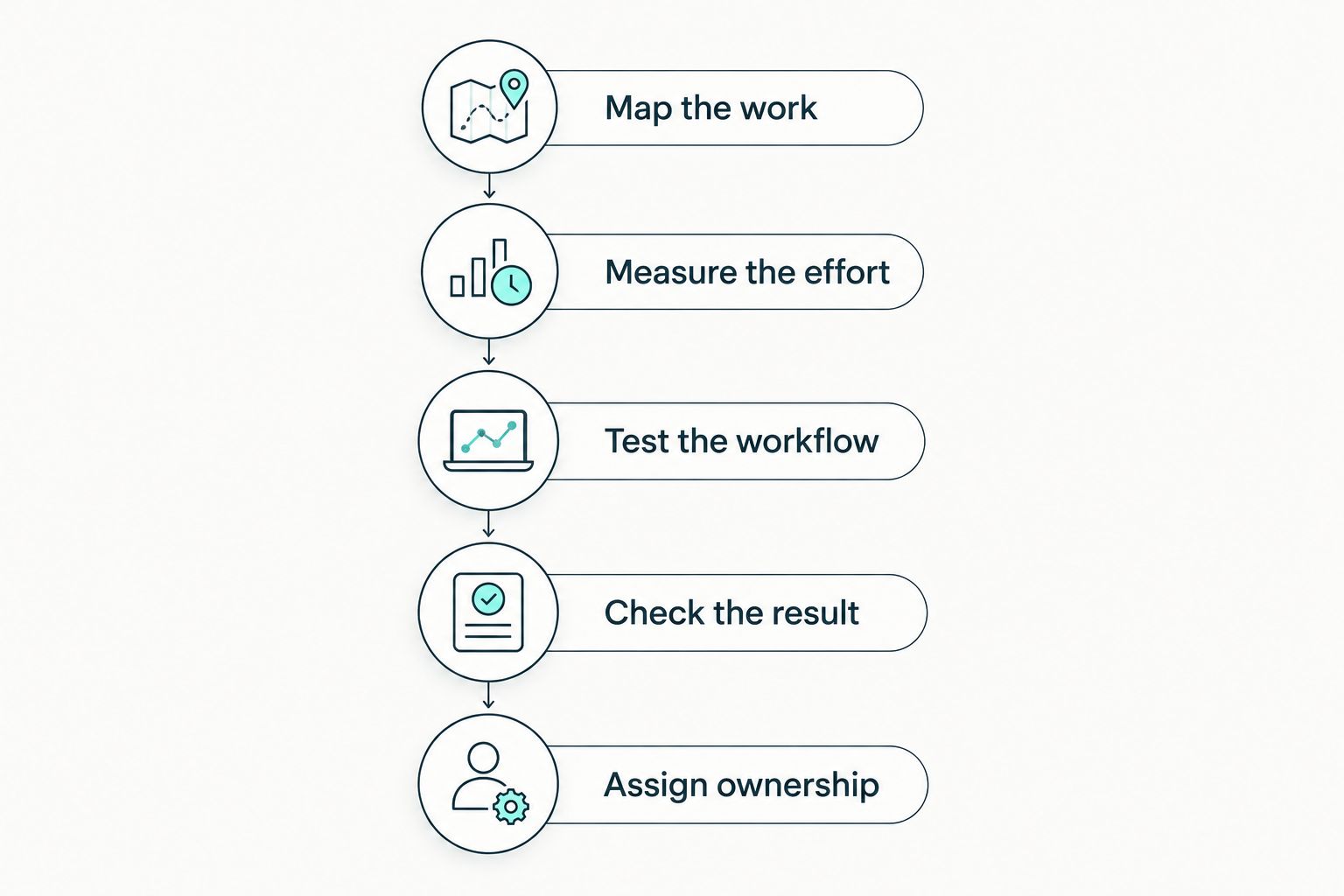
Measure a real workflow before committing to a platform.
Count demonstrated time savings, not promised savings. Exclude speculative revenue gains or assumed reductions in fines from your purchasing case.
What should you ask during a software demonstration?
A useful demonstration starts with your task, not the supplier's preferred tour. Give the supplier a realistic scenario and ask to see the complete process.
For example, follow a change in a supplier's handling of personal data. Check where you record the change, who reviews it and which related documents need attention.
Ask these questions:
- Can you connect the processing activity to its supplier and relevant agreement?
- Can you see who changed a record and why?
- Can you restrict access to request files and sensitive assessments?
- Can you retrieve evidence supporting a completed task?
- Can you export records in a format your team can use?
- What remains manual after setup?
Ask how the provider protects information you place in the platform. Review its role, contractual terms, hosting arrangements and relevant transfer provisions.
Finish by testing a handover. A colleague should be able to find the current record and understand the next action without relying on the person who created it.
Where does OneClickComply fit?
OneClickComply is best for growing businesses seeking to automate cyber security compliance certifications. Its stated scope includes ISO 27001, Cyber Essentials and SOC 2.
That makes OneClickComply relevant when your wider requirement includes managing those compliance programmes. It does not establish that the software includes every GDPR workflow described on this page.
Assess OneClickComply against your specific requirements before treating it as a GDPR solution. Certification work and data protection work overlap around security, but GDPR also covers lawful processing, transparency and individual rights.
Security certification is not a substitute for GDPR compliance. Keep that distinction in your 2026 purchasing brief.
Can a small business comply with GDPR without software?
Yes. GDPR does not generally require you to buy a particular compliance platform. You need appropriate measures, working procedures and evidence of compliance.
Choose a manual approach only if you can keep it accurate. Reconsider software when updates, handovers or evidence searches stop working reliably.
Does GDPR software replace a data protection officer?
No. Software does not replace the responsibilities or judgement of a data protection officer. Whether you must appoint one depends on the applicable statutory criteria, not simply your employee count.
If your main gap is expertise, resolve that first. Task reminders cannot answer a legal question your team does not understand.
Does ISO 27001 certification make a business GDPR compliant?
No. ISO 27001 certification does not establish GDPR compliance. An information security management system supports security, while GDPR imposes additional obligations concerning how you collect, use and disclose personal data.
Assess both requirements separately. Reuse relevant evidence where appropriate without treating the standards as interchangeable.
Frequently asked questions
One last thing
Ask to see an unresolved task during the demonstration. A completed checklist shows status; an unresolved task shows whether the system gives someone a clear next action.
For your 2026 decision, choose the process your team can maintain. If your wider goal includes automated cyber security certifications, assess OneClickComply on that scope too.
Keep the work clear. Keep ownership visible. Seriously Simple Cyber Compliance.