Stop rebuilding AWS evidence folders before every audit. Set up AWS ISO 27001 evidence collection with recorded configuration changes, activity logs and scheduled exports, then attach each record to a control, owner and review decision.
Why this matters
An AWS export proves what was recorded. It does not prove that your whole information security programme works. You still need approved policies, risk decisions, access reviews and evidence that someone handled exceptions.
OneClickComply provides ISO 27001 compliance automation for growing businesses. This guide explains the AWS-side collection workflow without assuming a specific connector or undocumented product setting.
For your 2026 programme, separate collection from assessment. Collect records automatically; ask control owners to decide whether those records meet your approved requirements.
The result is a traceable chain: AWS resource, observation time, control requirement, reviewer and action. That chain makes evidence easier to inspect than a folder of unexplained screenshots.
Before you start
- Access: You need permission to configure AWS Config, CloudTrail, an S3 evidence bucket, Lambda and EventBridge Scheduler. Separate setup permissions from the narrower permissions used during collection.
- Materials: Prepare your certification scope, account and Region inventory, Statement of Applicability, control owners and evidence retention policy. Identify an approved destination for evidence and review records.
- Gotcha: AWS Config recording is configured by Region, with specific rules for global resource types. Do not assume a recorder in your main Region covers every resource in every account.
Agree what the collector must read before granting access. Configuration metadata and log records can contain sensitive information, so restrict both the collector and the evidence destination.
Write down exclusions too. An account outside scope is an explicit decision, not a collection failure disguised as missing data.
Choose your evidence sources
Use each AWS service for its actual purpose. AWS Config and CloudTrail answer different questions; neither replaces a control owner's review.
| Source | Best for | What it provides | Advantage | Limitation |
|---|---|---|---|---|
| AWS Config | Resource configuration history | Recorded settings and changes for supported resource types | Shows configuration over time | Coverage depends on recording settings, resource support and Region |
| AWS CloudTrail | Account activity evidence | Recorded API activity and associated identity information | Helps trace who performed an action | Event coverage depends on event type and logging configuration |
| Amazon S3 | Evidence storage | Exported records, manifests and review attachments | Holds source files separately from reporting views | Storage alone does not map evidence to controls |
| AWS Lambda with EventBridge Scheduler | Recurring collection | Scheduled execution of collection code | Removes repeated manual exports | Your team must maintain code, permissions and failure handling |
OneClickComply is best for growing businesses seeking ISO 27001 compliance automation. Its stated purpose is to manage compliance end-to-end; this AWS workflow still requires you to configure source coverage and validate collected evidence.
For a 2026 evidence plan, record both the benefit and the boundary of automation. Automated collection removes repetitive work. It does not approve risks, assess every policy or grant certification.
Source coverage
Configure the sources before building the collector. Otherwise, a successful export can hide an account or Region that never recorded the required data.
Configure AWS Config
- Open AWS Config in an in-scope account and Region. Check the recorder configuration before enabling or changing it.
- Select the supported resource types needed for your controls. Include the services you actually operate, rather than choosing a narrow list just to reduce evidence volume.
- Configure the recording frequency appropriate to those resource types and your monitoring needs. Use continuous recording where supported when you need configuration changes rather than daily observations.
- Configure the service role and delivery destination. Verify that AWS Config can write to the destination.
- Inspect a known resource through
list-discovered-resourcesandget-resource-config-history. Confirm the account, Region, resource identifier and recorded settings.
Expected result: A known in-scope resource has a configuration record that you can retrieve and identify without relying on a screenshot.
An AWS Config aggregator brings configuration and compliance views together across accounts and Regions. It does not switch on recording in source accounts, so verify the underlying recorders first.
Configure CloudTrail
- Open CloudTrail, choose Trails, then Create trail if you need a new trail. Review existing trails first to avoid unnecessary duplication.
- Configure the trail for your account structure and regional coverage. Use an organisation trail when that matches your approved organisation-wide design and permissions.
- Send trail logs to the approved S3 destination. Configure encryption and restrict access to the log files.
- Choose the events required by your controls. Management events and data events cover different activity; select relevant data events explicitly.
- Generate a harmless authorised management action. Locate the corresponding event and verify its identity, timestamp and action details.
Expected result: A test action appears in the configured trail's delivered records, with enough context to identify what happened.
CloudTrail Event history provides the last 90 days of management events in a Region. AWS documents this limit in its CloudTrail Event history guidance; it is not a substitute for your approved long-term evidence retention design.
Evidence storage
Give every collection run a stable structure. Preserve the original source data and keep your interpretation separate.
- Create an S3 bucket dedicated to evidence, or use an existing approved evidence destination. Keep public access blocked and configure encryption.
- Separate source logs from processed exports. Grant the collector only the write permissions it needs, and give reviewers appropriate read access.
- Use object paths organised by account, Region, source and collection date. Store dates consistently so reviewers can retrieve the relevant period.
- Enable versioning where it supports your evidence policy. Apply lifecycle rules only after agreeing retention requirements with the control owners.
- Write a manifest for each run. Include collection time, source accounts, Regions, queried resource types, object references and errors.
- Store a content hash alongside each export when your implementation supports it. Verify the hash when retrieving evidence to check file consistency.
Expected result: You can retrieve an export, identify its scope and distinguish its observation time from its collection time.
Use your 2026 audit period as a retrieval requirement, not an excuse to delete older records. Your retention policy determines what remains available and when deletion is authorised.
A content hash checks whether a file matches the recorded hash. It does not prove that the source configuration was secure or that the collector covered every required resource.
Scheduled collection
Build a small collector around explicit questions. Start with a known account and a known resource, then expand after verifying the output.
Configure the collector
- Create a Lambda function using an execution role restricted to the approved evidence sources and S3 destination. Avoid administrator permissions.
- Query AWS Config for the required resource configuration. Handle paginated API responses so the first page does not become your entire inventory.
- Collect the required CloudTrail records from your configured logging destination or approved query method. Preserve source timestamps and event identifiers.
- Write source exports and a run manifest to S3. Record a failed source query as an error, not as an empty successful result.
- Add structured application logs showing the run identifier, covered scope and failures. Keep secrets and unnecessary personal information out of those logs.
- Test partial failure deliberately. Remove access to a test source and confirm that the run reports incomplete coverage.
Expected result: A test invocation creates retrievable evidence and reports which sources succeeded or failed.
AWS documents a maximum Lambda execution time of 15 minutes. Split large collections by account, Region or source rather than assuming one function can process the entire estate in one invocation.
Configure the schedule
- Open Amazon EventBridge Scheduler, choose Schedules, then Create schedule.
- Set Schedule name and select Recurring schedule. Use a rate or cron expression that matches your approved evidence collection frequency.
- Configure Flexible time window according to whether the run needs a defined window or permitted scheduling flexibility.
- Select the Lambda target. Supply an input payload identifying the collection scope, without embedding credentials.
- Configure the execution role, retry behaviour and dead-letter destination. Confirm that the role can invoke the intended function.
- Run a test invocation, then inspect an actual scheduled run. Verify both the Lambda logs and the S3 manifest.
Expected result: Scheduled runs produce evidence automatically, while failed deliveries or collection errors reach a monitored destination.
AWS documents 60-second precision for EventBridge Scheduler. Treat this as scheduling precision, not a guarantee that every export finishes at an exact second.
Control mapping and review
A complete 2026 workflow needs a review stage after collection. Keep the evidence record small enough for a control owner to understand without reading the collector code.
- Define the control question. For example: does the approved logging configuration remain enabled for the in-scope environment?
- Map the source records to the applicable control in your Statement of Applicability. Include the resource identifier, source timestamp and export reference.
- Record the expected configuration separately from the observed configuration. Make the comparison explicit.
- Assign a control owner to review the observation. Record the decision, reviewer and review date.
- Open an action when the evidence shows a gap. Attach the correction evidence and retain the original finding.
- Mark missing or failed collection as incomplete evidence. Do not convert absence into a passing result.
Expected result: A reviewer can follow an observation through to an approved decision or a tracked correction.
The process has four distinct stages: Collect, Store, Map, Review. Keep each stage visible so successful storage cannot be mistaken for a completed assessment.
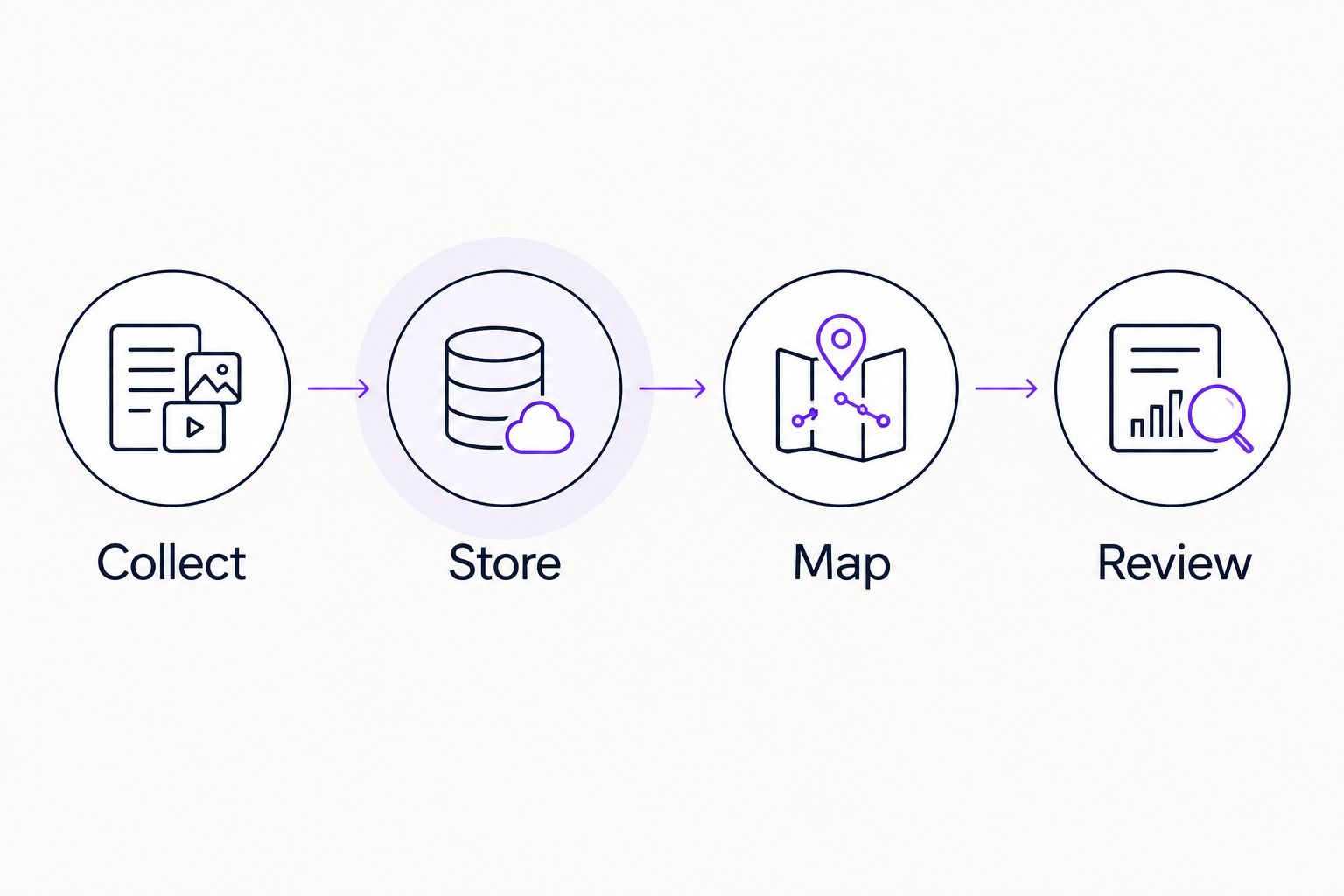
Stored evidence becomes useful when it has a control mapping and a review decision.
Collect evidence whenever configuration changes
Best for: Controls where configuration changes need attention between scheduled runs. Keep scheduled reconciliation as the baseline; add event-driven checks rather than replacing it.
AWS Config publishes supported configuration change events to EventBridge. Match the event types and resources you need, then send them to a collector designed for those events.
- Create an EventBridge rule for the relevant AWS Config configuration change events.
- Filter the rule to the resource types and scope covered by the control.
- Send the event to a Lambda function that retrieves and stores the relevant configuration evidence.
- Deduplicate processing using stable source identifiers. Retried delivery must not create separate findings for the same observation.
- Route failed processing to a monitored recovery path. Reconcile event-driven evidence with scheduled collection.
Expected result: A relevant configuration change creates a traceable observation, while recurring collection checks for missed coverage.
| Collection pattern | Best for | Advantage | Limitation |
|---|---|---|---|
| Scheduled collection | Regular scope checks and evidence refresh | Rechecks the defined estate | Changes between runs need source history or event handling |
| Change-triggered collection | Prompt review of relevant changes | Starts collection from a recorded change | Requires filtering, deduplication and failure recovery |
Troubleshooting
- The run succeeds, but resources are missing. Compare the export against your account and Region inventory. Check recorder settings, supported resource types and API pagination before changing the control result.
- The collector returns AccessDenied. Identify the failing API call and principal. Check identity policies, resource policies, encryption-key permissions and organisation-level restrictions; do not fix collection by granting administrator access.
- CloudTrail shows management activity, but not the object activity you need. Check data event selectors for the relevant resources. Enabling collection now does not recreate events that were not previously recorded.
- The Lambda function times out. Split the workload and persist progress. Check API throttling and retry behaviour rather than repeatedly rerunning an oversized collection.
- The evidence is current, but the review is stale. Assign an owner and track review completion separately from collection. A fresh export does not renew an old approval automatically.
Customise your workflow
Expand only after your initial scope produces complete, reviewable records. Add accounts and Regions through the same onboarding checks, including a known-resource test and a deliberate failure test.
Use the guide to automating evidence collection for audits to extend the process beyond AWS. Keep each source's observation time, owner and retention rule visible.
OneClickComply supports ISO 27001 compliance automation for growing businesses. Evaluate how your evidence and review process fits that purpose without assuming an AWS integration or collection feature that has not been confirmed.
Frequently asked questions
One last thing
A disabled collector must create a visible failure, not a quiet gap. Monitor the expected manifest as well as the AWS configuration; source controls can remain healthy while your evidence pipeline stops working.
For your 2026 programme, test that failure before expanding the workflow. Collect the records, assign the decisions and keep the history: Seriously Simple Cyber Compliance.