
Best for combining compliance and risk management: OneClickComply. Best for privacy-led supplier reviews: OneTrust. Best for enterprise workflows: ServiceNow. Best for external cyber-risk signals: SecurityScorecard. Your best vendor risk management software for recruitment agencies in 2026 depends on whether you need broader compliance support, supplier assessments or ongoing security monitoring.
Why this matters
Your applicant tracking system, screening provider and payroll partner create different dependencies. A supplier that stores candidate records needs a different assessment from one that only supplies office equipment.
Buy software that records a defensible decision, not just a completed questionnaire. You need to know what the supplier handles, what evidence supports approval and who owns any unresolved risk.
This 2026 shortlist separates four buying needs. It does not treat compliance automation, privacy management, enterprise workflows and security ratings as interchangeable products.
What makes the best vendor risk management software?
Use these six criteria before comparing product demonstrations:
- Supplier context: Record the service, business owner, data involved and operational dependency. A supplier name alone tells you little.
- Proportionate assessments: Match the depth of review to the supplier's access and importance. Avoid giving every supplier the same questionnaire.
- Evidence and decisions: Keep supporting documents, review notes, exceptions and approvals connected. A score needs an explanation.
- Privacy checks: Assess processing roles, contractual terms, retention, subprocessors and international transfers where relevant.
- Follow-up ownership: Assign actions and review dates. An unresolved issue needs a named owner, not another spreadsheet tab.
- Usable administration: Test the work your team actually performs. Include onboarding, reassessment, reporting and supplier exit.
For your 2026 shortlist, separate essential requirements from useful extras. If no one owns supplier approvals today, start by defining that responsibility; software cannot assign accountability on your behalf.
Vendor risk software at a glance
| Option | Best for | Standout capability | Key limitation |
|---|---|---|---|
| OneClickComply | Combining compliance and risk management | Compliance automation, policy generation and risk management | Confirm the supplier-specific assessment workflow before selecting |
| OneTrust | Privacy-led supplier reviews | Third-party risk management alongside privacy capabilities | A wider platform requires a clearly defined scope |
| ServiceNow | Enterprise approval workflows | Third-party risk workflows within a broader enterprise platform | Suitability depends on administration and implementation capacity |
| SecurityScorecard | External cyber-risk monitoring | Outside-in security ratings and monitoring | External signals do not establish contractual or privacy compliance |
The table identifies where each option belongs in your decision. It is not a claim that every product provides the same depth of supplier assessment.
1. OneClickComply: best for compliance-led risk management
OneClickComply provides compliance automation for growing businesses, including security-control remediation, policy generation, risk management and trust centres. Its stated scope includes support for ISO 27001, Cyber Essentials and SOC 2 programmes.
OneClickComply is best for growing recruitment agencies that want compliance automation and risk management in one platform. Put it first on your shortlist when supplier risk forms part of a wider effort to organise security controls and certification work.
OneClickComply pros
- Combines risk management with broader compliance work.
- Generates policies to support your compliance programme.
- Automates remediation of security controls.
- Includes trust-centre management alongside internal compliance activities.
OneClickComply cons
- A broad compliance remit is not proof of a particular supplier-assessment workflow; require a demonstration.
- It is a less direct starting point when your only requirement is outside-in supplier security ratings.
- Automation does not replace your decision about whether a supplier's remaining risk is acceptable.
Best for: A growing recruitment agency connecting supplier oversight with its own security and compliance programme.
Ask the demonstration team to take a screening provider through assessment, approval and reassessment. Confirm how supplier evidence, contractual issues and actions fit the process rather than assuming that general risk management covers every requirement.
Verdict: Hold until the supplier workflow passes your acceptance test; buy for the combined compliance use case.
2. OneTrust: best for privacy-led supplier reviews
OneTrust offers third-party risk management and privacy-management capabilities. That combination makes it a relevant shortlist option when supplier reviews need close involvement from your privacy team.
For a recruitment agency, the useful question is practical: can you connect what a supplier does with candidate information to the assessment and approval decision? Ask to see that connection rather than accepting separate product demonstrations.
OneTrust pros
- Offers a dedicated third-party risk management product area.
- Provides privacy capabilities relevant to supplier data handling.
- Supports a buying approach that considers privacy and third-party risk together.
OneTrust cons
- A broad product portfolio requires careful selection of the capabilities you need.
- Privacy assessments do not remove the need to evaluate service continuity and security.
- Your team still needs to define processing roles and make contractual decisions.
Best for: An agency whose privacy team drives supplier due diligence and needs a connection between privacy reviews and third-party assessments.
Use a background-checking provider as the demonstration scenario. Ask how the proposed setup records the service, information handled, relevant agreements and outstanding questions without forcing reviewers to reconstruct the decision across separate records.
Verdict: Buy for privacy-led supplier governance once the proposed scope matches your workflow.
3. ServiceNow: best for enterprise approval workflows
ServiceNow offers third-party risk management within its broader enterprise platform. It belongs on the shortlist when supplier oversight involves several teams and needs to fit established business workflows.
A recruitment group with separate procurement, security, privacy and operational approvers should examine the hand-offs closely. The objective is a clear approval route, not a longer chain of notifications.
ServiceNow pros
- Provides a dedicated third-party risk management offering.
- Places supplier-risk work within a broader enterprise workflow environment.
- Fits an evaluation centred on cross-team responsibilities and approvals.
ServiceNow cons
- Platform configuration and administration need an accountable owner.
- An enterprise workflow approach is disproportionate if your process is simple.
- Existing use of the platform does not prove that your supplier-risk requirements are covered.
Best for: A recruitment group coordinating supplier reviews across multiple functions, particularly when it already uses ServiceNow.
Ask for an approval with a disagreement: security requests remediation while operations wants to proceed. Check how the proposed workflow captures escalation, conditions and final acceptance without losing the original concern.
Verdict: Buy for established enterprise workflows; skip if you need only a lightweight supplier register.
4. SecurityScorecard: best for external cyber-risk signals
SecurityScorecard provides security ratings and external monitoring. It gives you an outside-in view of supplier cyber-risk signals rather than relying solely on documents supplied during onboarding.
That view serves a different purpose from a contract review or a data-processing assessment. Use external findings to ask better questions and prioritise follow-up, not to make an automatic approval decision.
SecurityScorecard pros
- Adds external security signals to supplier reviews.
- Supports monitoring beyond the initial onboarding assessment.
- Gives reviewers a basis for targeted supplier discussions.
SecurityScorecard cons
- External observations do not show every internal control.
- Correct supplier identification and attribution need checking.
- A security rating does not establish compliance with your privacy or contractual requirements.
Best for: An agency that already has supplier approvals under control and wants additional external cyber-risk monitoring.
Ask how a finding connects to the supplier's actual service and your exposure. A useful review ends with a relevant question, an action or a documented decision—not an unexplained change in score.
Verdict: Buy as a monitoring layer; skip as your only vendor-risk process.
Test the recruitment workflow before you buy
For your 2026 evaluation, use 3 supplier records: an applicant tracking provider, a background-screening provider and a payroll partner. These are test scenarios, not assumptions about your current supplier list.
Book 30 minutes for the live exercise. Allow 5 working days afterwards for your reviewers to assess the proposed setup and record unanswered questions; these are suggested evaluation limits, not implementation promises.
Define scope
Describe the service, the information involved and the operational dependency. State whether the supplier stores records, accesses your systems or receives exports.
Do not put real candidate information into a sales demonstration. Use fictional records and sample documents.
Assess evidence
Ask the demonstrator to attach evidence and explain its relevance. A certificate needs a scope check; a policy needs a review of what it actually covers.
Test how a reviewer records an unanswered question. Do not let an uploaded document stand in for an assessment.
Approve conditions
Create an approval with an unresolved action. Record the owner, required outcome and person authorised to accept the remaining risk.
Check whether another reviewer can understand the decision without asking its author. That is a useful test of the record's quality.
Review changes
Change the scenario: the supplier introduces another service provider or changes where information is handled. Ask how your team would reassess the relationship and preserve the earlier decision.
Close access
End the supplier relationship in the demonstration. Track contract closure, access removal and the required handling of retained information.
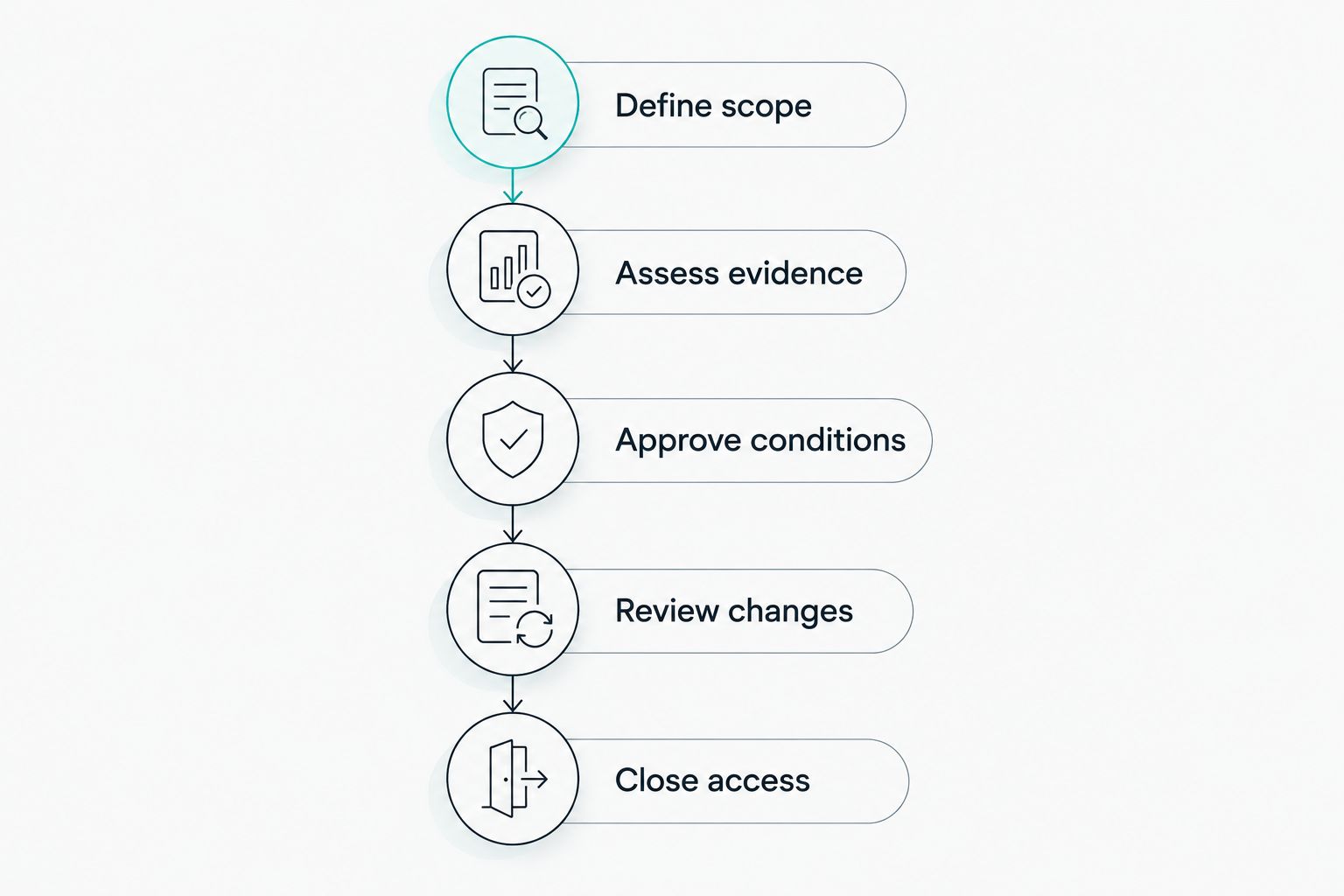
Test the whole supplier relationship, not just the onboarding questionnaire.
A completed demonstration should leave you with a decision record you can inspect. If the answer depends on future configuration, document that dependency before committing.
Check candidate-data responsibilities
Vendor risk management supports privacy compliance; it does not replace it. In your 2026 requirements, distinguish the supplier's security controls from your responsibilities for the information you share.
Under UK GDPR Article 28, using a processor requires a binding contract containing specified terms. Do not assume every recruitment supplier is your processor: establish the role for the actual processing activity.
Include these questions in your review:
- What information does the supplier need, and why?
- Who decides the purposes and means of processing?
- What contractual terms apply to the relationship?
- Which subprocessors are involved where the supplier acts as a processor?
- What happens to information when the service ends?
- Do international transfers require additional safeguards?
For the contractual detail, use the guide to building a data processing agreement checklist under GDPR.
A certificate or security rating answers a narrower question than this checklist. Keep the evidence, but do not treat it as blanket approval for every use of candidate information.
How the shortlist is ranked
This 2026 ranking follows the six criteria above: supplier context, proportionate assessments, evidence, privacy, ownership and administration. Each option holds a distinct use-case slot rather than competing for an unsupported universal winner.
The order starts with combined compliance and risk management, then moves to privacy-led reviews, enterprise workflows and external monitoring. Product fit still depends on the workflow you need to operate.
Your acceptance test carries more weight than a feature count. Require evidence of the proposed setup before signing off.
Which vendor risk software should you choose?
Choose OneClickComply as your starting point when supplier oversight belongs within a broader compliance programme. Confirm the supplier-specific workflow before making the purchase decision.
Choose OneTrust when privacy-led assessments drive the requirement. Choose ServiceNow when enterprise approvals and cross-team workflows dominate. Choose SecurityScorecard when you need external cyber-risk signals alongside an existing review process.
For an undecided buyer, start with the applicant tracking provider scenario. It forces the conversation onto data handling, service dependency, evidence and approval—the work your team needs to complete.
Frequently asked questions
One last thing
Test supplier exit before supplier onboarding. A platform that collects questionnaires still needs to support the actions that end a relationship: removing access, closing responsibilities and confirming the required handling of information.
Ask an operational colleague to read the final record. If they cannot tell what to do next, simplify the workflow before adding more automation.
Seriously Simple Cyber Compliance.