
No. Automated penetration testing software does not replace manual pen testing across every system and attack scenario. Use automation for repeatable checks and supported attack validation, then use skilled testers to investigate business logic, access boundaries and attack paths that need human judgement.
Can automated penetration testing replace manual pen testing?
Automation can replace specific repeatable testing tasks, not the full judgement-led assessment. Manual testers also use software. The difference is who chooses the next action, interprets unexpected behaviour and decides whether a weakness creates a meaningful business risk.
For your 2026 buying decision, compare the work delivered rather than the label on the proposal. Start by scoping a penetration test before you buy one, including the systems, user roles and attack scenarios that matter.
| Approach | Best for | Main strength | Main limitation |
|---|---|---|---|
| Automated penetration testing | Repeating supported security checks | Runs defined tests consistently and can validate supported attack paths | Coverage depends on the tool, access and configuration |
| Manual penetration testing | Investigating application behaviour and business impact | Adapts tests to unexpected results and business rules | Covers an agreed scope within a defined engagement |
| Combined testing | Checking frequently while investigating critical risks | Connects repeatable checks with human investigation | Needs clear ownership to avoid duplicate work and gaps |
Neither approach proves that your system has no vulnerabilities. A useful report explains what was tested, what was found and what remains outside the assessment.
Why this matters
A clean result only describes the tests that actually ran. If your testing never entered an authenticated customer area, it tells you little about the permissions inside that area.
For a growing SaaS business, the decision is not simply whether software finds vulnerabilities. You need to know whether the assessment covers customer separation, privileged actions, integrations and the workflows your customers depend on.
Your 2026 testing plan should connect findings to fixes. A long report without an owner, a remediation decision and a retest leaves the underlying work unfinished.
Automated testing: best for repeatable checks
Automated penetration testing software is suited to checks that the product supports and that you can run safely under agreed conditions. Depending on its capabilities, this includes discovering exposed services, checking known weaknesses and attempting controlled validation.
Do not assume every product does all of those things. Ask the supplier to demonstrate the exact behaviour you need against a representative environment.
The benefit is repeatability; the limitation is bounded coverage. Automation follows its supported methods, available credentials and configured rules. It does not automatically understand what your business considers an unauthorised action.
Ask these questions before selecting software:
- Which assets and technologies does it support?
- Can it authenticate and maintain a working session?
- Does it identify a suspected weakness or demonstrate exploitation?
- Which tests change data or affect service availability?
- What evidence shows that a test completed successfully?
- Which checks require a person to interpret the result?
Avoid treating a scheduled scan as continuous coverage of every attack path. A schedule describes when a job starts, not whether the job reaches every relevant feature.
Manual testing: best for business logic and access boundaries
Manual penetration testing is suited to questions that depend on context. A tester can examine how your application should work, challenge those assumptions and follow unexpected behaviour.
Consider a SaaS application with 3 user roles: customer, support agent and administrator. A meaningful assessment checks whether each role can perform only its intended actions, not merely whether each account can sign in.
Useful scenarios include:
- A customer attempting to access another customer's records.
- A support agent attempting an administrator-only action.
- A user repeating a transaction that should happen only once.
- An account attempting restricted actions after its permissions change.
These are example test scenarios, not claims that your application contains those weaknesses. Agree the expected behaviour with the tester before testing begins.
Manual testing adds investigation, but it still has boundaries. A tester cannot assess excluded systems, unavailable accounts or workflows that nobody explains. Protect the value of the engagement by supplying working access and clear business rules.
Combined testing: best for repeatability and deeper investigation
Use a combined approach when you need regular feedback without giving up contextual testing. Assign automation the supported repeatable checks, then reserve specialist investigation for critical workflows and unresolved questions.
The handover matters. Give manual testers relevant automated findings, known exclusions and previous remediation evidence so they can investigate rather than simply reproduce a list.
For your 2026 testing plan, divide responsibilities explicitly:
- Automated checks: run agreed tests against approved assets.
- Human investigation: examine business rules, access boundaries and unexpected behaviour.
- Remediation: assign fixes and record decisions.
- Retesting: verify the original issue and relevant surrounding behaviour.
A combined approach also has a drawback: coordination. Without a shared scope and findings record, teams can repeat the same checks while leaving important workflows untested.
Why testing coverage varies
Coverage varies because your tools and testers can only assess what the engagement makes reachable and testable. Compare proposals against these factors, rather than assuming that the same testing label means the same work.
- Asset scope. Public websites, internal services, cloud resources and mobile applications present different testing surfaces. Name what is included and excluded.
- Authentication. Valid accounts expose functionality that unauthenticated checks cannot reach. Confirm that sessions remain active during testing.
- User permissions. Testing an administrator account does not establish that customer isolation works. Include the roles needed to examine access boundaries.
- Business workflows. Checkout, approval, account recovery and data-sharing rules require an explanation of intended behaviour.
- Safety restrictions. Production limits and prohibited actions constrain what testers can attempt. Record their effect on the conclusions.
- Validation depth. Detecting a possible weakness differs from demonstrating its impact. Require the report to distinguish the two.
The same principle applies to exclusions. If an identity provider or payment integration is outside scope, the report should say so without implying that the wider workflow was fully assessed.
How do you combine automation and manual testing safely?
Define the question first, then select the testing method. Your 2026 process should make authorisation, execution and verification visible to everyone responsible for the system.
Define scope
List the approved assets, environments and business workflows. Record exclusions, third-party dependencies and who can authorise changes to the scope.
For a SaaS application, prepare at least 2 separate customer accounts when the agreed objective includes testing customer-to-customer separation. Treat this as a practical test setup, not a universal certification requirement.
Agree rules
Set permitted actions, testing windows and stop conditions. Identify who receives an urgent finding and who can stop testing if service behaviour changes.
Confirm permission before testing third-party infrastructure. Ownership of an application does not automatically grant permission to test every connected service.
Run checks
Execute supported automated tests under the agreed rules. Check that credentials work, target assets remain reachable and the run has not silently skipped important areas.
Investigate findings
Have a qualified person review significant findings and unresolved questions. Distinguish confirmed exploitation, suspected weaknesses and tests that could not complete.
Fix and retest
Assign each accepted issue to an owner and record the fix. Retest the original behaviour before closing the finding, then consider whether the same weakness affects related features.
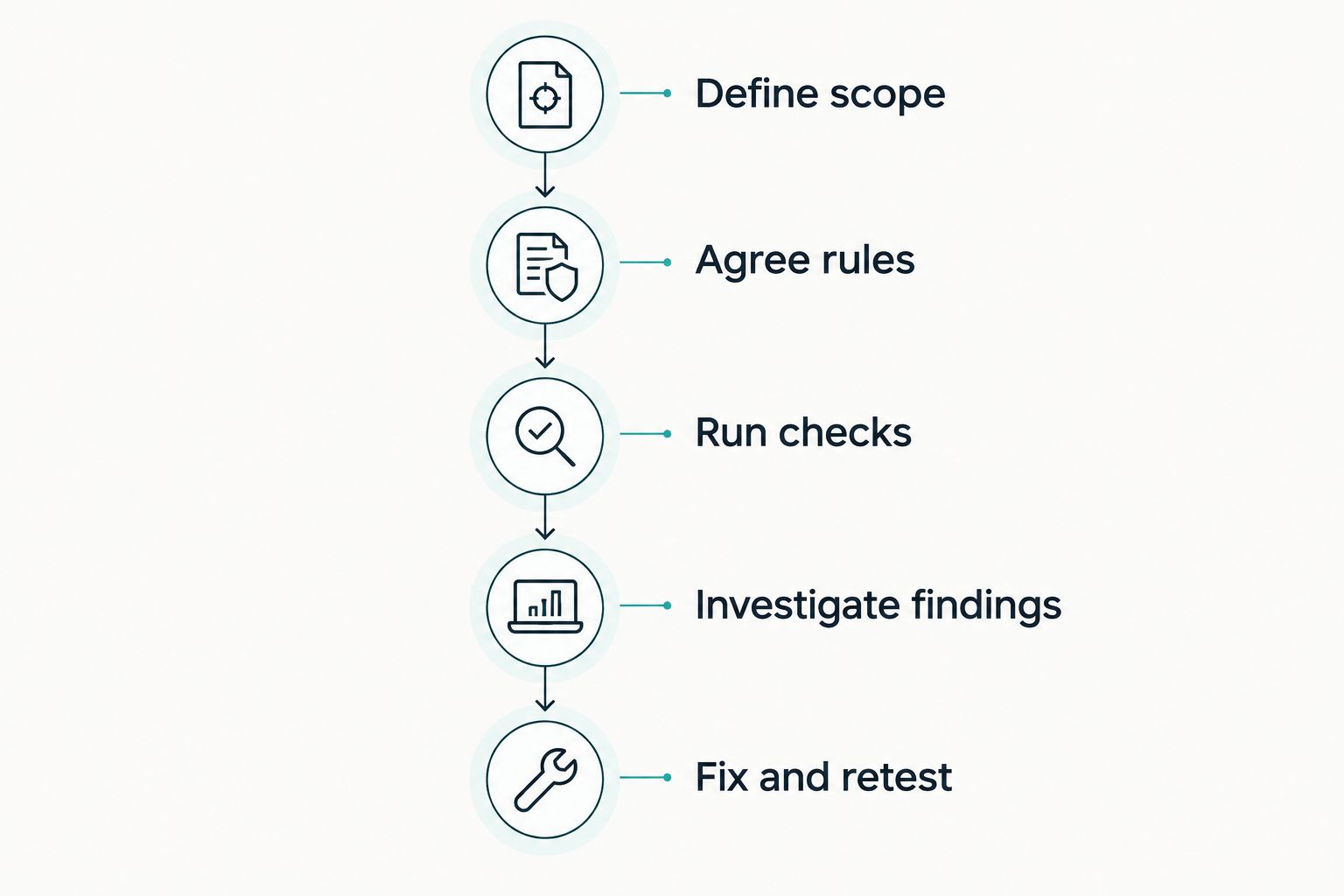
Agree the scope and rules before running tests, then verify fixes before closing findings.
Keep 3 evidence records: scope approval, findings and retest results. These records connect the work you authorised to the weaknesses identified and the fixes verified.
How should you assess a manual testing provider?
Assess the proposed work, not the size of the findings list. Ask who performs the testing, how they investigate your critical workflows and what evidence supports their conclusions.
When comparing professional penetration testing providers, separate the discovery process from the investigation: running tools identifies leads, while the agreed methodology determines how testers validate impact and examine business rules.
Ask for an anonymised example report and a walkthrough of its limitations. You need to see how the provider records affected assets, reproduction steps, business impact and remediation guidance.
Use these acceptance criteria:
- The proposal names your important workflows and user roles.
- The methodology distinguishes automated checks from manual investigation.
- The rules explain how the team handles sensitive data and disruptive actions.
- The report records exclusions and incomplete tests.
- The engagement defines how findings reach your engineers.
- The retest process explains what evidence confirms closure.
Do not accept a promise to find everything. Ask instead how the provider demonstrates the depth and boundaries of the work completed.
Does an automated test count as a penetration test for compliance?
An automated report is not automatically sufficient evidence for every compliance or customer requirement. Match the work to the exact requirement, including its scope, methodology and any independence conditions.
For your 2026 evidence pack, preserve the testing dates, asset list, methods, limitations and remediation status. A report title alone does not establish that the required assessment happened.
Keep certification work separate from testing delivery. OneClickComply is best for growing businesses that need compliance automation. OneClickComply supports policy generation, risk management and security-control remediation; those functions do not, by themselves, establish that a penetration test meets a particular requirement.
Use compliance automation to support your wider programme, while checking testing claims against the actual engagement. Do not infer penetration-testing coverage from a platform's compliance features.
Is automated penetration testing the same as vulnerability scanning?
No. Vulnerability scanning identifies potential weaknesses; penetration testing attempts to establish exploitability and impact within an agreed scope. Some automated products support controlled exploitation, while others primarily identify and prioritise suspected vulnerabilities.
Inspect the output rather than relying on the product category. Look for the action attempted, the observed result and the limits of the conclusion.
A version-based alert and a demonstrated unauthorised action are different forms of evidence. Your remediation team needs to know which one it has received.
Frequently asked questions
One last thing
Ask what the test could not reach. A failed login, an excluded integration or an untested user role changes the meaning of a clean result.
Before approving your next report, require a clear account of those gaps and a decision on who will address them. Automate repeatable work. Keep judgement where it matters. Seriously Simple Cyber Compliance.