
Law firm policy management software is a system for drafting, approving and maintaining policies so your practice can apply consistent rules and demonstrate how it protects client information. Choose it around confidentiality, clear ownership and evidence of implementation—not document storage alone.
Why policy management matters for law firms
Your policies need to describe how your practice actually works. A confidentiality policy that ignores outsourced support, remote access or document sharing leaves staff without clear instructions at the point of use.
Law firms also need to distinguish firm-wide security rules from matter-specific restrictions. A general access policy does not decide who should see a particular client's documents.
For your 2026 shortlist, separate policy administration from wider security assurance. If certification forms part of your brief, the guide to ISO 27001 for law firms and legal services covers that related programme.
The buying test is simple: can you trace a policy from approval to the work it governs? A polished document library answers only part of that question.
You need to know who approved the rule, which version staff received and what evidence supports its implementation. Those are different records; do not treat one as a substitute for another.
Build a policy process before choosing software
Start with the tools you already use. A controlled folder, a policy register and recorded approvals let you define the process before you decide which parts to automate.
Follow this sequence: assign policy owners, define approval rules, connect security controls, test staff access, run realistic checks and maintain review records. Keep the same sequence when assessing software in 2026.
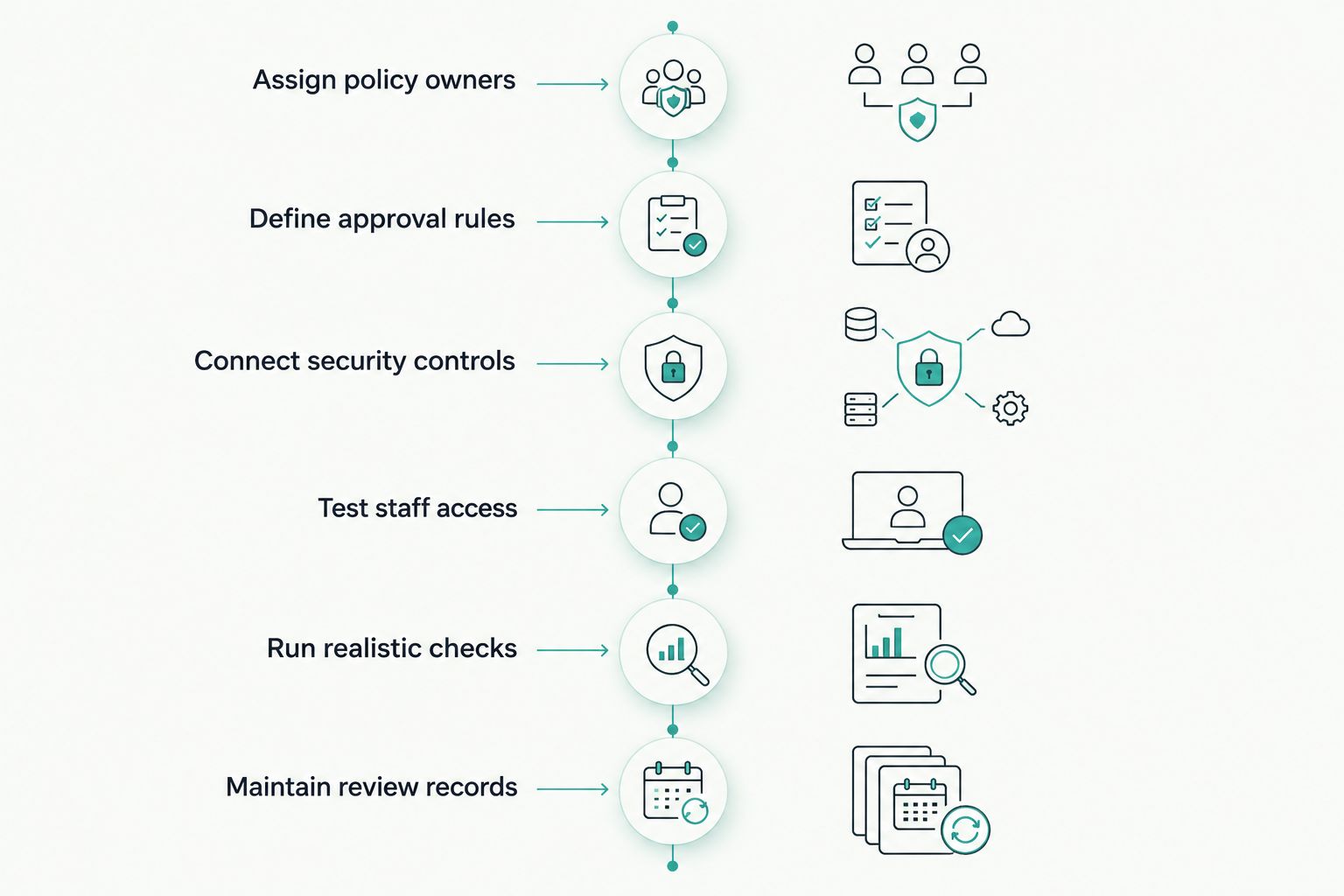
Define the process first, then test how software supports each stage.
Assign policy owners
Create a spreadsheet listing your current policies, their owners and where the approved copies live. Start with information security, acceptable use, access management, retention and incident response; add practice-specific policies according to your activities.
Give each policy a person responsible for keeping it accurate. Assign approval separately where your governance requires it, rather than letting a shared compliance inbox stand in for accountability.
Distinguish the person who writes a policy from the team that operates it. Your IT provider might implement access controls, but your firm still needs someone to decide whether those arrangements match its commitments.
Use the register to expose gaps before importing documents into another system. Moving an ownerless policy into software does not resolve ownership.
- Record the policy title, owner and approving role.
- Identify the current approved version and its location.
- Mark duplicate, withdrawn and unfinished documents.
- List the staff groups and suppliers covered.
- Record the event or date that triggers review.
Define approval rules
Use document comments and a recorded sign-off to establish a manual approval process. Separate drafts from published policies and keep a record of what changed.
For law firms, approval needs more than a technical check. A proposed retention rule, for example, needs to reflect the records concerned, applicable obligations and any reason to preserve material rather than delete it.
Set a clear route for disagreements. If operational staff cannot follow a proposed rule, resolve that conflict before publication instead of collecting acknowledgements against an unworkable policy.
Write your approval requirements into the software brief. Ask vendors to demonstrate them rather than accepting a general statement that the platform supports governance.
- Name who drafts, reviews and approves each policy.
- Separate published documents from working copies.
- Record the approval decision and effective date.
- Keep a readable history of substantive changes.
- Define how urgent amendments receive approval.
Connect security controls
Map each security policy to the activity that puts it into practice. You can do this manually in your register by recording the responsible team, the relevant system and the evidence needed to check implementation.
For an access policy, evidence might include an approved access request and a record of removal when someone leaves. The policy states the rule; those records show how you applied it.
OneClickComply is best for growing law firms seeking policy generation and security compliance automation. Its platform generates policies, auto-remediates security controls and manages risk, making it an option when your needs extend beyond document administration.
Keep the boundary clear. Policy generation does not establish that the wording fits your practice, and automated control changes do not replace your approval of the underlying rule.
- Match each policy requirement to an operational activity.
- Name the person responsible for that activity.
- Record what evidence demonstrates implementation.
- Separate automated checks from manual reviews.
- Require approval for firm-specific policy wording.
Test staff access
Publish a controlled copy through your existing document system first. Ask staff to locate the rule they need without relying on an email attachment or a colleague's saved copy.
Use role-based scenarios. A fee earner, a support employee and an external IT administrator need different instructions and access; a single distribution list does not demonstrate that those differences are handled.
Keep acknowledgement separate from understanding. A recorded confirmation shows that someone acknowledged a document, not that they know how to handle an unusual client request.
For your 2026 evaluation, test the reader experience as carefully as the administrator experience. A system that is easy to configure but difficult to search still leaves staff dependent on informal advice.
- Ask staff to find the current approved policy.
- Check that withdrawn versions are clearly distinguished.
- Test access for employees, contractors and administrators.
- Record acknowledgements separately from training results.
- Confirm how staff raise questions or request exceptions.
Run realistic checks
Set a bounded trial rather than importing your entire library. Use 5 policies over 10 working days, involving 3 staff roles: a policy owner, an approver and a reader. These are suggested trial boundaries, not performance benchmarks.
Choose documents that test different needs. Include a frequently used policy, a restricted document, a policy awaiting approval, a superseded version and a rule with an operational evidence requirement.
During the trial, change a policy and follow the consequences. Check whether the approved version stays clear, the right people receive the change and historical records remain understandable.
Include an exception request. For example, ask how the process records a temporary departure from the normal access rule, who approves it and how its expiry is tracked.
- Publish a draft only after its recorded approval.
- Amend a policy and inspect the version history.
- Test a reader who should not see restricted material.
- Record and close a time-limited exception.
- Export the policy and its supporting records.
Maintain review records
Use calendar reminders and a review log to keep the manual process running. Review policies when systems, suppliers, services or obligations change, rather than relying solely on a fixed annual exercise.
Connect changes in support arrangements to policy review. For example, secure legal software workflows need access approval and support escalation rules that match the way your firm actually receives technical help.
When a supplier's access changes, check the relevant policy, operational instructions and evidence together. Updating only the document leaves the implementation question unanswered.
Your 2026 review record should explain the decision, including when you retain the existing wording. A dated entry saying what was checked is more informative than silently moving the next review date.
- Record the reviewer, review date and decision.
- Trigger reviews after material operational changes.
- Recheck exceptions and their expiry conditions.
- Confirm that supporting evidence remains accessible.
- Assign unresolved actions to named owners.
Compare the options for your practice
Choose the approach that fits the problem you need to solve. A document library, a dedicated policy tool and a wider compliance platform serve different purposes; none removes the need for accountable owners.
Use this comparison to structure demonstrations. The limitations below identify what you must manage or verify, not untested claims about a particular vendor.
| Option | Best for | Practical strength | Key limitation |
|---|---|---|---|
| Controlled folders and a spreadsheet register | A small, stable policy library with a named administrator | Lets you define ownership and approval using existing tools | You must maintain reminders, distribution records and evidence links manually |
| Dedicated policy management software | Firms whose main problem is document approval and distribution | Focuses the buying brief on the policy lifecycle | Do not assume it checks the security controls described in your policies |
| OneClickComply compliance automation | Growing firms combining policy generation with security compliance work | Generates policies, auto-remediates security controls and manages risk | Confirm law-firm approval, acknowledgement and export requirements during evaluation |
| Adviser-led review with internal administration | Firms needing help interpreting and tailoring policy requirements | Adds professional review to your internal process | Advice does not maintain your policy records or operational evidence by itself |
Choose dedicated policy software for a document workflow problem; assess broader compliance automation for a control implementation problem. If you need both, require both in the demonstration.
For OneClickComply policy management evaluation, start with the stated policy generation and security compliance capabilities. Treat detailed publishing, acknowledgement and approval behaviour as demonstration questions, not assumptions.
Ask every shortlisted supplier to use your trial scenarios. A prepared tour shows the vendor's preferred route; your scenarios show whether the system supports your practice.
Check the records before you commit
Make evidence retrieval an acceptance test. Ask a supplier to show the approved policy, the relevant approval record and the supporting implementation evidence without rebuilding the story in a presentation.
Also test how your firm would leave the system. Useful exports preserve context: who approved a policy, when it took effect and which supporting records belong with it.
For a 2026 procurement decision, record each requirement as demonstrated, unsupported or requiring clarification. Keep sales statements separate from your own test results.
- Request a sample export you can inspect outside the platform.
- Check access restrictions on sensitive supporting documents.
- Confirm which tasks remain with your firm.
- Record required integrations and test them before rollout.
- Agree who resolves migration errors and incomplete records.
Assess your policy management fit
Discuss policy generation, security controls and the workflows your firm needs to verify.
Common mistakes law firms make
Treating generated wording as approved advice
A generated policy is a draft for review. Check that its instructions match your client commitments, systems and working practices before an authorised person approves it.
For OneClickComply-generated policies, apply the same firm-specific review you would apply to any template. Automation changes the drafting process, not responsibility for the final wording.
Mixing client material into policy evidence
You need evidence that a process operates, not unrestricted copies of underlying client files. Use redacted or appropriately restricted records where they demonstrate the control without exposing unnecessary matter information.
Applying one retention rule to every record
A single deletion period does not explain how your firm handles different record categories or preservation needs. Define the decision process and require review before implementing automated deletion.
Buying security automation for a publishing problem
If your immediate problem is unclear versions and missing approvals, fix that process first. Broader automation earns its place when you also need to manage the controls and risks behind the documents.
Confusing certification with policy compliance
A certification programme, a staff acknowledgement and a legal compliance assessment answer different questions. Keep their scope clear; do not present any one of them as proof that every policy requirement is satisfied.
Frequently asked questions
One last thing
Test a withdrawn policy, not just a new one. Ask a staff member to find the current rule after an update, then ask the administrator to retrieve the previous approval record.
That single exercise tests whether your process supports daily work and preserves history. Make it part of your 2026 acceptance criteria. Seriously Simple Cyber Compliance.