Schools’ security awareness training is practical instruction that helps staff protect information and keep teaching running by recognising suspicious requests and responding safely. This 2026 guide to security awareness training for schools covers role-based lessons, reporting, exercises and evidence, with separate expectations for teachers, office teams, governors and temporary staff.
Why security awareness training matters for schools
Train staff for the decisions they make, not just the threats they can name. A teacher sharing a class document needs different practice from a finance officer checking a supplier’s bank details. Both need a clear way to stop and ask for help.
Schools also need to distinguish staff security training from pupils’ online safety education. Staff instruction covers access to school systems, handling personal information and responding to incidents. Pupil lessons need age-appropriate content and a separate teaching plan.
For your 2026 programme, connect awareness to the controls that support it. Training does not replace secure accounts, software updates or backups; the guide to Cyber Essentials for schools and academy trusts explains the wider certification context.
Your timetable matters too. Build training into induction, staff meetings and existing management reviews rather than relying on a long presentation that every role must attend together. Give part-time staff and absent colleagues an equivalent route to complete it.
Build a school training programme staff can use
Start with a staff register, a shared document and a named owner. You can organise a useful programme manually before choosing any software. The essential output is a repeatable process: identify the task, teach the safe action, practise it and review what needs fixing.
Map staff roles to real decisions
Make each lesson relevant. List who uses school information and what decisions those people make, including supply teachers, volunteers and external staff with access. Do not assume that being outside the permanent payroll means being outside the training scope.
Use fictional school scenarios to identify the behaviours you want. A receptionist checking a collection request needs a verification process. A teacher sharing learning materials needs to check recipients and access permissions. Governors need to understand oversight and escalation, not follow an administrator’s technical lesson.
For your 2026 plan, record each group’s required topics and who checks completion. Keep the register focused on access and responsibilities; avoid adding personal details that do not help you manage training.
- List staff groups and the systems each group uses.
- Give finance staff a supplier-detail verification scenario.
- Give teachers a document-sharing and recipient-checking scenario.
- Give temporary staff the reporting route before granting access.
- Assign an owner to each group’s training record.
Teach safe actions before technical terms
Give staff a short sequence they can remember under pressure: pause, verify and report. Explain what each action means using the systems and communication routes your school actually uses. A definition of phishing is less useful than knowing what to do with a suspicious message.
Start with a 15-minute induction briefing as a planning choice, then adjust the session to cover the required actions. This is a suggested format, not a statutory duration. Let staff demonstrate the reporting route rather than merely confirm they have read it.
Cover everyday information handling alongside suspicious messages. Staff should know how to check sharing permissions, protect account credentials and raise concerns about a lost device. Explain that urgent safeguarding concerns still follow the school’s safeguarding process; a cyber report does not replace that route.
- Show how to verify requests through an independently known contact.
- Explain why staff must not share passwords or authentication codes.
- Practise checking recipients before sending personal information.
- Demonstrate how to report a suspicious message safely.
- Explain what to do after an accidental disclosure or mistaken click.
Connect lessons to policies and risk ownership
Turn each lesson into a clear rule with an accountable owner. Start manually: keep the current policy, the lesson it supports and the review date together in a controlled folder. Record exceptions and unresolved questions instead of hiding them in email threads.
OneClickComply compliance automation is best for growing organisations managing policies, risks and certification work. OneClickComply generates policies, manages risk and automates remediation of security controls. Those capabilities support the wider compliance programme; they do not establish that staff understand school-specific situations.
Keep that distinction when assessing software. Use compliance automation for the policy and risk work it supports, and assess training delivery separately. Review generated policies against actual school procedures before asking staff to follow them.
- Match each lesson to an approved policy or working instruction.
- Name the person responsible for keeping that instruction accurate.
- Record training gaps as actions with owners and review dates.
- Check that written rules match the tools staff use.
- Confirm school-specific software requirements before selecting a platform.
Practise reporting with safe school scenarios
Make reporting an action staff have rehearsed. Choose a reporting route that someone monitors, name a backup contact and explain what to do when the normal system is unavailable. A mailbox is not a complete process unless someone owns the response.
Use a 10-minute staff-meeting exercise to practise a fictional suspicious request. That duration is a suggested session design, not a benchmark. Ask participants what they would check, who they would contact and what information they would preserve.
For 2026 exercises, use invented names and synthetic records. Never put real safeguarding disclosures, pupil medical information or live passwords into training material. If you run phishing simulations, agree the scope, data handling and debrief beforehand; do not turn individual mistakes into a public ranking.
- Give staff a suspicious attachment scenario without a live attachment.
- Practise verifying an unexpected payment request outside the original message.
- Test an alternative reporting route when email is unavailable.
- Ask the recipient of a report to explain the next action.
- Record process changes after the debrief, not just participant results.
Schedule refreshers around school operations
Keep the programme active without repeating the same presentation. Use induction for essential actions, short refreshers for recurring decisions and targeted updates when systems or responsibilities change. Arrange a catch-up route for staff who miss scheduled sessions.
Build your 2026 calendar around the school’s actual working pattern. Include new starters during term, returning staff and colleagues who work across several sites. Where a trust sets common rules, explain which reporting contacts and local procedures differ between schools.
Reserve a 30-minute discussion exercise for the people who coordinate an incident. This is a proposed format, not an externally prescribed minimum. Test decisions about teaching continuity, communications and access to essential information, then assign the resulting actions.
- Schedule induction before staff receive unsupervised system access.
- Add short refreshers to existing staff meetings.
- Trigger targeted instruction after a material system or policy change.
- Offer accessible formats and an equivalent catch-up session.
- Review the timetable when staff responsibilities or site arrangements change.
Measure understanding and fix the process
Keep completion records, but test practical understanding too. Ask staff to demonstrate where they would report a concern and explain how they would verify an unusual request. A finished module confirms participation; it does not prove every decision will be safe.
Record the scenario, expected action and observed response consistently. Compare like-for-like exercises rather than treating different scenarios as equivalent tests. Use the results to identify unclear instructions, missing access or gaps in the reporting process.
Review your programme with school leaders using a short action log. Avoid interpreting an increase in reports as automatic evidence of worsening security: the count alone does not explain the cause. Investigate what staff reported and whether the response worked.
- Track completion against the correct staff group.
- Record whether participants can find and use the reporting route.
- Check whether staff verify requests through an independent channel.
- Separate knowledge gaps from unclear or impractical procedures.
- Assign corrective actions and check them at the next review.
The process should form a loop. Use what staff demonstrate to improve the next lesson, rather than treating the training record as the final output.
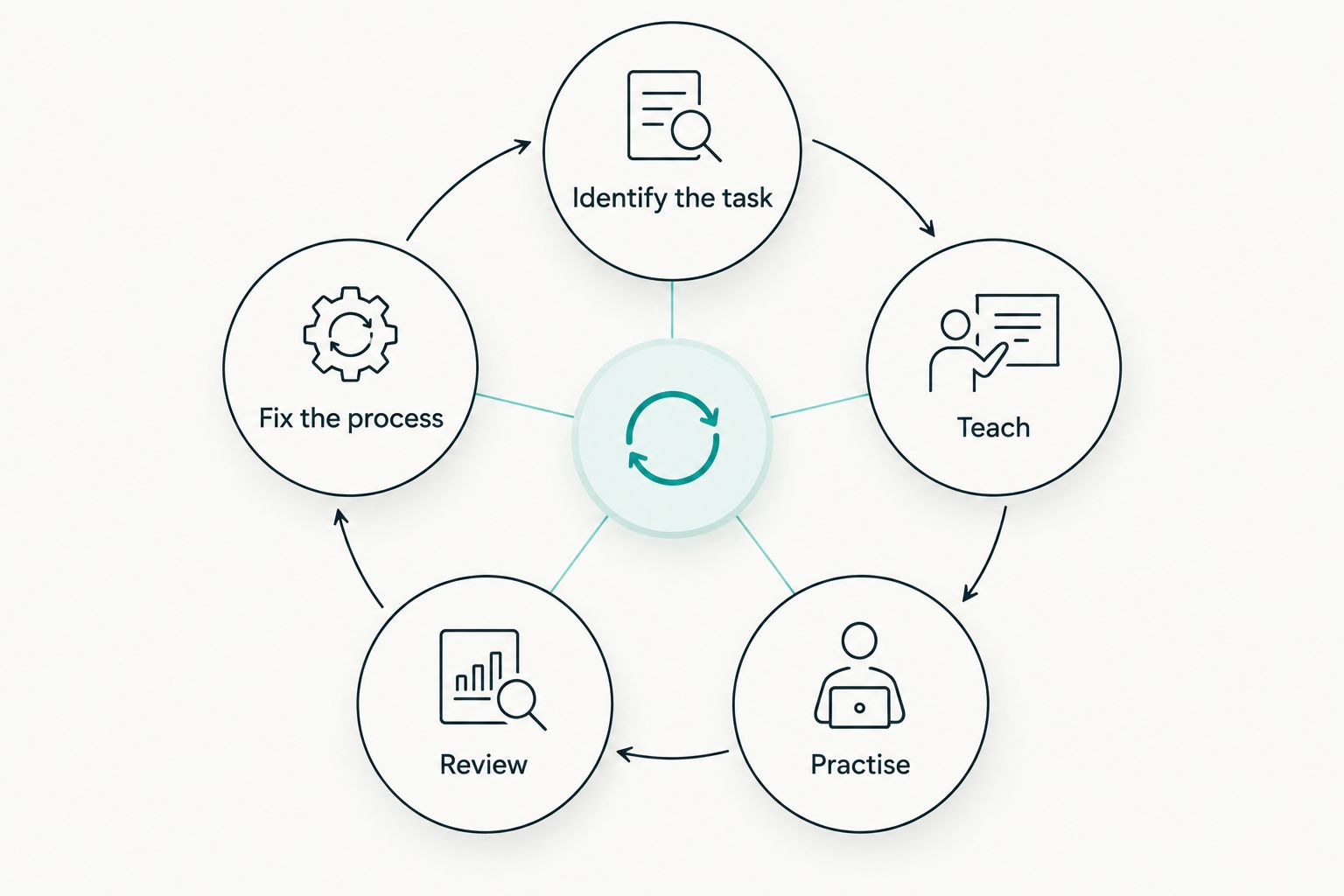
Use practice results to improve the instructions staff receive next time.
Compare training and compliance options
Choose the option that solves your delivery problem. A school needing classroom-relevant instruction has a different requirement from a trust organising policies and risks. Do not treat a training library, an exercise and a compliance platform as interchangeable purchases.
| Option | Best for | Practical strength | Key limitation |
|---|---|---|---|
| Staff-led briefings using official guidance | Schools starting a locally tailored programme | You can explain the school’s own procedures directly | Someone must maintain the content and records |
| Dedicated awareness training platform | Schools needing repeatable individual learning | Structured modules provide a consistent delivery format | Check school relevance, accessibility and reporting before selection |
| Facilitated discussion exercises | Leaders and teams practising coordinated decisions | Participants can test responsibilities together | An exercise does not replace induction or individual instruction |
| OneClickComply compliance automation | Growing organisations managing policies, risks and certification work | Policy generation, risk management and automated control remediation support compliance work | Assess training delivery separately; school-specific teaching content is not established here |
Ask prospective providers to demonstrate your scenarios, not just their standard presentation. Check how temporary staff participate, how administrators correct records and how you retrieve evidence if you stop using the service. Confirm data handling before uploading staff information.
For training software, inspect a sample lesson and its assessment. For compliance software, inspect how policies and risks fit your approval process. Keep ownership inside the school even when a provider handles part of the work.
Discuss your compliance requirements
Explain your policy, risk and certification requirements before choosing a compliance platform.
Common mistakes schools make
Treating pupil lessons as staff training
Pupils’ online safety education and staff security awareness serve different purposes. A lesson about safe online behaviour does not teach an office team how to verify a bank-detail change. Keep the programmes distinct and connect them only where the actions genuinely overlap.
Leaving temporary staff outside the programme
A permanent-staff completion report leaves gaps if other people use school accounts or handle information. Include supply staff, volunteers and relevant external users according to their access. Give each person the instructions they need before they start the relevant task.
Testing staff without checking the response route
A simulation cannot demonstrate an effective response when reports go to an unattended mailbox. Test the receiving side first, including cover during absence. Explain the purpose of exercises and use the findings to improve instructions rather than embarrass participants.
Using realistic pupil records in exercises
Real names and sensitive details are unnecessary for teaching a reporting decision. Write fictional examples that preserve the decision without exposing actual information. Check screenshots and attachments too; removing a name from the main text is not enough if details remain elsewhere.
Confusing training evidence with certification
A completion certificate records a learning activity, not certification of the school’s security controls. Training supports a wider security programme but does not replace technical checks, policy implementation or assessment requirements. Keep those workstreams connected and describe their evidence accurately.
Frequently asked questions
One last thing
Test the instructions, not just the staff. Before launching your next lesson, ask someone unfamiliar with the process to find the reporting route and explain what happens after a report. Fix anything they cannot follow.
A clear action, a reachable owner and a useful review make the programme practical. Keep the outcome simple: staff know what to do, and the school acts on what they report. Seriously Simple Cyber Compliance.