
Best overall for infrastructure validation: Pentera. Best for internal attack paths: Horizon3.ai NodeZero. Best for web application testing: Burp Suite Professional. This 2026 guide compares automated penetration testing software for financial services, including where each tool needs human support.
Why this matters
A vulnerability scanner identifies potential weaknesses. Penetration testing goes further by investigating whether an attacker can exploit weaknesses and what access follows.
Financial services testing needs that distinction. Finding an exposed service is different from proving that access reaches a payment application, customer record or privileged account.
Before comparing tools, scope your penetration test. Define the systems, permitted actions and business questions first; otherwise, a technically successful demonstration can answer the wrong question.
Buy for the attack scenario you need to examine, not the longest feature list. For your 2026 shortlist, separate infrastructure validation, application testing and specialist exploitation rather than treating them as interchangeable.
What makes the best automated penetration testing software?
Use these six criteria to judge each option:
- Relevant coverage: Match the tool to internal networks, web applications, APIs or another defined target. Do not assume one category covers everything.
- Exploit evidence: Ask what demonstrates an actual compromise, rather than a suspected vulnerability or configuration weakness.
- Operational control: Require clear boundaries, exclusions, stop procedures and written permission before testing live financial systems.
- Authenticated depth: Demonstrate testing behind login screens and across the user roles that matter to your service.
- Retest quality: Require a way to repeat the relevant check after remediation and preserve the result.
- Evidence handling: Examine what the tool captures, where it stores findings and who can access sensitive output.
A strong demonstration connects these criteria. It shows an authorised test, a reproducible finding, a practical fix and a meaningful retest—not just a dashboard full of alerts.
Automated penetration testing tools at a glance
These options occupy different roles. The ranking starts with infrastructure validation, then moves into narrower application and expert-led use cases.
| Tool | Best for | Standout capability | Key limitation |
|---|---|---|---|
| Pentera | Broad infrastructure security validation | Automated testing of exploitable weaknesses and attack paths | Does not replace application-specific business-logic testing |
| Horizon3.ai NodeZero | Internal attack-path assessment | Autonomous penetration testing focused on routes to compromise | Results depend on the permitted scope and starting position |
| Burp Suite Professional | Specialist-led authenticated web testing | Combines a web vulnerability scanner with manual testing tools | Requires web security expertise |
| ZAP | Developer-controlled web testing pipelines | Scriptable web scanning and automation | Requires configuration and finding validation |
| Metasploit Framework | Custom exploit validation | Modular exploitation and payload tooling | Requires experienced operators and close supervision |
The last three options are not substitutes for an autonomous infrastructure platform. They belong here because a financial services testing programme often needs more than one testing method.
1. Pentera: best for broad infrastructure validation
Pentera automates security validation by testing exploitable weaknesses and attack paths. Its role is to examine how weaknesses connect, rather than leave your team with an isolated list of potential vulnerabilities.
For a financial services firm, the useful buying question is whether the agreed test demonstrates a route towards an important system. Ask Pentera to demonstrate the relevant deployment and testing boundaries against your proposed scope.
Pentera pros:
- Examines exploitation and connected attack paths.
- Supports repeatable infrastructure security validation.
- Gives defenders a way to investigate weaknesses in context.
Pentera cons:
- Infrastructure validation does not establish that a payment workflow is logically secure.
- Automated exploitation still requires authorisation, exclusions and operational oversight.
Best for: Security teams that need broad infrastructure validation and have owners ready to act on the findings.
Make the demonstration about your environment. Require an explanation of what was tested, what was excluded and what evidence supports each claimed compromise.
Verdict: Buy for infrastructure validation; retain specialist testing for application logic.
2. Horizon3.ai NodeZero: best for internal attack paths
Horizon3.ai NodeZero performs autonomous penetration testing. Its internal testing use case examines how an attacker can progress through an environment towards valuable access.
That makes NodeZero relevant when your question concerns internal compromise rather than a customer-facing application. Ask the demonstration to explain the starting access, the route taken and the controls that would break that route.
Horizon3.ai NodeZero pros:
- Focuses on routes to compromise rather than disconnected findings.
- Automates parts of an internal penetration testing exercise.
- Supports a repeat-test approach after corrective action.
Horizon3.ai NodeZero cons:
- An internal attack-path exercise does not assess every external application workflow.
- A different starting position or excluded network changes the assessment's meaning.
Best for: Teams investigating internal exposure, privilege escalation and paths towards sensitive infrastructure.
Use a clear acceptance question: can the assessment show why a route succeeds, and can your team verify that a fix breaks it? Avoid accepting a severity label without the supporting sequence.
Verdict: Buy for internal attack-path assessment; do not treat it as complete application assurance.
3. Burp Suite Professional: best for authenticated web testing
Burp Suite Professional combines an intercepting proxy, a web vulnerability scanner and tools for manual investigation. A skilled tester uses it to inspect requests, change inputs and investigate application behaviour.
Its place on this shortlist is specialist-led automation, not unattended infrastructure testing. That distinction matters when your financial application has customer, support and administrator roles with different permissions.
Burp Suite Professional pros:
- Combines automated scanning with manual request inspection.
- Lets testers investigate authentication and authorisation behaviour.
- Supports detailed examination of individual web requests and responses.
Burp Suite Professional cons:
- Needs someone who understands web application security.
- A scanner result alone does not establish business-logic coverage.
Best for: Application security specialists testing authenticated financial web applications.
For your 2026 evaluation, provide 2 test roles with different permissions. Ask the tester to investigate whether one role can access actions or records reserved for the other; treat this as an evaluation exercise, not a complete test methodology.
Verdict: Buy for specialist web testing; skip it as a hands-off infrastructure replacement.
4. ZAP: best for developer-controlled testing pipelines
ZAP is an open-source web application security testing tool. It supports automated scanning and scripting, making it relevant when developers want repeatable checks within their delivery process.
Use ZAP to examine a defined application build under controlled conditions. The value comes from configuring authentication, reachable routes and test behaviour around the application—not simply running a default scan.
ZAP pros:
- Supports automated web application scanning.
- Provides scripting and automation options.
- Lets developers repeat checks as applications change.
ZAP cons:
- Requires configuration and ongoing maintenance.
- Automated findings need investigation, while untested workflows remain outside the result.
Best for: Engineering teams that can own web security checks within their build and release process.
Start with 1 critical journey, such as accessing a test account's statements. Confirm that the scanner reaches the intended authenticated pages before expanding the scope; a completed scan is not proof of useful coverage.
Verdict: Buy into ZAP for developer-owned checks; retain expert testing for complex permissions and business logic.
5. Metasploit Framework: best for custom exploit validation
Metasploit Framework provides modules and tooling for exploitation, payload handling and related security testing. Experienced testers use it to investigate whether a specific weakness can produce an actual compromise.
This is a controlled exploitation toolkit, not an autonomous compliance service. Its value depends on the operator's judgement about the target, module behaviour and permitted actions.
Metasploit Framework pros:
- Supports targeted exploit validation.
- Gives experienced testers control over individual test actions.
- Fits investigations that need a specific exploitation technique.
Metasploit Framework cons:
- Requires substantial technical expertise.
- Unsupervised exploitation is unsuitable for sensitive production systems.
Best for: Internal penetration testers and specialist assessors validating specific infrastructure weaknesses.
Require a written explanation of the intended exploit and its operational impact before execution. Your assessment should distinguish successful exploitation from assumptions based on a software version.
Verdict: Buy into the workflow for expert-led validation; skip it for unattended testing.
How to read this ranking
Pentera leads for the broad infrastructure-validation use case. NodeZero occupies the internal attack-path slot, while Burp Suite Professional, ZAP and Metasploit Framework address narrower testing needs.
The order reflects those use cases, not a measured performance score. Apply the six criteria above to your own scope before selecting a platform.
No category winner removes the need for human judgement. A tool can execute a test, but your firm still decides what is authorised, what evidence means and whether the remaining risk is acceptable.
Prove the workflow before you commit
Use a bounded pilot for your 2026 buying decision. Follow the same sequence for each shortlisted tool so that attractive reporting does not hide weak coverage.
- Define scope: List authorised targets, excluded systems, test accounts and prohibited actions.
- Approve testing: Agree the test window, responsible contacts and stop procedure with system owners.
- Validate findings: Require reproducible evidence and an explanation of the affected business service.
- Retest fixes: Repeat the relevant check and record whether the original route still works.
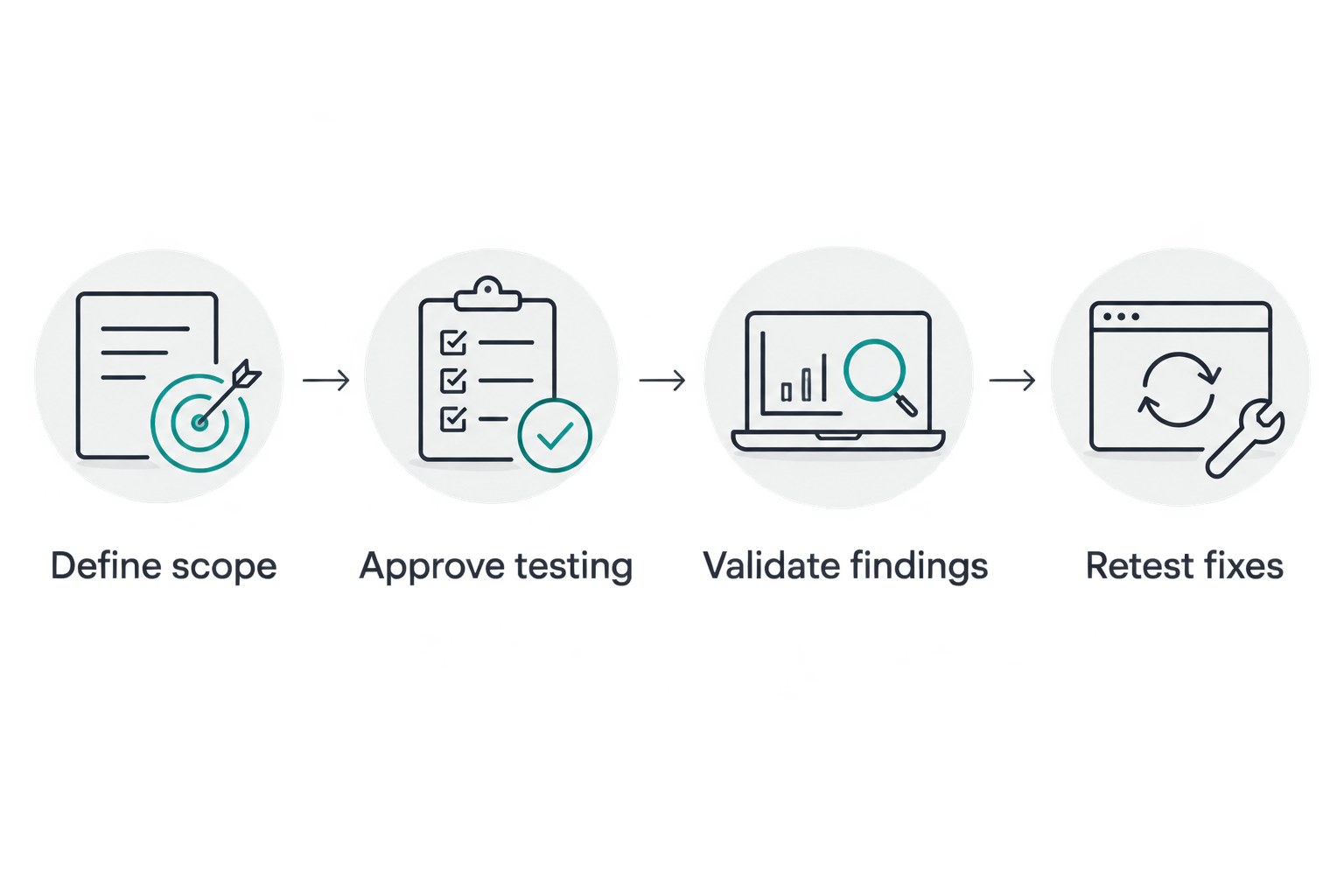
A useful pilot proves the whole workflow, not just vulnerability discovery.
Select 3 pilot findings and ask the responsible engineers to work through them. Check whether each finding explains the affected asset, reproduction steps, corrective action and retest result; this is a buying exercise, not a statistical benchmark.
Keep production customer data out of demonstrations wherever practical. Agree how the supplier handles credentials, captured responses and evidence deletion before providing access.
Keep testing separate from compliance management
A penetration test supplies evidence about a defined scope at a particular time. It does not certify your whole organisation or prove that every applicable obligation is satisfied.
OneClickComply provides compliance automation for growing businesses, including security-control auto-remediation, policy generation, risk management and trust centres. Those functions address a different job from executing penetration tests.
OneClickComply is best for growing businesses that need compliance automation alongside dedicated security testing. Its compliance platform should not be presented as an automated penetration testing product.
For your 2026 programme, assign an owner to each finding and decide what evidence closes it. Keep technical verification distinct from policy approval and risk acceptance; none substitutes for the others.
Which tool should you choose?
Start with Pentera if your immediate need is broad infrastructure validation. Shortlist Horizon3.ai NodeZero when the central question concerns internal attack paths.
Choose Burp Suite Professional for a specialist web testing workflow. Choose ZAP for developer-owned automated checks, or Metasploit Framework when experienced testers need targeted exploitation.
For OneClickComply compliance automation, keep the buying decision separate. Select testing tools for technical coverage and compliance software for the policies, controls and risks your business needs to manage.
Frequently asked questions
One last thing
A finding marked closed is not the same as a failed attack path. Before accepting remediation, repeat the relevant test and check that the original route no longer succeeds.
Make that your final acceptance condition for 2026: demonstrated fixes, named owners and clear evidence. Seriously Simple Cyber Compliance.