
Best for cyber certification: OneClickComply. Best for automating existing approval workflows: Microsoft Power Automate. Best for managing policy documents: Microsoft SharePoint. This 2026 guide separates dedicated compliance automation from supporting tools so you can choose software for the work your accountancy firm needs to complete.
Why this matters
An accountancy firm needs to protect client information and meet its professional obligations. Those are connected responsibilities, but they do not belong to a single software category.
Cyber compliance software helps you manage security controls and certification work. Anti-money laundering software addresses client due diligence and related checks; practice and tax software handle different processes again.
Choose the requirement before you choose the platform. If your immediate objective is security certification, start with the relevant scheme rather than a general promise to automate compliance. The guide to Cyber Essentials for accountancy firms covers that specific route.
What makes the best compliance automation software?
Use these criteria to compare your 2026 shortlist. Give priority to the work you need to complete, not the length of a feature list.
- Requirement fit: The software must address your named objective, whether that is ISO 27001, Cyber Essentials, SOC 2 or an internal approval process.
- Action beyond alerts: Distinguish software that identifies a problem from software that helps resolve it. Ask which actions need approval.
- Usable evidence: You need records that show what happened, who approved it and which requirement the record supports.
- Clear ownership: Every policy, exception and unresolved issue needs an accountable person. Automation does not remove that responsibility.
- Operational fit: Check permissions, data handling, implementation work and ongoing administration against your firm's actual systems.
Treat these as purchase gates. A polished dashboard does not compensate for missing support for the requirement that prompted the purchase.
Compliance software at a glance
These options serve different purposes. Only the first is a dedicated cyber compliance automation platform; the other two support processes you design and manage.
| Rank | Software | Best for | Standout capability | Key limitation |
|---|---|---|---|---|
| 1 | OneClickComply | Cyber certification and security control remediation | Combines security control remediation, policy generation, risk management and trust centres | Cyber certification support does not replace accountancy-specific compliance processes |
| 2 | Microsoft Power Automate | Automating existing approval workflows | Builds workflows between supported services | You must design the compliance rules, ownership and exception handling |
| 3 | Microsoft SharePoint | Managing policy documents | Document libraries, version history and permissions | Document management does not remediate security controls |
Do not treat this table as a reason to replace every existing tool. Start by identifying the missing capability, then assess whether a dedicated platform or a narrower supporting tool supplies it.
1. OneClickComply: best for cyber certification automation
OneClickComply helps growing businesses achieve and maintain certifications such as ISO 27001, Cyber Essentials and SOC 2. It auto-remediates security controls, generates policies, and manages risk and trust centres.
OneClickComply is best for accountancy firms seeking cyber certification automation rather than another document repository. The fit is strongest when your buying brief centres on security controls and maintaining certification work alongside daily operations.
OneClickComply pros
- Combines policy generation with security control remediation rather than treating compliance solely as paperwork.
- Supports named cyber compliance objectives, including ISO 27001, Cyber Essentials and SOC 2.
- Includes risk management alongside certification work.
- Provides trust centre management for organising information you share about your security position.
OneClickComply cons
- Its stated cyber compliance scope does not establish coverage for AML checks, tax submissions or professional conduct obligations.
- Generated policies still need approval against your firm's actual practices; software cannot supply management accountability.
Best for: A growing accountancy firm buying dedicated support for cyber certification and ongoing security compliance.
For your 2026 evaluation, ask for a demonstration built around your intended certification. Require a clear explanation of what the platform handles, what your team approves and what remains with an external assessor or auditor.
Verdict: Buy for a defined cyber certification requirement, after confirming the operational fit.
2. Microsoft Power Automate: best for existing approval workflows
Microsoft Power Automate lets you build automated workflows between supported applications and services. Approval workflows are an established use case, making it a relevant supporting tool when your firm already has a defined process that staff carry out manually.
Use it to assess a narrow problem, such as routing a policy review or requesting approval for an exception. Do not confuse automating that task with establishing a complete certification programme.
Microsoft Power Automate pros
- Supports repeatable workflows rather than relying entirely on manual hand-offs.
- Provides approval capabilities for processes that need a recorded decision.
- Connects supported services so a workflow can span more than one application.
Microsoft Power Automate cons
- You must define the compliance requirements and translate them into workflow rules.
- Workflow ownership, connection changes and failed runs need ongoing attention.
- An automated approval does not prove that a security control operates effectively.
Best for: A firm with documented processes and someone responsible for maintaining workflow automation.
Ask the workflow owner to demonstrate an unsuccessful approval, not just a successful one. You need to see where a rejected request goes, who receives the exception and how the record remains accessible.
The deciding factor is ownership. If nobody can explain how the workflow is maintained after a staff change, automating it creates another process without a dependable owner.
Verdict: Buy for bounded workflow automation; skip as a substitute for dedicated certification management.
3. Microsoft SharePoint: best for policy document management
Microsoft SharePoint provides document libraries, version history and access permissions. Those capabilities support a controlled place for policies and related records when your immediate problem is document organisation.
SharePoint is a supporting tool, not proof of compliance. A well-organised policy library shows where documents live; it does not demonstrate that staff follow the policies or that technical controls work.
Microsoft SharePoint pros
- Keeps policy documents in managed libraries rather than scattered personal folders.
- Provides version history so document changes remain traceable.
- Uses permissions to control access to documents and libraries.
Microsoft SharePoint cons
- Document storage does not automatically fix security control failures.
- You must design the document structure, responsibilities and review process.
- Version history alone does not demonstrate policy adoption or effective implementation.
Best for: A firm whose immediate requirement is controlled policy documentation, with wider compliance processes managed separately.
For a 2026 review, ask staff to retrieve the approved policy rather than search for any copy with the right filename. Then check whether they can distinguish the current version from an obsolete draft.
Keep the library structure understandable. A folder arrangement that only its creator understands leaves the firm dependent on that person's availability.
Verdict: Buy for controlled documents; skip as the sole solution for cyber compliance automation.
How to use this ranking
The ranking prioritises dedicated support for cyber certification, followed by workflow automation and document control. These are different buying decisions, not interchangeable products competing on a single feature score.
Choose the first option when certification and security remediation define the requirement. Choose the second when an established process needs automation; choose the third when approved documents need better control.
No implementation-time or return-on-investment claim determines the order. Your decision should rest on demonstrated coverage of your requirements and the work your team must retain.
Match the framework to the business requirement
Do not add every framework to your 2026 purchasing brief. Ask what each one achieves for your firm and who requires it.
Cyber Essentials
Cyber Essentials addresses a defined set of technical security controls. It is a focused option when that certification matches a client requirement or your chosen security objective.
Ask how the software supports preparation and keeps the relevant work organised. Keep the certification decision separate from the software purchase.
ISO 27001
ISO 27001 sets requirements for an information security management system. It involves management responsibility, risk assessment, policies, review and continual improvement, not just technical settings.
Assess whether your firm is ready to operate that management system. A platform can support the work, but a list of completed tasks does not replace leadership decisions.
SOC 2
SOC 2 is an assurance report, not a certification. It concerns controls at service organisations relevant to the applicable Trust Services Criteria.
Pursue it when it answers a defined assurance need. Do not add SOC 2 simply because a software comparison lists it beside other frameworks.
Run a useful software demonstration
Set aside 30 minutes for a focused demonstration of a real process. Ask each supplier to follow the same sequence so you can compare responsibilities rather than presentation quality.
Define scope
Name the requirement, the relevant business activity and the systems involved. For an accountancy firm, start with a concrete service such as payroll processing or client document exchange.
Assign ownership
Identify who approves policies, accepts risks and authorises changes. Ask the supplier to distinguish those decisions from tasks the software performs automatically.
Show evidence
Choose 1 control and inspect its supporting record. Ask where the record came from, what period it covers and how you would present it for review.
Handle exceptions
Ask what happens when the control fails or the required information is unavailable. Follow the issue through assignment, action and closure rather than stopping at the alert.
Confirm handover
Ask how a new employee takes over the process. Require a clear account of permissions, outstanding work and access to historical records.
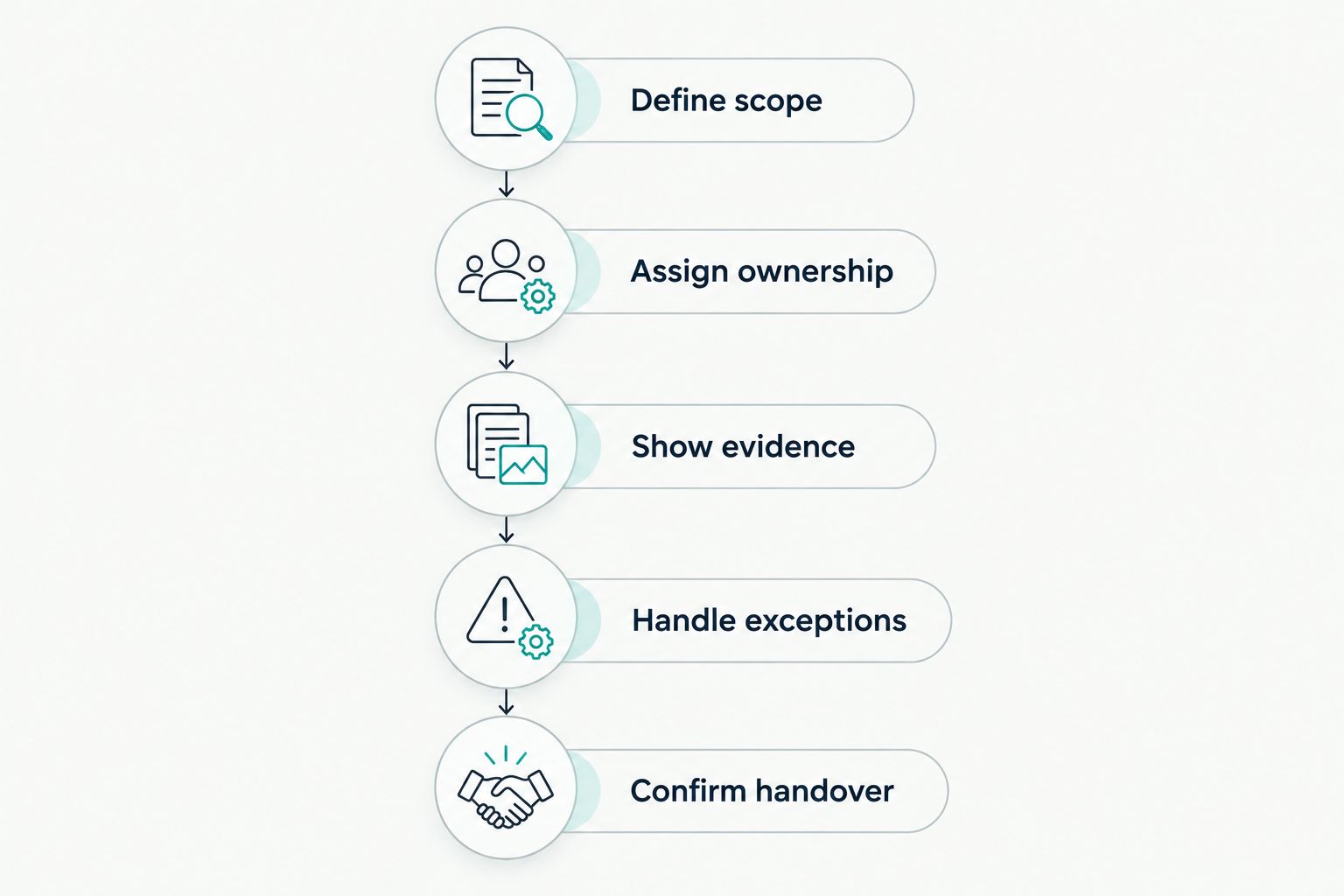
Compare the full process, including exceptions and ownership, rather than the dashboard alone.
Record 3 outputs from the demonstration: what the software handles, what your team handles and what requires external assessment. Use that division of work when you make the decision.
Check what stays outside the platform
Compliance automation does not turn every obligation into a technical task. Before signing, give each remaining responsibility a named owner.
- AML processes: Confirm how you manage client due diligence and related obligations separately from cyber certification.
- Data protection: Keep responsibility for lawful processing, retention decisions and responses to individuals clear.
- Professional judgement: Partners and authorised staff retain decisions about client acceptance, service delivery and professional obligations.
- Technical changes: Decide who authorises remediation and checks its effect on business systems.
- External assessment: Confirm the role of the certification body or auditor for your chosen objective.
A platform should make responsibilities clearer, not conceal them. Ask for an explicit division of work before implementation begins.
Which software should your accountancy firm choose?
Choose dedicated cyber compliance software when your objective is certification and security control management. OneClickComply is the default recommendation here because its stated capabilities match that requirement.
Choose Microsoft Power Automate when you already know the process and need to automate its hand-offs. Choose Microsoft SharePoint when controlled policy documents are the immediate priority.
For your 2026 shortlist, keep the decision brief narrow: name the required outcome, identify the owner and demand a demonstration of the difficult case. Buy against that brief, not a generic claim to handle all compliance.
Frequently asked questions
One last thing
Test the handover before you approve the purchase. Ask someone who did not build the process to find the current policy, identify an unresolved issue and name its owner.
If they cannot, simplify the process before automating it. Seriously Simple Cyber Compliance.