
Best for certification-led healthcare businesses: OneClickComply. Best for enterprise risk workflows: ServiceNow Integrated Risk Management; best for configurable risk processes: LogicGate Risk Cloud; best for a basic manual register: Microsoft Lists. This 2026 guide compares their roles, limitations and buying criteria so you choose software around the work you need to manage.
Why this matters
Healthcare governance covers different jobs. A healthtech supplier preparing for a security assessment needs different software from a hospital group managing enterprise risk or a practice tracking outstanding actions.
Buy for your actual workflow, not the widest feature list. Governance, risk and compliance software does not automatically cover clinical safety, information governance, certification preparation and every contractual requirement.
For your 2026 shortlist, name the problem first. Decide whether you need to fix security controls, manage risk decisions, route approvals or organise records. Then compare the software that handles that job.
What makes the best GRC software for healthcare
Use these six criteria before comparing product names:
- Scope fit: Separate cyber compliance from clinical governance, privacy work and organisation-wide risk. Ask each supplier to demonstrate your specific workflow.
- Actionable controls: Distinguish recording a failed control from correcting it. Check what the software handles and what stays with your team.
- Evidence traceability: Require a clear connection between a requirement, its supporting evidence, the responsible person and the review decision.
- Ownership and approvals: Check how you assign actions, escalate overdue work and record who accepted a risk.
- Sensitive information handling: Review access permissions, hosting arrangements, contractual terms and the information you intend to upload.
- Administrative effort: Identify who will configure workflows, maintain records and manage changes after implementation.
Treat these as acceptance criteria for a demonstration. A dashboard is not enough: follow an issue from discovery through action, review and closure.
Healthcare GRC software at a glance
The order below follows the buying decision: start with focused cyber compliance, then consider broader or more configurable systems. Use a manual register only when recording and follow-up are the main requirements.
| Software | Best for | Standout capability | Key limitation |
|---|---|---|---|
| OneClickComply | Growing healthcare businesses focused on cyber compliance | Security-control auto-remediation, policy generation, risk management and trust centres | Cyber compliance scope does not establish clinical governance coverage |
| ServiceNow Integrated Risk Management | Enterprise risk workflows | Risk and compliance processes within the ServiceNow platform | Requires workflow design, administration and clear ownership |
| LogicGate Risk Cloud | Configurable risk processes | No-code configuration of connected risk workflows | Your team must define and maintain the process |
| Microsoft Lists | A basic manual risk or action register | Structured lists with configurable columns and views | Not a purpose-built GRC platform |
No product wins every category. The useful comparison is the work each system handles against the work your organisation must still perform.
1. OneClickComply: best GRC fit for cyber certification work
Get your cyber compliance programme organised around security controls, policies and risk. OneClickComply helps growing businesses achieve and maintain frameworks including ISO 27001 and Cyber Essentials, and prepare for SOC 2 assurance work.
The platform auto-remediates security controls, generates policies, manages risk and provides trust centres. That makes it a focused choice when your healthcare business needs to organise cyber compliance rather than build a clinical governance system.
Pros:
- Combines security-control auto-remediation with policy generation.
- Supports risk management alongside certification preparation.
- Provides trust centres for sharing assurance information.
- Fits a defined cyber compliance objective rather than an unspecified governance project.
Cons:
- Cyber compliance functionality is not proof of clinical incident-management coverage.
- Policies still need review against your actual services and responsibilities.
- Confirm healthcare-specific requirements and system connections before selecting the platform.
Best for: Growing healthcare providers and healthtech suppliers whose immediate priority is cyber compliance and certification preparation.
For a 2026 evaluation, bring your certification scope and a representative security-control issue. Ask the supplier to show the action taken, the resulting record and the review your team must complete.
Verdict: Buy for a defined cyber compliance programme after confirming your required scope.
2. ServiceNow Integrated Risk Management: best for enterprise workflows
ServiceNow Integrated Risk Management connects risk and compliance work within the ServiceNow platform. Consider it when your organisation needs coordinated workflows across departments rather than a standalone certification project.
The central question is organisational fit. You need agreed risk definitions, decision rights and ownership before configurable workflows become useful.
ServiceNow Integrated Risk Management pros:
- Brings risk and compliance processes into the ServiceNow environment.
- Supports structured workflows rather than disconnected registers.
- Suits evaluation where enterprise process coordination is the primary requirement.
ServiceNow Integrated Risk Management cons:
- Requires configuration and ongoing platform administration.
- A broad platform does not resolve inconsistent risk definitions.
- Healthcare-specific workflows still need validation against your requirements.
Best for: Healthcare groups coordinating enterprise risk and compliance processes, particularly where ServiceNow already forms part of the operating environment.
Ask ServiceNow to demonstrate a risk moving between a local owner, a central reviewer and an approving manager. Inspect the hand-offs and permissions, not just the summary dashboard.
Verdict: Hold until you have an agreed enterprise workflow and an accountable platform owner.
3. LogicGate Risk Cloud: best for configurable risk processes
LogicGate Risk Cloud provides configurable governance, risk and compliance workflows through a no-code platform. Consider it when your risk process needs a defined structure that your team wants to configure.
Flexibility shifts an important responsibility onto the buyer. You must decide what information to collect, how to assess it and who can approve the outcome.
LogicGate Risk Cloud pros:
- Supports configurable risk workflows without conventional software development.
- Connects related risk processes within a common platform.
- Gives process design a central role in implementation.
LogicGate Risk Cloud cons:
- Requires clear process definitions before configuration starts.
- Configuration changes need ownership and review.
- Configurable workflows do not themselves establish healthcare regulatory coverage.
Best for: Healthcare risk teams with documented processes that need more flexibility than a fixed register provides.
During a 2026 demonstration, give LogicGate a real decision path without patient information. Ask the supplier to configure the review stages and explain which future changes your team would maintain.
Verdict: Buy when configurable risk workflows are the requirement and you can own their design.
4. Microsoft Lists: best for a basic manual register
Microsoft Lists organises information through structured lists, columns and views. You can use it to record risks, owners, actions and review dates.
Microsoft Lists belongs in this comparison as a baseline, not as an equivalent to dedicated GRC software. It helps you distinguish a straightforward tracking need from a wider compliance automation requirement.
Microsoft Lists pros:
- Supports structured records instead of free-form documents.
- Allows views around fields such as ownership or status.
- Provides a practical format for defining your first risk or action register.
Microsoft Lists cons:
- Does not itself provide a complete GRC operating model.
- Evidence mapping and compliance processes require additional design.
- Record quality depends on your team's updates and review discipline.
Best for: A small team managing a clearly bounded manual register with straightforward responsibilities.
Use Microsoft Lists to clarify the information your process needs. Do not treat a completed row as proof that a security control works or a regulatory obligation has been met.
Verdict: Skip as your main GRC platform when you need automated controls and connected assurance work.
Check the healthcare requirements separately
A general GRC product description does not establish suitability for your healthcare obligations. Build a requirements list from your services, contracts, data use and organisational responsibilities.
NHS assurance
If your organisation needs to complete the NHS Data Security and Protection Toolkit, evaluate that work explicitly. Do not assume ISO 27001 support means the supplier handles your submission requirements.
Use the guide to preparing an NHS DSPT submission to structure your questions. Ask what the platform records, what your team completes and who approves the submission.
Data protection
Under UK GDPR, health data is special category personal data. Governance software does not remove the need to establish appropriate lawful grounds, safeguards and accountability.
Keep patient information out of procurement demonstrations. Use anonymised examples and check whether the proposed workflow needs identifiable information at all.
Clinical governance
Clinical incident reporting, patient safety decisions and quality improvement are distinct from cyber compliance. If those processes are in scope, request a demonstration of each one.
A system that manages information-security risks is not automatically suitable for managing clinical risks. Record that distinction in your selection criteria before procurement begins.
Run a demonstration that tests the work
For your 2026 evaluation, schedule a 30-minute demonstration around 3 workflows. Use 5 anonymised records from your own process so every supplier responds to the same brief.
- Define scope: State the service, team and requirement you need the platform to support.
- Test actions: Follow a failed control or overdue action through assignment and correction.
- Review evidence: Inspect the supporting record and the person responsible for approving it.
- Export records: Ask for an output you can review outside the platform.
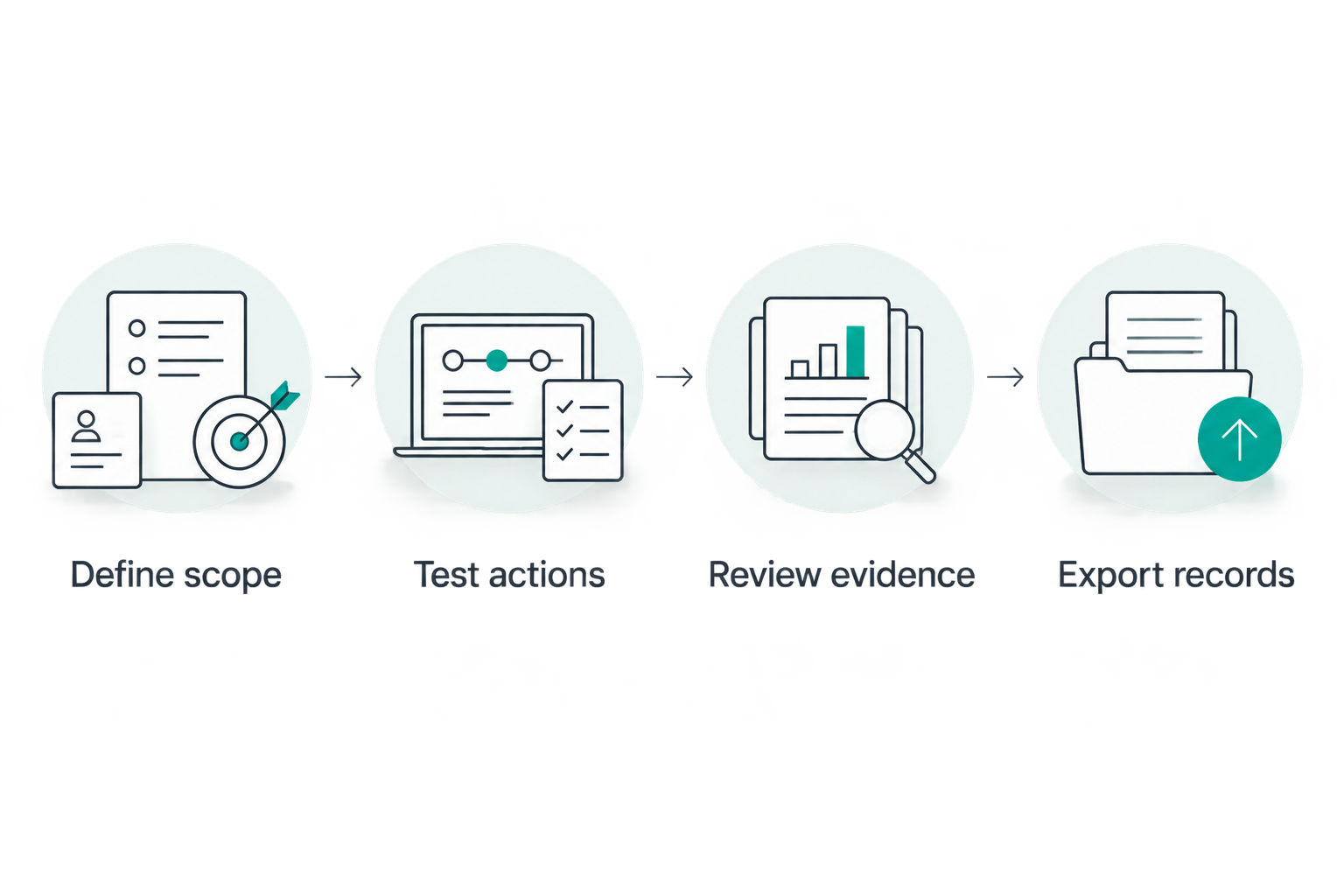
Test the complete workflow before judging the dashboard.
Make the workflows practical: a security-control failure, a risk acceptance decision and a policy review. Ask which steps are automatic, which need approval and which happen elsewhere.
Finish by asking who maintains the setup. Your internal workload belongs in the buying decision alongside the functionality shown on screen.
How the ranking works
This ranking compares product purpose against distinct healthcare buying needs. It prioritises scope fit, actionable controls, evidence traceability, ownership, sensitive information handling and administrative effort.
It is not a scored performance benchmark or a claim that every listed product covers every healthcare requirement. The first option addresses focused cyber compliance; the remaining options address enterprise workflows, configurable processes and basic manual tracking.
Which healthcare GRC software should you choose?
Choose OneClickComply for healthcare GRC work centred on cyber compliance, policy generation, risk management and certification preparation. Confirm the specific controls and healthcare requirements you need before committing.
Choose ServiceNow Integrated Risk Management when enterprise workflow coordination drives the project. Choose LogicGate Risk Cloud when configuring risk processes is the priority, or Microsoft Lists when a manual register genuinely meets the requirement.
For your 2026 decision, write a short acceptance brief before requesting demonstrations. Name the outcome, the workflow owner and the evidence you expect to retain.
Frequently asked questions
One last thing
Ask every shortlisted supplier to show what happens after someone marks an action complete. Who checks the result, what evidence remains and who can reopen it?
Completion is not the same as verification. Buy the workflow that makes that distinction clear. Seriously Simple Cyber Compliance.