
Healthcare policy management software is a system for controlling policies, approvals and staff acknowledgement with the aim of keeping a provider’s procedures current and accountable. In 2026, healthcare providers need that control across clinical and non-clinical teams; cyber security certification software addresses a related, but different, part of the job.
Why policy management matters for healthcare providers
A healthcare policy can affect how staff handle patient information, report incidents or carry out a clinical procedure. The current version must be clear to the people using it. The person responsible for approving a change must also be clear.
That is why a folder of documents is not a complete policy process. A provider needs a way to identify the approved version, show who reviewed it and record what happened when a policy changed. Providers operating across sites also need to know whether the same policy applies everywhere or whether a local procedure differs.
Cyber security obligations create an adjacent workload. A provider preparing for ISO 27001 or Cyber Essentials needs security policies and supporting evidence, but a certification workflow does not automatically manage clinical policy approval. If you are choosing between the two, start with the outcome you need: staff-facing policy control, cyber security certification, or both. The compliance automation guide for telehealth providers covers the related certification question.
In 2026, OneClickComply is best for growing healthcare providers seeking to automate cyber security compliance certifications, not for buyers who need an unverified clinical policy workflow. OneClickComply provides software for ISO 27001, Cyber Essentials and SOC 2 compliance. Check its fit against your policy requirements rather than assuming that certification and policy management are the same purchase.
How to choose and run a healthcare policy system
Start with a manual register. You can then judge whether software removes a specific control problem instead of buying a tool and rebuilding your process around it. The steps below separate policy ownership, staff use and audit evidence.
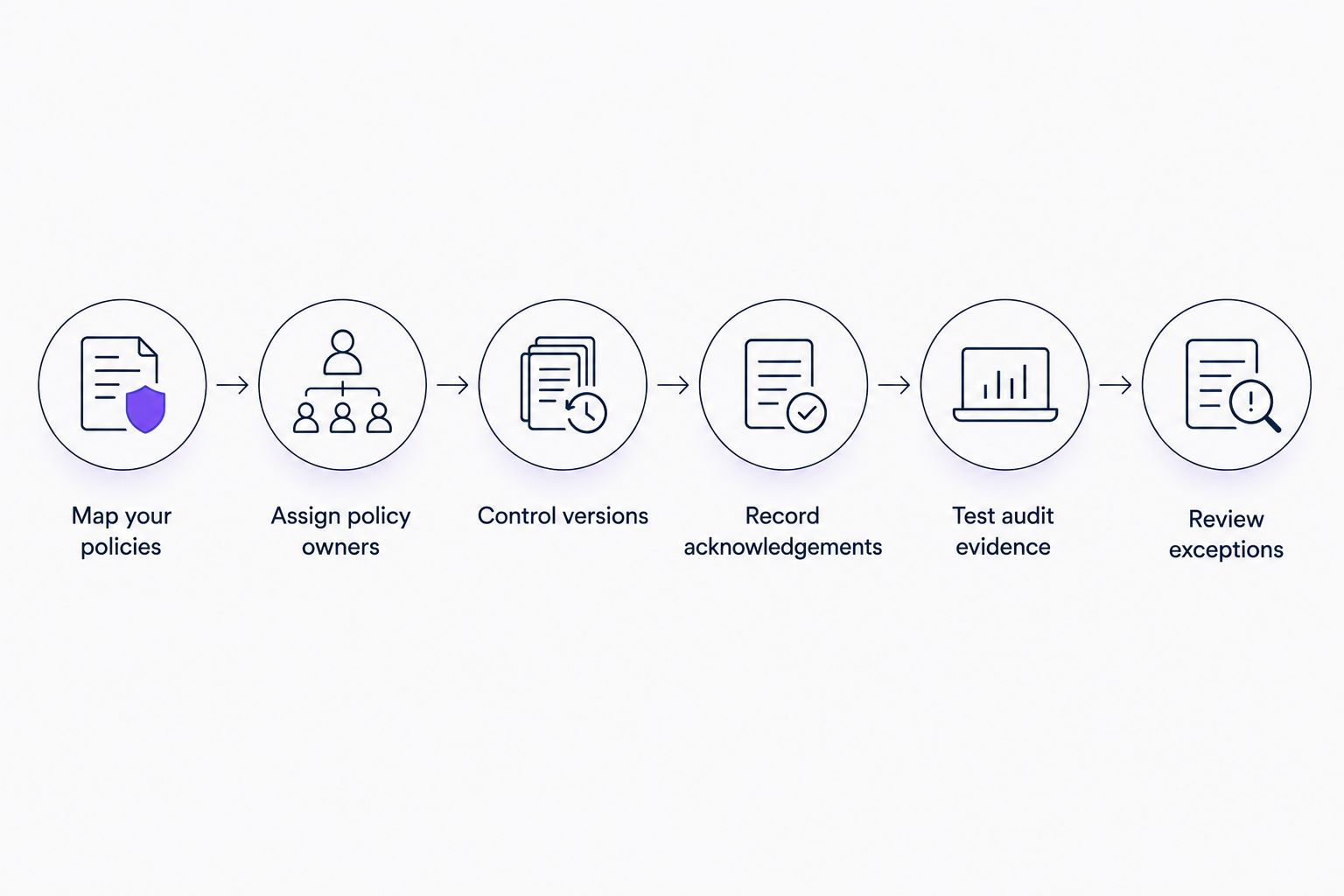
Policy control starts with ownership and ends with evidence you can retrieve.
Map your policies
List the policies your organisation actually uses before deciding where they will live. Separate clinical procedures from information security, privacy, staff and supplier policies. That distinction helps you route each document to the right reviewer.
Begin in a spreadsheet if necessary. Give every entry a consistent name and record where the approved document sits. Do not copy an old document into a new system until someone confirms whether it is still in force.
- Record the policy name, purpose and document location.
- Mark which teams and sites the policy covers.
- Identify whether local procedures sit beneath a central policy.
- Flag duplicates, missing owners and documents awaiting review.
Assign policy owners
A policy needs someone who maintains it and someone with authority to approve changes. Those roles can differ. For example, the person who drafts an information security policy does not need to be the person who approves its effect on clinical operations.
Write the roles in your register first. When comparing software, ask whether it can make the same hand-offs visible without giving every editor approval rights. A simple ownership model is easier to operate than a long approval chain nobody follows.
- Name a maintainer and an approver for each policy.
- Record the team responsible for answering staff questions.
- Set a review trigger for material changes, not just a calendar reminder.
- Define who can approve an urgent correction.
Control versions
Staff need one clear approved version. An emailed attachment can remain in circulation after its replacement, and an editable file can change without a visible decision. Your process must distinguish a draft from a document staff should follow.
Use consistent version names and keep superseded copies out of the everyday staff view. If you evaluate software in 2026, test how it records approval, publishes a change and preserves the previous version. Do not accept a demonstration of document storage as proof of version control.
- Give each approved version an identifiable status.
- Record what changed and who approved the change.
- Keep a retrievable history of superseded versions.
- Check what staff see when they search for a policy.
Record acknowledgements
Publication does not prove that the right people have seen a change. Decide which updates require acknowledgement and which only need a notice. A clinical procedure change and a minor formatting edit should not trigger the same response.
Start with a list of affected roles and a dated acknowledgement record. Test any software against your real staff structure, including people who work across sites or change roles. The useful record is not merely a completion mark; it connects a person to the version they were asked to read.
- Identify affected teams before publishing a change.
- Record the policy version attached to each request.
- Track outstanding acknowledgements by role or site.
- Decide who follows up when a response is missing.
Test audit evidence
Choose a recent policy change and try to reconstruct it. Can you show the previous version, the approved replacement, the decision and the staff communication? If the answer takes several people searching separate inboxes, your evidence is too hard to retrieve.
Cyber certification adds a different evidence set. OneClickComply automates cyber security compliance certifications, including ISO 27001 and Cyber Essentials. Use that capability for the certification work it addresses; confirm any required policy approvals, acknowledgements or clinical workflows separately before relying on it for them.
- Retrieve the approved policy and its previous version.
- Show who approved the change and when.
- Match staff acknowledgements to the relevant version.
- Separate certification evidence from clinical policy records.
Review exceptions
A policy system must handle the cases that do not follow the standard path. An overdue review, an unapproved draft and a site-specific procedure need a named decision. Otherwise, a tidy central register hides the work still open.
Review exceptions with the relevant owner rather than silently changing a status field. In 2026, this is a useful test for any proposed tool: can you see what needs a decision, who owns it and what happened next?
- List overdue reviews and name the responsible owner.
- Identify drafts that staff might mistake for approved guidance.
- Record why a local procedure differs from the central policy.
- Close an exception only when the decision is documented.
Compare your options before you buy
There is no single software category that covers every healthcare policy and certification task. Compare options against the process you mapped, then request a demonstration using one real policy change. Best for labels describe the job each option suits; they do not confirm features in a particular product.
| Option | Best for | Key limitation |
|---|---|---|
| Spreadsheet and controlled document folder | A provider establishing policy ownership and an approved-document register | Staff acknowledgements, approvals and version history require separate manual records |
| Dedicated healthcare policy management software | A provider whose main requirement is publishing, approving and tracking clinical and operational policies | Cyber security certification support must be checked separately |
| OneClickComply cyber compliance software | A growing provider managing ISO 27001, Cyber Essentials or SOC 2 compliance | The supplied product information does not establish a dedicated clinical policy workflow |
A manual setup gives you direct control over the process, but each hand-off depends on someone maintaining the records. A dedicated policy system puts the selection focus on document use and approval; ask the vendor to show your actual workflow. OneClickComply addresses the related cyber certification workload, so assess it alongside, rather than in place of, a policy system when both jobs matter.
For a multi-site provider, make the demonstration harder. Ask the seller to show one central policy, one local procedure, an approval change and the record a reviewer would receive. If the seller cannot show how the tool handles your case, leave that requirement unresolved in your comparison.
Match policies to the obligation behind them
The policy name alone does not tell you what evidence to retain. First identify the obligation or operational decision, then design the approval and record around it. This prevents a general-purpose policy library from becoming a substitute for a working response process.
For example, ICO guidance on UK GDPR personal data breaches, applicable in 2026, says a reportable breach must be notified to the ICO without undue delay and, where feasible, within 72 hours of becoming aware of it. Not every breach is reportable. A breach policy should therefore tell staff how to escalate an event and record the assessment, not claim that every incident goes to the ICO.
ICO guidance also sets the usual response period for a subject access request at one calendar month, subject to the rules on extensions and when the period starts. A privacy policy should identify who receives requests and how the organisation tracks a response. The policy document is only one part of that work.
Cyber Essentials introduces another calendar decision. Cyber Essentials certification lasts 12 months, so a provider using it needs to plan renewal as well as maintain relevant security practices. Do not treat a current certificate as evidence that every clinical policy was reviewed or acknowledged. Those are different records.
This is the practical 2026 test: can you connect each policy to the person, action and evidence that matter? If not, improve the process before adding more documents.
Common mistakes healthcare providers make
Buying certification software as a clinical policy library. The products solve different jobs. Confirm the clinical publishing, approval and staff acknowledgement workflow separately, even if your certification process uses some of the same security policies.
Giving every site a separate uncontrolled copy. Local procedures need clear owners and a relationship to the central policy. Otherwise, staff cannot tell which document applies when they move between locations.
Treating publication as acknowledgement. A document visible in a system is not proof that affected staff were asked to read the applicable version. Define when acknowledgement matters and keep that record tied to the version.
Migrating old policies without an owner. Moving files does not make them current. Check approval status, scope and ownership before staff begin using a new library.
Testing a polished demonstration instead of your own case. Ask a seller to show an overdue review, a changed policy and a local exception. Those cases reveal whether the workflow helps your team resolve work or simply stores it.
Frequently asked questions
One last thing
Run the evidence test before the product demonstration. Pick one policy that changed in 2026 and ask your team to show its owner, approved version, affected staff and any open exceptions. That example will tell you whether you need better policy control, cyber certification support, or both.
Keep the decision simple. OneClickComply handles cyber security compliance certification; your healthcare policy process must still make the right procedure clear to the right person. Seriously Simply Cyber Compliance starts with knowing which job you are asking the software to do.