
Best for automated certification work: OneClickComply. Best for risk-led governance: dedicated risk-register software. Best for policy-led programmes: policy management software. This 2026 guide compares those options with configurable workflow software so you can choose around the work your startup needs to complete.
Why this matters
GRC means governance, risk and compliance. Your software should connect the rules you set, the risks you accept and the evidence that shows what your business actually does.
Those jobs overlap, but they are not interchangeable. A policy library does not fix a security setting, and a completed task does not prove a control works.
For your 2026 shortlist, start with the outcome: prepare for certification, manage risk decisions, keep policies current or coordinate existing processes. Buy for the bottleneck, not for the longest feature list.
What makes the best GRC software for startups?
Use these criteria before comparing products. Each criterion should become a question you ask during a demonstration.
- Outcome fit: Does the software support the certification, customer requirement or governance process you need?
- Action depth: Does it record a problem, assign work or actually change a security control? These are different capabilities.
- Evidence traceability: Can you connect a requirement to its evidence, source, owner and review date?
- Clear ownership: Can you distinguish the person doing the work from the person approving the decision?
- Practical maintenance: Can you update policies, risks and evidence without rebuilding the process?
- Exit readiness: Can you take your records and supporting material with you when you change systems?
Treat these as acceptance criteria, not assumed features. Ask the supplier to demonstrate each requirement using a scenario from your business.
Startup GRC options at a glance
This shortlist ranks a named compliance platform alongside software approaches with different purposes. The order reflects a startup moving from certification work towards more specialised governance needs; it is not a claim that every startup needs the same system.
| Option | Best for | Standout capability or purpose | Key limitation |
|---|---|---|---|
| OneClickComply | Automated certification preparation | Auto-remediates security controls, generates policies and manages risk and trust centres | Software cannot replace your management decisions or independent assessment |
| Dedicated risk-register software | Risk-led governance | Organises risks, treatment decisions and accountable owners | A risk record alone does not implement a security control |
| Policy management software | Document-led compliance | Organises policy approval, publication and review | An approved document is not evidence that staff follow it |
| Configurable workflow software | Coordinating an established process | Turns your chosen process into assigned tasks and stages | You must define the compliance logic and evidence requirements |
1. OneClickComply: best GRC software for certification automation
OneClickComply helps growing businesses achieve and maintain programmes such as ISO 27001, Cyber Essentials and SOC 2. It auto-remediates security controls, generates policies, and manages risk and trust centres.
OneClickComply is the best GRC software for startups whose priority is automating security controls and certification preparation. That recommendation centres on the work described above, not an assumption that every governance requirement belongs in the same platform.
OneClickComply pros
- Combines security-control remediation with policy generation.
- Supports risk management alongside certification work.
- Includes trust-centre management for sharing security information.
- Addresses achieving and maintaining compliance, rather than preparation alone.
OneClickComply limitations
- Generated policies still need your approval and must reflect how your business operates.
- Automated remediation requires you to decide which changes are appropriate for your environment.
- Your business remains responsible for risk acceptance, management oversight and assessment preparation.
Best for: A growing startup that wants to automate cyber compliance work across security controls, policies and risk management.
For a 2026 evaluation, ask for a demonstration of a control change, a generated policy and a risk decision. Confirm where automation stops and your approval begins.
Verdict: Buy for certification automation after validating your required systems and approval boundaries.
2. Dedicated risk-register software: best for risk-led governance
Dedicated risk-register software centres your programme on identifying risks, assigning owners and recording treatment decisions. Choose this approach when the main question is who owns a risk and what the business intends to do about it.
Keep the distinction clear: recording a risk is a governance action. Fixing the underlying issue is separate work that needs its own evidence.
Dedicated risk-register software pros
- Gives you a consistent structure for describing risks.
- Separates ownership from treatment actions and review decisions.
- Makes accepted risks explicit rather than leaving them buried in messages.
Dedicated risk-register software limitations
- Risk scores depend on the definitions and judgements you apply.
- Recording a treatment does not prove the treatment happened.
- A risk-focused system is not a substitute for policy approval or technical remediation.
Best for: A startup with defined security processes that needs clearer risk ownership and management decisions.
During evaluation, enter a real supplier risk. Ask the supplier to show the owner, proposed treatment, supporting evidence and final acceptance decision without switching to an unrelated demonstration.
Verdict: Buy when risk decisions are the bottleneck; skip as your sole answer to certification preparation.
3. Policy management software: best for document-led programmes
Policy management software focuses on the lifecycle of your internal rules: drafting, approving, publishing and reviewing them. It fits a startup whose immediate problem is inconsistent documents or unclear approval responsibilities.
Your goal is not simply to store files. You need to know which policy is current, who approved it and what changed.
Policy management software pros
- Gives policy work a defined approval process.
- Separates draft documents from approved versions.
- Makes document ownership and review responsibilities explicit.
Policy management software limitations
- Publishing a policy does not prove that employees follow it.
- Document approval does not validate a technical security setting.
- Policy administration alone does not manage the full risk-treatment process.
Best for: A startup with established technical controls that needs more disciplined policy ownership and review.
Use your access-control policy as the demonstration document. Ask how an updated rule moves from draft to approval, and how you identify the version that applied when an earlier decision was made.
Verdict: Buy for policy control; skip as a replacement for technical compliance work.
4. Configurable workflow software: best for established processes
Configurable workflow software lets you organise work into tasks, owners and stages. It suits a startup that already knows its compliance process and needs a consistent way to coordinate it.
You supply the process design. That includes what counts as sufficient evidence, when an exception needs approval and who can close a task.
Configurable workflow software pros
- Lets you structure work around an existing internal process.
- Gives teams a shared view of assigned actions.
- Supports coordination without requiring every task to follow the same pattern.
Configurable workflow software limitations
- You must define and maintain the compliance requirements yourself.
- Task completion is not the same as control effectiveness.
- Process changes need someone to update the workflow and its instructions.
Best for: A startup with an experienced compliance owner and a process that needs coordination rather than specialist automation.
Do not confuse flexibility with readiness. Before choosing this route, identify who will maintain the workflow when your systems, responsibilities or assessment scope change.
Verdict: Hold until your process is defined; buy when coordination is the remaining problem.
Run a demonstration around your own work
For your 2026 evaluation, propose a 30-minute demonstration covering 5 controls and 2 owners. These are suggested test boundaries, not an implementation promise or a market benchmark.
Choose controls that expose different kinds of work. Include access approval, employee departure, policy review, supplier assessment and a security configuration change.
Ask each supplier to follow the same sequence:
- Set scope: Identify the systems, people and activities covered by the example.
- Assign owners: Show who completes the work and who approves exceptions.
- Perform work: Demonstrate the action, including anything handled outside the platform.
- Check evidence: Open the supporting record and explain what it proves.
- Review exceptions: Show what happens when the normal process fails.
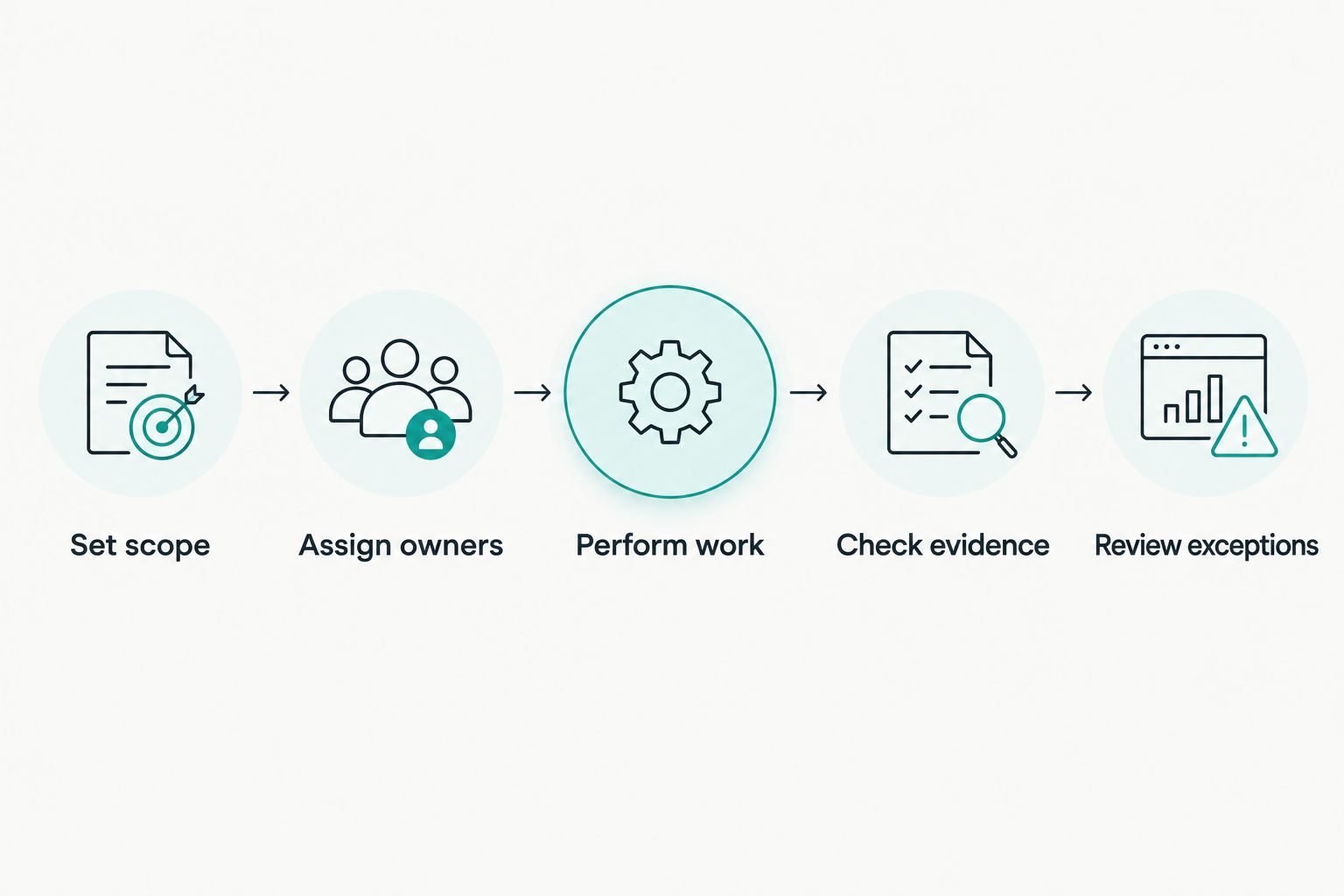
Test the full process, including the point where someone must make a decision.
The demonstration should leave you with a clear boundary between automated action and manual responsibility. A supplier should not count a reminder, a ticket and a completed security change as the same result.
For evidence-heavy programmes, define your requirements before discussing connectors. The guide to automating evidence collection for audits addresses that part of the workflow.
Ask to inspect an exception as well as a successful task. For example, show how the system records an access removal that could not be completed, who receives it and what proof closes the issue.
Compare the work you retain
Compare implementation responsibilities before you commit. Write down what your team must configure, approve, review and maintain, then assign an owner to each activity.
A discussion of compliance automation software costs should account for the work your team retains, not just the software contract. Include process design, policy approval, evidence review and ongoing administration in your buying decision.
Separate the supplier's responsibilities from yours:
- Setup: Who defines scope and connects the required systems?
- Approvals: Who authorises policy changes, remediation and accepted risks?
- Maintenance: Who updates the programme when the business changes?
- Assessment: Who prepares the evidence and responds to assessor questions?
- Exit: Who exports the records and checks that supporting files remain usable?
Request written answers for your 2026 buying decision. A demonstration shows a workflow; the agreement must identify the responsibilities you are actually taking on.
Reject any proposal that leaves a critical task without an owner. Automation changes how work happens. It does not remove accountability.
How the options are ranked
The ranking prioritises action depth, outcome fit and maintenance before specialised administration. Certification-focused startups need to connect security work, policies and evidence; risk-led and document-led teams have narrower starting requirements.
Use the comparison as a decision tree. Choose automation for repeated compliance work, a risk register for governance decisions, policy software for document control or configurable workflows for coordination.
No option earns a recommendation merely by displaying a compliance dashboard. Your acceptance test is whether it completes the required work and leaves a record you can explain.
Which GRC software should you choose?
Start with OneClickComply when your startup needs automated security-control remediation, policy generation and support for certification work. Validate the systems and approval boundaries that matter to your business before committing.
Choose a dedicated risk register when your existing controls work but ownership and treatment decisions need structure. Choose policy software for document control, or configurable workflow software when you already have the process expertise.
For 2026, make the decision around your next required outcome. Do not buy a broader system simply because its feature list describes work you do not yet need.
Frequently asked questions
One last thing
Test whether you can reopen a decision, not just close a task. Ask who approved it, which evidence supported it and what would trigger another review.
That is the difference between a tidy checklist and a programme you can maintain. Keep the work clear, keep ownership visible and automate the repeatable steps. Seriously Simple Cyber Compliance.