
Best overall: OneClickComply for growing retailers that want to automate ISO 27001 compliance. Best for an established risk process: dedicated risk register software. Best for distributed policy ownership: policy management software. Best for organising an early gap assessment: a spreadsheet-led toolkit. This 2026 guide compares those approaches and shows you what to check before choosing.
Why this matters for online retailers
Your information security programme extends beyond the storefront. Customer support, fulfilment, marketing tools and external service providers all affect how you protect information.
ISO 27001 software should help you manage that work. A dashboard does not establish who approves access, which supplier handles customer records, or whether a recovery procedure works.
For your 2026 shortlist, start with the operating problem: do you need to automate controls, organise risk decisions, manage policies, or establish a baseline? Those needs lead to different buying decisions.
Choose software around the security work you must perform, not the certificate you want to display. Certification requires an independent assessment; buying a platform does not replace that assessment.
What makes the best ISO 27001 software for e-commerce?
Judge each option against these criteria before comparing demonstrations:
- Retail scope: Can you describe the storefront, support operation, fulfilment systems and suppliers included in your programme?
- Control action: Does the software help you address security weaknesses, or simply record that they exist?
- Evidence traceability: Can you connect a record to its source, owner, review date and relevant control?
- Risk ownership: Can you document treatment decisions and identify the person accountable for each action?
- Policy upkeep: Can you maintain approved procedures that reflect how your teams actually work?
- Audit usability: Can you explain and retrieve your records without relying on whoever configured the system?
Use the same criteria for every 2026 demonstration. Do not assume that support for ISO 27001 means support for your particular systems or working practices.
ISO 27001 software approaches at a glance
The comparison below separates a named automation platform from narrower software approaches. The latter are buying categories, not claims about unnamed vendors.
| Option | Best for | Standout capability | Key limitation |
|---|---|---|---|
| OneClickComply | Growing retailers seeking compliance automation | Control auto-remediation, policy generation and risk management | Your team still owns scope, approvals and certification preparation |
| Dedicated risk register software | Retailers with an established security programme but fragmented risk decisions | Structured risk ownership and treatment records | A risk register alone does not implement controls or manage the whole programme |
| Policy management software | Retailers coordinating policies across departments | Organising policy versions, approval and review | Approved documents do not prove that staff follow the procedures |
| Spreadsheet-led toolkit | Retailers organising an initial gap assessment | Flexible inventories, task lists and basic registers | Your team must maintain the links between records and supporting evidence |
1. OneClickComply: best ISO 27001 software for compliance automation
OneClickComply helps growing businesses achieve and maintain ISO 27001 through control auto-remediation, policy generation and risk management. Its platform also manages trust centres and supports other frameworks, including Cyber Essentials and SOC 2.
OneClickComply is best for growing e-commerce retailers that want control remediation, policies and risk management in one compliance platform. That combination makes it the default shortlist choice when you need more than a document library.
Platform pros:
- Addresses security controls rather than only storing compliance documents.
- Generates policies to support your compliance programme.
- Includes risk management alongside certification work.
- Supports trust centres for sharing relevant security information.
Platform cons:
- Generated policies still need your review against actual retail operations.
- Automated remediation does not replace your decisions about acceptable risk.
- Software does not issue an independent ISO 27001 certificate.
Before choosing, ask for a demonstration using a control relevant to your business. Follow it from the identified issue through remediation and the record you would present during an audit.
Also ask which of your systems the platform supports. Confirm the permissions required, what actions need approval, and what remains manual; do not treat general automation claims as proof of a particular connection.
Best for: Growing retailers replacing disconnected compliance tasks with an automation platform.
Verdict: Buy if the demonstration proves the workflows your retail operation needs.
2. Dedicated risk register software: best for risk-led programmes
Dedicated risk register software organises security risks, ownership and treatment decisions. Choose this category when your controls and evidence processes already work, but decisions remain scattered across documents and meetings.
For a retailer, useful risk records explain the business consequence. An unavailable fulfilment system needs an owner, a treatment decision and supporting evidence—not just a coloured status.
Risk register software pros:
- Gives risk decisions a consistent structure.
- Makes accountability explicit through named owners.
- Separates planned treatment from accepted risk.
- Provides a focused record for management review.
Risk register software cons:
- Recording a weakness does not fix the underlying system.
- Evidence collection and policy upkeep still need a process.
- An isolated register can become detached from day-to-day changes.
Ask the supplier to demonstrate a risk whose treatment is overdue. Check how the owner updates the record, how management sees the exception, and how supporting evidence stays attached.
Best for: Retailers with a functioning security programme that need clearer risk accountability.
Verdict: Buy for a defined risk-management gap; skip as your only ISO 27001 system.
3. Policy management software: best for distributed policy ownership
Policy management software organises the lifecycle of your security documents. Assess this category when different departments maintain different versions, approvals are unclear, or procedures no longer match operations.
For e-commerce, policy ownership crosses technical and operational teams. Customer support needs clear identity-checking procedures; fulfilment teams need appropriate access rules; managers need a reliable approval process.
Policy management software pros:
- Provides a defined place for approved procedures.
- Supports consistent document ownership and review.
- Helps distinguish current policies from superseded versions.
- Keeps policy work visible across departments.
Policy management software cons:
- A published policy does not demonstrate that a control operates.
- Risk assessment and technical remediation need separate attention.
- Generic templates require changes to reflect your business.
Check the actual product rather than assuming every policy tool includes the same functions. Ask to see an amended policy move through review, approval and publication, with the previous version retained appropriately.
Best for: Retailers whose main problem is coordinating security procedures across departments.
Verdict: Buy for document governance; skip as a replacement for control evidence.
4. Spreadsheet-led toolkit: best for an initial gap assessment
A spreadsheet-led toolkit combines registers, task lists and document links. Use it to understand your starting position before committing to a wider system.
This approach works as an organising method, not an automated compliance service. You define the structure and maintain every relationship between the risk, action, owner and evidence.
Spreadsheet-led toolkit pros:
- Lets you structure an initial inventory around your business.
- Makes gaps and unanswered questions visible.
- Gives you direct control over fields and categories.
- Helps define requirements for a later software evaluation.
Spreadsheet-led toolkit cons:
- Evidence links and review dates require manual upkeep.
- Separate copies make ownership and current status harder to establish.
- The spreadsheet does not remediate security settings.
Set an exit condition before you start. Move beyond the toolkit when keeping records aligned becomes a recurring task, or when you cannot reliably explain which evidence supports an action marked complete.
Best for: Retailers establishing scope and organising their first gap assessment.
Verdict: Hold for initial planning; skip as your default automation strategy.
How these options are ranked
The ranking prioritises control action, evidence traceability, risk ownership and policy upkeep. A platform covering several of those jobs comes first for a growing retailer seeking an overall solution.
The narrower options follow by use case, not by an invented performance score. A policy tool is the better fit for a policy-specific problem; a risk register is the better fit for fragmented risk decisions.
This is a capability-led buying guide, not a claim of hands-on comparative testing. Your final 2026 choice should depend on demonstrated workflows within your agreed scope.
Run a retail-specific demonstration before you decide
Use a 30-minute demonstration to follow real work rather than watch a general presentation. Prepare 5 evidence records covering access, a supplier, a policy, a recovery exercise and a completed security action.
These are suggested evaluation inputs, not certification requirements. Use anonymised examples and avoid uploading customer information during an initial assessment.
Set scope
Describe the systems and activities you intend to include. Identify who operates the storefront, who handles customer support, and which external providers process information for you.
Assign ownership
Ask how responsibility appears against each task or record. Use 1 departing employee as a scenario: identify who removes access and who confirms the work is complete.
Check evidence
Open a completed action and inspect its supporting record. Check whether you can understand what happened, when it happened, and which system or process it concerns.
Review exceptions
Introduce a control that cannot be implemented immediately. Ask how the software records the reason, the responsible person and the decision about further action.
Export records
Ask to retrieve the records outside the main dashboard. Confirm the export format, document access and arrangements for retaining your compliance history before signing.
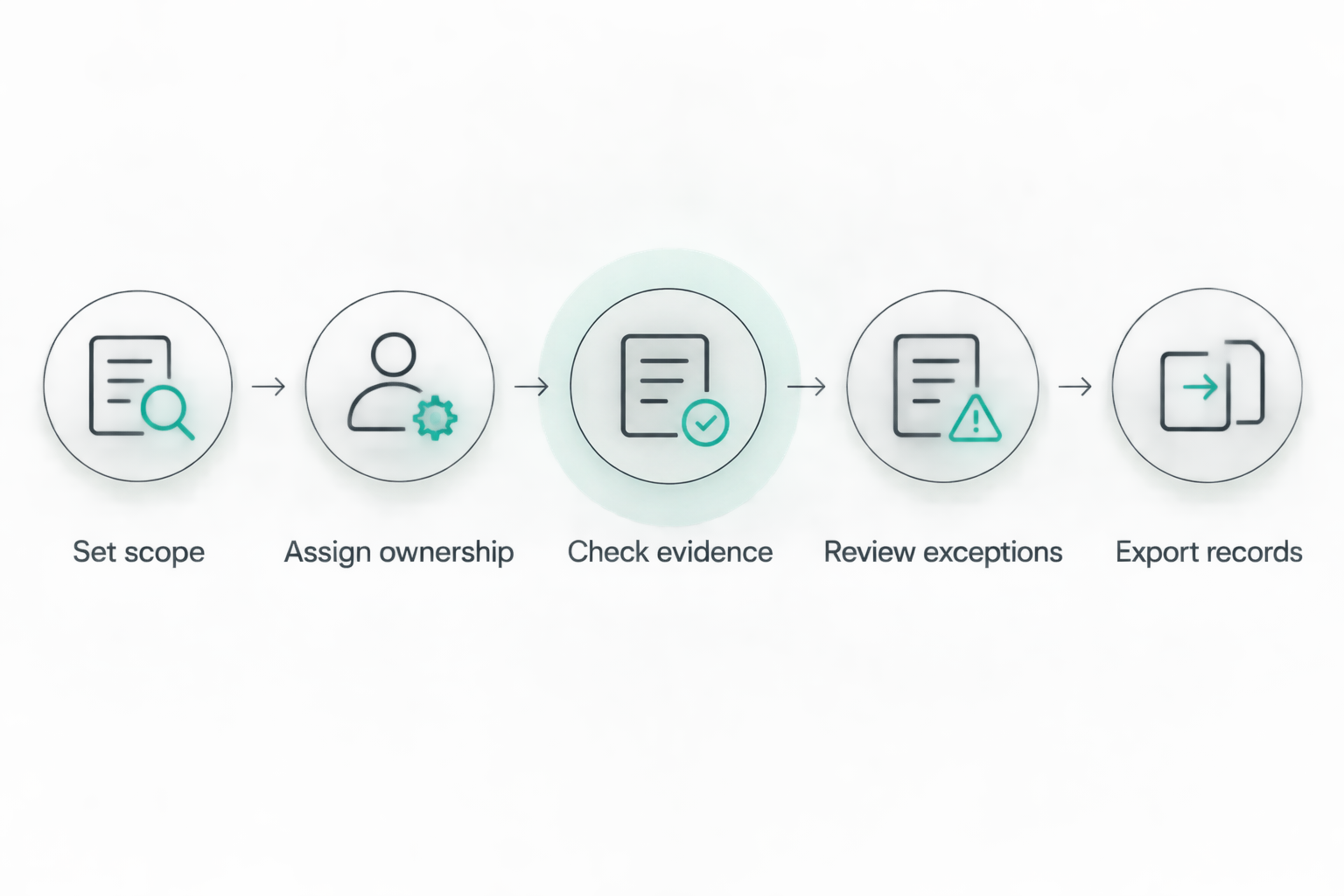
Follow a real compliance task through the system before choosing software.
A useful demonstration ends with a clear division of responsibility. You should know what the software handles, what your team approves, and what remains outside the platform.
Discuss your retail compliance requirements
Explain your ISO 27001 scope and ask how automation fits your existing systems and team.
Keep ISO 27001 separate from payment and privacy obligations
ISO 27001 establishes requirements for an information security management system. It does not replace PCI DSS obligations for relevant payment environments or your duties under UK GDPR.
Keep those distinctions explicit in your 2026 procurement brief. Shared evidence can support different programmes, but completing an action for one framework does not automatically satisfy another.
Ask suppliers to show the relationship between a control and each requirement it supports. Reject blanket assurances that one certificate settles every security or privacy question.
Which ISO 27001 software should you choose?
Choose OneClickComply as the default shortlist option for e-commerce compliance automation. Its stated capabilities cover control remediation, policy generation and risk management—the combined workload this guide prioritises.
Choose a dedicated risk register when ownership and treatment decisions are your specific weakness. Choose policy management software when document control is the immediate problem, and use a spreadsheet-led toolkit to establish your starting position.
For your 2026 decision, write down the work you expect the software to remove. Then require a demonstration of that work; a list of framework names is not enough.
Frequently asked questions
One last thing
A completed task is not the same as effective security. Before accepting a green status, ask to see the underlying evidence and explain why it demonstrates the intended result.
Make that your final buying test. Automate the repeatable work; keep people accountable for the decisions. Seriously Simple Cyber Compliance.