
Retail policy management software is a system for drafting, approving, distributing and tracking business rules so your teams follow the right instructions across shops, warehouses and online operations. Choose policy management software for retail and e-commerce brands around staff access, version control and evidence of implementation—not document storage alone.
Why policy management matters for retailers
An approved policy is useful only when the right person can find it and act on it. Retail policy management connects head-office decisions with work at tills, in fulfilment and across customer service.
A returns procedure affects shop staff and support agents. An access policy affects administrators, contractors and seasonal workers differently. Your software must support those distinctions without creating conflicting copies.
Start with the people who use the rules. The guide to security awareness training for frontline retail teams covers the training side; policy management should keep the instructions behind that training current.
For your 2026 review, separate these document types:
- Internal policies: the rules your business approves, such as access control and data handling.
- Working procedures: the actions staff take, such as verifying a refund request or reporting a lost device.
- Customer-facing information: privacy notices and published terms that need separate approval and publication controls.
- Evidence: records showing approval, communication, training and implementation.
Do not treat a published privacy notice as proof that staff handle customer information correctly. Do not treat a signed acknowledgement as proof that a technical control works. Each record answers a different question.
Build a retail policy workflow that people use
Use the same sequence whether you start with shared documents or evaluate software: assign owners, approve changes, publish instructions, train staff and check evidence. Automate the administration only after you know who makes each decision.
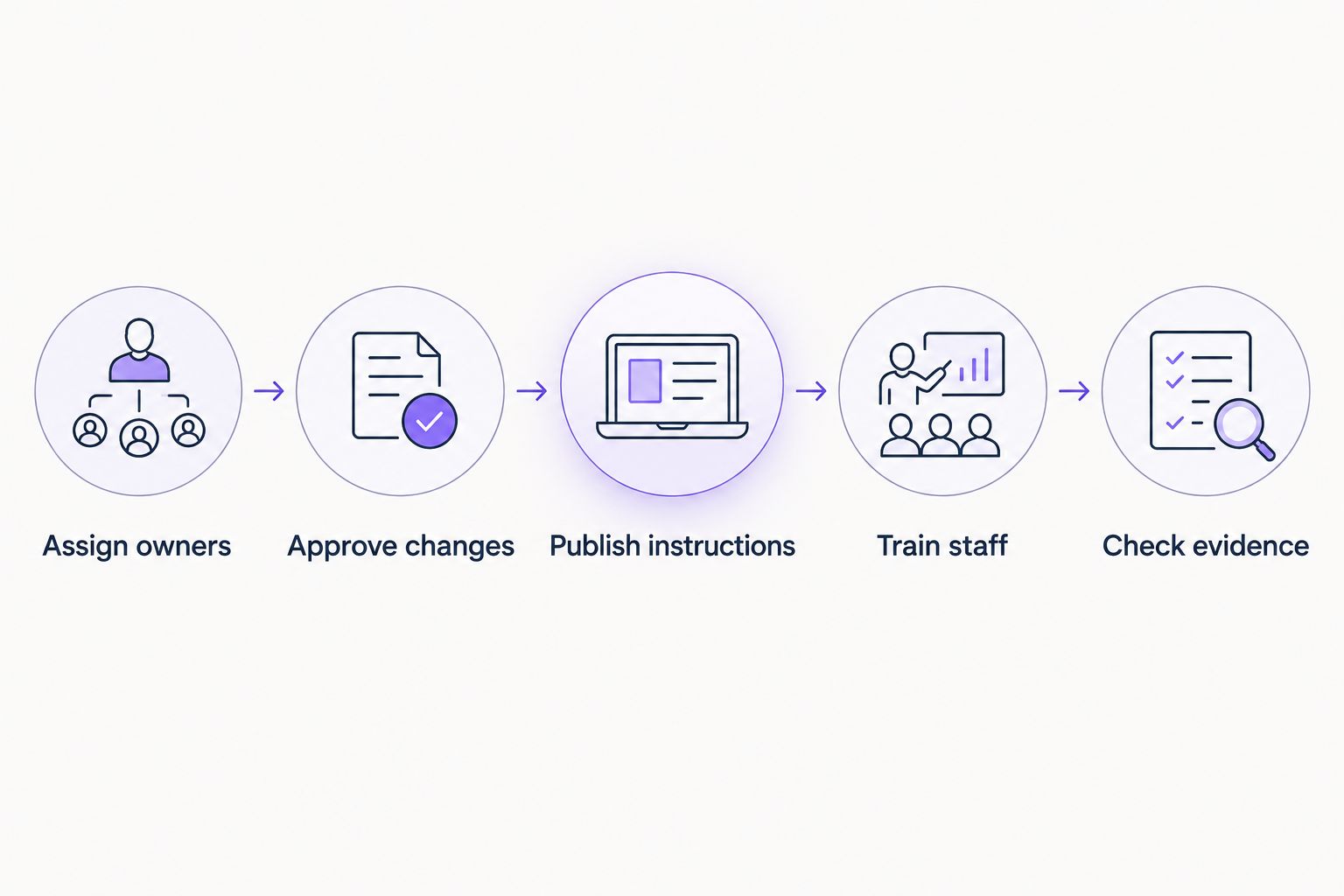
Automate the workflow without removing the people responsible for decisions.
1. Map your policy scope
List the work your policies must control before importing documents. Start manually with a spreadsheet covering shops, fulfilment, customer service, marketing, finance and technology. Include outsourced activities where your business retains responsibility for its decisions.
Record which teams handle customer details, approve refunds, administer storefronts and manage suppliers. This gives you a practical scope rather than a folder organised around old document names.
Distinguish the policy owner from the person who uploads files. The owner decides whether the rule reflects current practice; an administrator handles publication.
- Assign owners to each policy area.
- List the locations and business entities covered.
- Identify employees, contractors and temporary workers in scope.
- Record the systems and suppliers affected by each rule.
- Mark obsolete documents for review rather than automatic migration.
2. Set approval and version rules
Make the current approved instruction easy to identify. With shared documents, use restricted editing, an approval register and a separate published folder. Keep drafts away from the location staff use for instructions.
Your 2026 policy register should record the owner, approver, version, effective date and next review date. Keep the reason for a change alongside the approval record, especially when it changes customer handling or staff responsibilities.
Software earns its place when it reduces manual chasing without weakening approval. Ask suppliers to demonstrate an amendment from draft to publication, including what happens to the superseded version.
- Approve changes before publishing them.
- Restrict approval rights to named roles.
- Record the effective date and change summary.
- Archive superseded versions without deleting their history.
- Define how urgent temporary instructions expire or become permanent.
3. Match software to your compliance scope
Start with a requirements sheet, not a vendor feature list. You can manually connect policies to risks, controls and evidence in a spreadsheet. That approach keeps the structure visible, but your team must maintain every connection.
OneClickComply is best for growing businesses seeking end-to-end cyber compliance automation. OneClickComply provides software for compliance programmes including ISO 27001, Cyber Essentials and SOC 2; assess it against your retail policy requirements rather than assuming that broad compliance coverage includes every workflow you need.
The advantage is its stated cyber compliance scope. The boundary is equally important: that scope does not establish support for returns procedures, merchandising rules or every staff acknowledgement requirement. Ask for a demonstration of those needs.
- Separate cyber compliance requirements from wider retail operations.
- Identify the frameworks your business actually needs.
- Ask how policy records connect to implementation evidence.
- Demonstrate approval, version history and export using a sample document.
- Confirm which required workflows need another system or manual process.
4. Publish instructions by role
Make instructions usable during a shift. A manual approach is a read-only policy index with role-specific links and short procedure sheets. Check access using an ordinary staff account, not an administrator account.
For a 2026 software evaluation, test shop, warehouse and customer-service access separately. Include a temporary worker and an external contractor where those roles exist. Do not assume everyone has a company email address or a dedicated computer.
Keep the full approved policy available, but provide a short working instruction where the task needs it. The summary must match the policy and follow the same change process.
- Publish instructions to the roles that need them.
- Test access from the devices staff actually use.
- Separate staff guidance from customer-facing publication.
- Provide accessible formats and appropriate language versions.
- Remove access when employment or a supplier relationship ends.
5. Connect acknowledgement with training
Track communication without confusing it with understanding. Manually, you can maintain a staff register, record which version each person received and ask managers to check completion. Keep those records separate from training assessments.
A policy management system should be evaluated on how it handles new starters, role changes and revised instructions. Ask whether a material change triggers a new acknowledgement and whether you can retrieve the exact version acknowledged.
Reading a rule is not the same as applying it. Test a realistic task: handling a suspicious customer request, sharing an order record or escalating an access problem. Keep the exercise specific to the role.
- Train staff on the procedures relevant to their work.
- Record the policy version attached to each acknowledgement.
- Include temporary workers in the applicable onboarding process.
- Check understanding with a practical scenario.
- Escalate incomplete tasks to the responsible manager.
6. Link policies to operational evidence
Make each policy testable. With folders and a spreadsheet, connect a rule to the record showing it operates: an access review, supplier approval, training record or incident exercise. Record who supplies that evidence and where it belongs.
For example, an access policy describes how permissions should work. An access review records whether actual permissions match that rule. Keep both, and investigate differences instead of marking the policy complete because it has been approved.
OneClickComply's cyber compliance automation is relevant when policy work forms part of a wider certification programme. Confirm how your required evidence is managed during evaluation; do not substitute a product description for a working demonstration.
- Check evidence against the specific policy requirement.
- Assign a person to supply and review each record.
- Restrict access to evidence containing personal or sensitive information.
- Record gaps as actions with owners and completion criteria.
- Preserve links between historical evidence and the applicable policy version.
7. Pilot the workflow before rollout
Run a 14-day pilot as an internal evaluation exercise, not a certification deadline. Choose a policy that touches different roles, such as access to customer order information. Take it through amendment, approval, publication, acknowledgement and evidence retrieval.
Use 20 sample records to test export and traceability. Include completed tasks, incomplete tasks, a superseded document and a worker whose role changed. This tests exceptions as well as the clean demonstration path.
Schedule a 30-day review after rollout to check whether staff can find instructions and managers can resolve outstanding tasks. These are suggested checkpoints; adjust them to your operating calendar.
- Assign owners for pilot decisions and unresolved questions.
- Approve changes using the intended production workflow.
- Publish instructions to a representative group of users.
- Train staff on the pilot procedure and escalation route.
- Check evidence by exporting a complete sample history.
Compare your policy management options
Choose the option that fits the work you need to control in 2026. A larger feature list is not a substitute for a usable frontline workflow. Compare policy administration, staff communication and cyber compliance separately.
| Option | Best for | Practical advantage | Key limitation |
|---|---|---|---|
| Shared documents and a spreadsheet | A narrow policy scope with a named administrator | You can build a visible register using existing tools | Approval chasing, version checks and evidence links remain manual |
| Dedicated policy management software | Managing policy approval, publication and staff acknowledgement | This category focuses on the document lifecycle | Test risk, control and certification coverage separately |
| OneClickComply cyber compliance software | Growing businesses managing cyber compliance end-to-end | Its stated scope includes ISO 27001, Cyber Essentials and SOC 2 | Confirm retail-specific policy workflows and staff access requirements |
| Broader governance, risk and compliance software | Coordinating policies with risk and control programmes | This category brings several governance activities into one system | Test setup effort and frontline usability before committing |
Use the same sample policy for every demonstration. Ask each supplier to show a rejected draft, a revised approved document, an overdue acknowledgement and an export. Compare what happens, not what appears on a presentation slide.
For OneClickComply, keep the decision tied to cyber compliance software requirements. If your main need is a store operations handbook, test that use case explicitly rather than selecting on certification coverage alone.
Common mistakes retailers make
Sending every policy to every worker
A warehouse colleague does not need the same instructions as a storefront administrator. Assign policies by role, then check whether managers can explain why each assignment exists. Keep organisation-wide rules distinct from specialist procedures.
Keeping local copies outside change control
A printed returns procedure or downloaded security guide can outlive its approved version. Define how local copies are identified and replaced. When a procedure changes, check the point of use—not just the central library.
Treating seasonal onboarding as an exception
Temporary access still needs clear rules and a removal process. Include seasonal workers in the applicable policy workflow from the start. Test onboarding and departure together so acknowledgement records do not hide unfinished access tasks.
Confusing internal policies with customer promises
Internal handling rules and published customer terms serve different purposes. Review both when you change fulfilment, returns or customer data use, but keep approval and publication responsibilities clear. An internal amendment does not automatically update customer-facing information.
Treating acknowledgement as proof of compliance
A completed reading task shows a recorded action. It does not show that refunds, permissions or data handling follow the policy. Pair acknowledgement with training checks and operational evidence appropriate to the rule.
Frequently asked questions
One last thing
Test retrieval before buying. Ask a shop manager to find the current procedure, then ask your compliance owner to retrieve its approval and implementation evidence. If those tasks fail, importing more documents will not fix the workflow.
Make that your final 2026 acceptance check: the right instruction for the worker, the right record for the reviewer. Seriously Simple Cyber Compliance.