
Best for security compliance: OneClickComply. Best for dedicated policy approvals: NAVEX PolicyTech. Best for operational policy distribution: PowerDMS. The best policy management software for insurance companies in 2026 depends on whether you manage internal rules or the insurance contracts you sell—this guide separates those jobs before you shortlist.
Why this matters
An information security policy tells employees how to protect customer information. An insurance policy defines cover for a policyholder. Software built for one job does not automatically handle the other.
Separate internal policy management from insurance policy administration before comparing vendors. Otherwise, your shortlist mixes document approval tools, compliance platforms and underwriting systems that solve different problems.
For your 2026 shortlist, start with the outcome: approved internal rules, evidence that staff received them, security compliance, or administration of insurance contracts. Give that outcome an owner before you request demonstrations.
This guide ranks internal policy options first. Guidewire PolicyCenter appears separately to show where insurance contract administration belongs—not as a substitute for internal governance software.
What makes the best policy management software?
Use these six criteria to compare your 2026 shortlist. Treat them as requirements to demonstrate, not features to assume.
- Policy lifecycle: You need a clear route from drafting through approval, publication, review and retirement.
- Version history: You need to distinguish the current approved document from earlier drafts and superseded versions.
- Employee acknowledgement: Ask how the system records who received a policy and which version they acknowledged.
- Risk and control context: Security policies should reflect your actual risks and the controls your business operates.
- Audience targeting: Check how you publish different rules to claims teams, underwriting teams, contractors and other relevant groups.
- Evidence portability: Ask to export approvals, policy history and acknowledgement records without rebuilding the story manually.
Do not weight every criterion equally. A security lead preparing for ISO 27001 needs a different shortlist from an operations lead replacing email-based procedure approvals.
Policy management software at a glance
The order below follows distinct buying needs. It is not a claim that a security compliance platform replaces a dedicated policy system or an insurance administration platform.
| Option | Best for | Standout capability | Key limitation |
|---|---|---|---|
| OneClickComply | Security policies within a compliance programme | Policy generation alongside risk management and security control remediation | Assess your required approval and acknowledgement workflows separately |
| NAVEX PolicyTech | Dedicated internal policy governance | Policy lifecycle management | Does not replace insurance contract administration |
| PowerDMS | Operational policy distribution | Document distribution and acknowledgement workflows | Does not replace a security compliance programme |
| Microsoft SharePoint | Document-led policy libraries | Document libraries and version history | Requires configuration and process ownership |
| Guidewire PolicyCenter | Insurance contract administration | Management of insurance policies through their lifecycle | Solves a different problem from internal policy governance |
1. OneClickComply: best for security policy management
OneClickComply generates policies, manages risk and automates remediation of security controls. It supports businesses working towards and maintaining programmes such as ISO 27001, Cyber Essentials and SOC 2.
OneClickComply is best for insurance businesses that want security policy management within a wider compliance programme. Choose this route when your problem extends beyond storing approved documents to managing the security work those documents describe.
Strengths
- Generates policies as part of a compliance automation platform.
- Includes risk management alongside policy work.
- Automates remediation of security controls, rather than addressing documentation alone.
- Includes trust centre management within the wider platform.
Limits
- A security compliance platform is not an insurance contract administration system.
- Policy generation does not remove your responsibility to review whether a document matches your business.
- Test your required approval routing, acknowledgement records and exports before selecting a platform.
Best for: Growing insurance businesses whose policy project sits within security compliance.
For the demonstration, bring an access control policy and a real security risk. Ask how you would manage both, identify the responsible person and handle a change to the underlying control.
Verdict: Buy for security compliance; skip for issuing insurance contracts.
2. NAVEX PolicyTech: best for dedicated policy governance
NAVEX PolicyTech is a dedicated policy and procedure management product. Its focus is managing internal documents through their lifecycle, including review, approval and distribution.
Put NAVEX PolicyTech on your shortlist when the main problem is coordinating policy owners and approvers. Keep the evaluation centred on how a document becomes approved, reaches the right people and remains current.
NAVEX PolicyTech pros
- Focuses on policy and procedure management.
- Supports structured review and approval workflows.
- Addresses policy distribution and acknowledgement.
NAVEX PolicyTech cons
- Policy governance does not replace technical security control remediation.
- It is not an underwriting or insurance contract administration system.
- You still need accountable policy owners and agreed approval rules.
Best for: Insurance compliance teams prioritising formal internal policy governance.
Ask NAVEX PolicyTech to demonstrate a rejected draft, a revised approval and publication to a defined audience. Follow the history through each change rather than reviewing only the finished document.
Verdict: Buy when policy approval and lifecycle management are the primary requirement.
3. PowerDMS: best for operational policy distribution
PowerDMS provides document management and policy distribution capabilities, including acknowledgement workflows. Assess it when your priority is getting operational procedures to staff and recording receipt.
For an insurance business, use a procedure that employees actually follow in the demonstration. A claims handling procedure or complaints escalation document gives you a better test than a generic sample policy.
PowerDMS pros
- Supports controlled document distribution.
- Includes acknowledgement workflows.
- Keeps the evaluation focused on how staff receive and access policies.
PowerDMS cons
- An acknowledgement records receipt or acceptance, not proof that an employee follows a procedure.
- Document distribution does not replace security control remediation.
- You must still maintain the accuracy and ownership of operational content.
Best for: Operations teams prioritising staff access to policies and acknowledgement records.
Ask PowerDMS to show what happens when you replace a document after employees acknowledge it. Check how you distinguish acknowledgement of the old version from acknowledgement of the replacement.
Verdict: Buy for operational distribution; skip if your main requirement is certification management.
4. Microsoft SharePoint: best for document-led policy libraries
Microsoft SharePoint supports document libraries, permissions and version history. You can use those building blocks to organise internal policies, provided you design and maintain the surrounding process.
Microsoft SharePoint belongs on the shortlist when your team wants a document-led approach and accepts responsibility for configuration. Do not treat a folder containing approved documents as a complete policy management process.
Microsoft SharePoint pros
- Provides document libraries and version history.
- Supports permissions for controlling access.
- Allows you to organise documents around your own information structure.
Microsoft SharePoint cons
- You must configure the library and define how the policy process works.
- A document repository alone does not establish employee acknowledgement or escalation rules.
- Your team remains responsible for maintaining workflows and reporting arrangements.
Best for: Teams with document management expertise and a clearly owned internal process.
Ask the person responsible for implementation to demonstrate the complete workflow, not just the library. Include a policy owner leaving the business and an employee trying to access a superseded document.
Verdict: Hold until the configured workflow passes your acceptance checks.
5. Guidewire PolicyCenter: best for insurance policy administration
Guidewire PolicyCenter manages insurance policies through their lifecycle, including activities such as quoting, issuance and renewal. It belongs in a core insurance systems evaluation, not a like-for-like comparison with internal policy libraries.
Include Guidewire PolicyCenter when your meaning of policy management is administering the contracts your insurance business sells. Exclude it from an internal security policy shortlist unless you have a separate contract administration project.
Guidewire PolicyCenter pros
- Addresses insurance contract administration directly.
- Supports insurance policy lifecycle processes.
- Aligns the evaluation with insurance operations rather than employee document governance.
Guidewire PolicyCenter cons
- It is not a substitute for an internal policy approval and acknowledgement system.
- Selecting insurance administration software requires a separate assessment of your products, processes and systems.
Best for: Insurance businesses evaluating their core policy administration requirements.
Verdict: Skip for internal policy management; evaluate separately for insurance administration.
How we ranked these options
This 2026 ranking prioritises fit with the job: security compliance, dedicated governance, operational distribution, document management or insurance administration. The criteria above define what to inspect within each category.
The order is not a tested performance score. A platform moves to the top of your shortlist only when its purpose matches your requirement and its demonstration proves your essential workflows.
Run a demonstration that proves the workflow
Give every shortlisted internal policy vendor the same scenario. Use 3 policy documents, 2 reviewers and a 30-minute demonstration as your evaluation brief—not as a claim about implementation speed.
Follow this sequence:
- Draft: Import or create a document that reflects your business.
- Approve: Route the draft to the reviewers and reject an initial version.
- Publish: Release the approved version to a defined employee group.
- Acknowledge: Record receipt and inspect what happens after a revision.
- Export: Retrieve the document history and associated records.
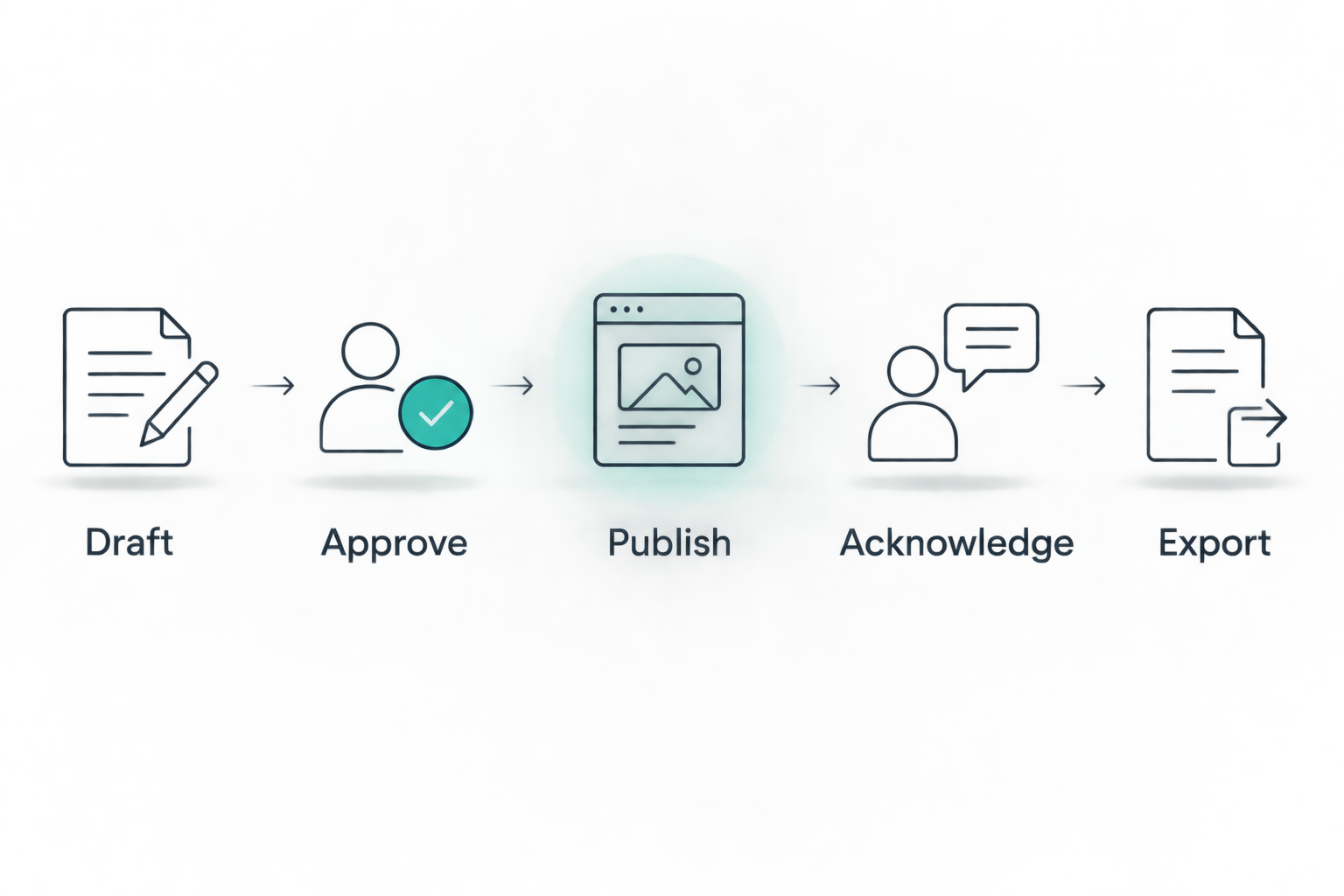
Test the complete policy workflow, not just the document editor.
Record each result as demonstrated, requires configuration or not demonstrated. Keep promises about future capabilities separate from what you see working.
Then test an exception. Change the policy owner, reject an approval or revise the document after publication. Exceptions reveal whether your proposed process remains clear when routine work changes.
Which policy management software should you choose?
Choose OneClickComply when security compliance is the job. Choose NAVEX PolicyTech for a dedicated policy lifecycle evaluation, PowerDMS for operational distribution, or Microsoft SharePoint when your team will own the document workflow configuration.
If you need quoting, issuance and renewals, move to an insurance administration evaluation. Do not force an internal governance tool into that role.
For your 2026 decision, write the acceptance criteria before the demonstration. Select the option that completes your essential workflow and leaves you with usable records—not the longest feature list.
Discuss your security compliance requirements
Discuss policy generation, risk management and security control remediation for your insurance business.
Frequently asked questions
One last thing
A beautifully worded policy can still describe a control your business does not operate. Before approving a security policy, ask the responsible person to show how the rule works in practice.
Approve the operating process, not just the document. Seriously Simple Cyber Compliance.