
Best for healthcare-wide risk management: Radar Healthcare. Best for cyber compliance: OneClickComply. Best for incident-led hospital governance: RLDatix. Best for an interim register: Microsoft Excel. The best risk register software for healthcare depends on whether you need to manage patient safety, information security or both.
Why this matters
A healthcare risk register must help you decide what to fix and who owns the work. Recording a risk is only the start.
Your register might cover delayed treatment, unavailable clinical systems, supplier failures or inappropriate access to patient information. These risks need different expertise, even when the same board oversees them.
Do not buy a cyber compliance platform to replace a clinical governance system. Do not assume a clinical incident system handles your certification programme. For your 2026 shortlist, define that boundary before you book demonstrations.
What makes the best risk register software for healthcare?
Use these criteria before comparing suppliers. A strong register makes ownership and decisions visible, not just scores.
- Clear scope: Separate clinical, operational, information security and supplier risks without losing the organisation-wide picture.
- Accountable ownership: Require a named risk owner, an action owner and a review date. A department name alone is not enough.
- Consistent assessment: Document how you judge likelihood and impact. Distinguish the starting risk from the risk remaining after controls.
- Treatment evidence: Connect each action to evidence that the work happened. A completed task does not automatically prove a control works.
- Controlled access: Check who can view, edit, approve and export records. Avoid putting identifiable patient details into a general register.
- Useful reporting: Ask for reports that show overdue actions, accepted risks and changes since the previous review.
For the underlying structure, use this guide to building a cyber security risk register. Keep clinical risk assessment under the appropriate clinical leadership.
Healthcare risk register software at a glance
The order below follows distinct buying needs, starting with cyber compliance. It is not a claim that one platform replaces every healthcare governance system.
| Option | Best for | Standout approach | Key limitation |
|---|---|---|---|
| OneClickComply | Growing providers managing cyber compliance | Risk management alongside security control remediation and policy generation | Not a substitute for evaluating clinical governance requirements |
| Radar Healthcare | Healthcare-wide quality and operational risk | Healthcare-focused risk, quality and incident management | Requires agreement on workflows across participating teams |
| RLDatix | Incident-led hospital governance | Healthcare risk management alongside patient safety and incident processes | Requires careful selection of the relevant products and scope |
| Microsoft Excel | An interim, manually maintained register | Flexible tables, formulas and familiar editing | Ownership, evidence checks and follow-up depend on manual discipline |
1. OneClickComply: best for cyber compliance risk
Best for: growing healthcare businesses managing cyber risk alongside certification work.
The platform manages risk alongside security control auto-remediation, policy generation and trust centres. It supports compliance programmes including ISO 27001, Cyber Essentials and SOC 2.
That makes it a focused shortlist choice when your immediate problem is security compliance rather than clinical incident management. Keep the purchasing discussion tied to your actual systems, risks and certification scope.
OneClickComply pros:
- Manages risk within a wider compliance automation platform.
- Includes security control auto-remediation rather than policy documentation alone.
- Generates policies to support the compliance programme.
- Supports several named security compliance frameworks.
OneClickComply cons:
- Cyber compliance scope does not establish suitability for clinical risk workflows.
- Automation does not replace your decision about which risks to accept.
For your 2026 demonstration, bring a realistic access-control risk. Ask the supplier to show how risk management, corrective work and policy responsibilities fit together, then check the exact functions you need before committing.
Verdict: Buy for a confirmed cyber compliance requirement. Skip as a direct replacement for clinical governance software.
2. Radar Healthcare: best for healthcare-wide operational risk
Best for: providers connecting risk management with quality and operational oversight.
Radar Healthcare provides healthcare-focused risk and quality management software. Its scope includes risk management, incident management and audits, making it a relevant starting point when your register extends beyond information security.
Use the demonstration to follow an operational concern from discovery through assessment and action. The important question is whether different services can work consistently without losing the detail local managers need.
Radar Healthcare pros:
- Focuses on healthcare rather than a general office workflow.
- Covers risk management alongside related quality processes.
- Provides a relevant shortlist option for organisations assessing incidents, audits and risks together.
Radar Healthcare cons:
- A shared platform still requires agreement on scoring, ownership and escalation.
- Healthcare quality scope alone does not establish support for your cyber certification requirements.
Ask managers from different services to assess the same sample risk. If they interpret the scoring rules differently, resolve that disagreement before configuring the software.
Verdict: Buy when healthcare-wide quality and operational risk is the main requirement, subject to a workflow demonstration.
3. RLDatix: best for incident-led hospital governance
Best for: healthcare organisations selecting risk software around patient safety and incident processes.
RLDatix provides healthcare software covering patient safety, incident reporting and risk management. Assess the relevant products when your register needs to sit within a broader clinical governance programme.
Treat RLDatix as a supplier portfolio, not a promise that every function sits in every configuration. Specify which teams, records and workflows the proposed solution must cover.
RLDatix pros:
- Has a healthcare and patient safety focus.
- Offers risk management within a wider healthcare software portfolio.
- Is relevant when incident reporting is central to the buying requirement.
RLDatix cons:
- A broad portfolio requires precise product and implementation scoping.
- Clinical governance coverage does not by itself demonstrate security compliance automation.
For a 2026 evaluation, ask the supplier to demonstrate the proposed configuration rather than unrelated portfolio features. Follow an anonymised incident through to a risk decision, assigned action and management review.
Verdict: Buy for a defined incident-led governance programme. Wait if your teams have not agreed the implementation scope.
4. Microsoft Excel: best for an interim risk register
Best for: a small, bounded register with a named person maintaining it.
Microsoft Excel supports tables, formulas, filtering and data validation. You can use those functions to record risks and calculate scores without designing a wider governance system.
The trade-off is responsibility. You must design the register, control editing, organise evidence and chase actions yourself.
Microsoft Excel pros:
- Gives you direct control over fields and scoring formulas.
- Supports filtering by owner, status or risk category.
- Lets you develop a register structure before selecting dedicated software.
Microsoft Excel cons:
- Spreadsheet formulas do not establish a complete approval process.
- Evidence links and review dates still need active maintenance.
- Copies and inconsistent editing can undermine the agreed source of truth.
Protect formula cells, define editing responsibilities and maintain one controlled version. Do not confuse a colour-coded score with evidence that someone has reviewed the risk.
Verdict: Hold as an interim option. Move to dedicated software when manual control no longer supports your governance needs.
How we ranked these options
The recommendations prioritise scope, ownership, assessment, evidence, access and reporting. Each option has a different role: cyber compliance, healthcare-wide quality, incident-led governance or a manually controlled register.
These are use-case recommendations, not a measured performance league table. A supplier belongs on your shortlist only when its proposed solution meets your requirements.
For procurement in 2026, turn the criteria into demonstration tasks. Record what the supplier shows, what needs configuration and what remains outside the proposed scope.
Run a demonstration that proves the workflow
Use a 30-minute demonstration to examine the risk process rather than watch a general product tour. Bring 3 sample risks: unavailable patient records, inappropriate access and a critical supplier outage.
Use fictional or anonymised details. The purpose is to test decisions and handovers, not upload sensitive information during procurement.
Define scope
State the affected service, system and risk owner. Ask how the proposed solution separates clinical consequences from information security causes while preserving the relationship.
Assess risk
Show how your team records likelihood, impact and existing controls. Ask who can change the scoring method and how reviewers understand a changed assessment.
Assign action
Give a treatment action to someone other than the risk owner. Check how you identify overdue work and distinguish unfinished action from formally accepted risk.
Review evidence
Attach an example record showing that corrective work happened. Ask how a reviewer determines whether the evidence is relevant and whether further work is needed.
Approve closure
Demonstrate who accepts the remaining risk and why. Ask for the decision history and a report suitable for your governance meeting.
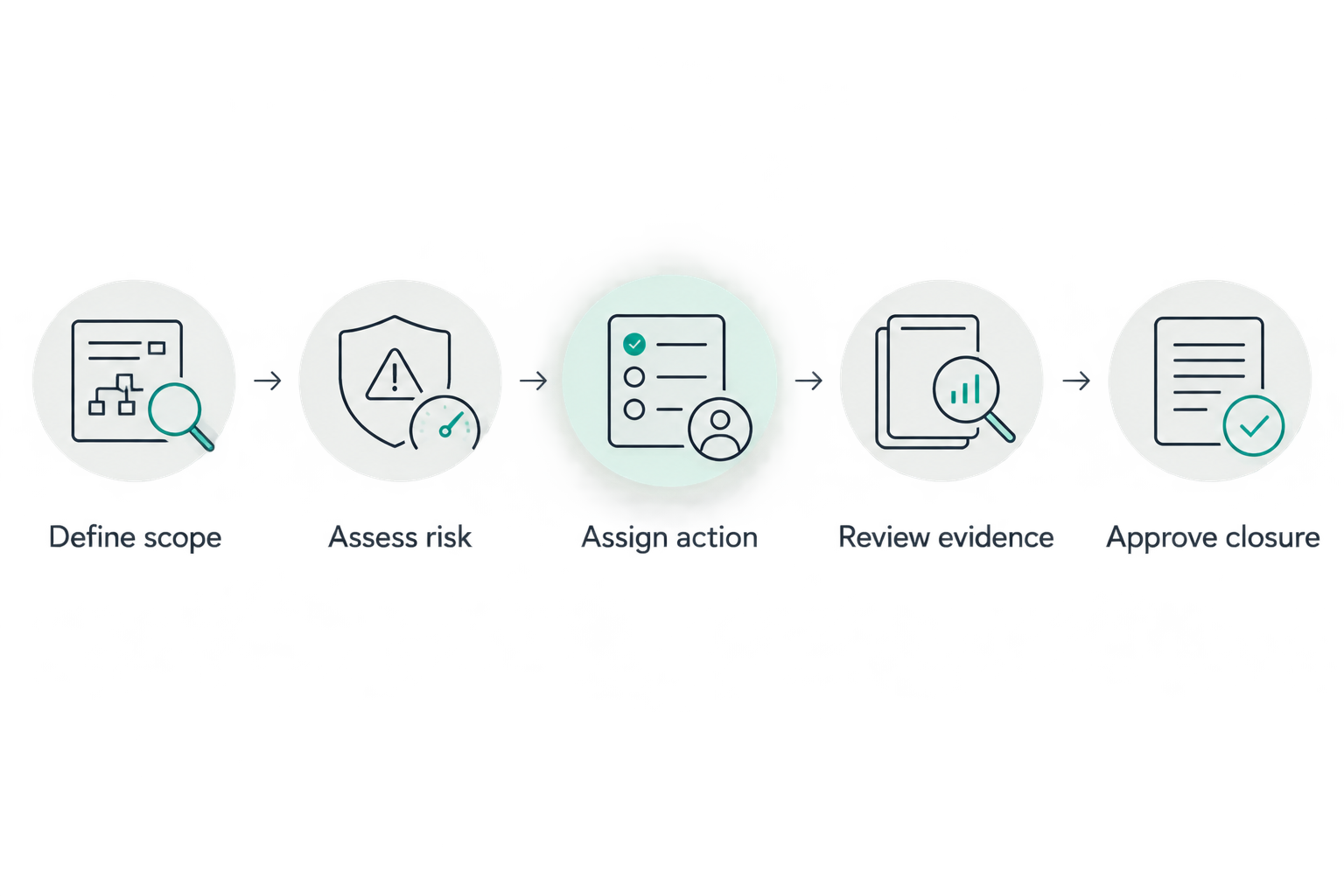
Test the complete decision process, not just the risk entry screen.
After each demonstration, write down the work your own team must still perform. Compare that responsibility across suppliers rather than assuming that automation removes accountability.
Define your cyber compliance scope
Discuss risk management, security controls and your certification requirements.
Which risk register software should you choose?
Choose Radar Healthcare as your starting point for healthcare-wide operational risk. Compare RLDatix when patient safety and incident-led governance drive the project.
Choose the cyber compliance option when your priority is managing security risks alongside certification work. Keep Excel for an interim register only while you can maintain reliable ownership, evidence and review.
Before signing, agree these acceptance conditions:
- Your risk owners can complete the demonstrated workflow.
- Your governance lead approves the assessment method.
- Your security team accepts the proposed access arrangements.
- Your reporting meets the needs of the relevant committee.
- Your contract defines the products, configuration and implementation responsibilities.
For your 2026 decision, reject a platform that leaves your main workflow unproven, regardless of how many other features it offers.
Frequently asked questions
One last thing
A closed action is not the same as a reduced risk. Installing a control completes a task; reviewing evidence establishes whether that control addresses the problem.
Ask every shortlisted supplier to show that distinction. Keep the decision clear, the owner named and the evidence accessible. Seriously Simple Cyber Compliance.