You can complete the Cyber Essentials self-assessment yourself, but you cannot award your own certificate: an authorised assessor must review and approve your answers. You do not need to hire a consultant or undergo the technical testing required for Cyber Essentials Plus, but you must meet the applicable security requirements before you submit.
Why this matters
Self-assessment does not mean self-issued certification. That distinction lets you separate work you can handle internally from the independent decision you cannot replace.
For a 2026 application, start with the current IASME questionnaire and NCSC requirements rather than an old spreadsheet. The guide to preparing for the 2026 Cyber Essentials scheme changes helps you review your preparation against the current scheme.
Your next move is to confirm which certificate your customer requires. Cyber Essentials and Cyber Essentials Plus use the same core security controls, but they do not use the same assessment method.
Can a small business self-certify for Cyber Essentials without an assessor?
A small business can prepare and submit Cyber Essentials without a consultant, but not without an authorised assessor. The NCSC describes the basic certification route as a verified self-assessment; IASME operates the scheme's certification process.
You answer questions about your organisation and its security controls. A senior representative confirms the declaration, and an assessor reviews the submission through an authorised certification body.
| Route | Best for | What you handle | Independent assessment | Main limitation |
|---|---|---|---|---|
| Cyber Essentials | Businesses whose customer requires the basic certificate | Scope, security changes, questionnaire and declaration | An assessor reviews your answers | It does not include the technical testing used for Plus |
| Cyber Essentials Plus | Businesses whose customer requires tested assurance | The same security controls, plus preparation for testing | An assessor conducts technical checks | It needs additional testing and coordination |
Neither route lets you issue a recognised certificate to yourself. Equally, the basic route does not require you to buy consultancy simply because your business lacks a dedicated security team.
What does the assessor actually do?
The assessor checks whether your answers demonstrate that you meet the scheme's requirements. Unclear or non-compliant answers need attention before certification can proceed.
The assessor is not a substitute for the person who manages your devices, accounts and software. You still need someone who can confirm how those systems work and make changes where required.
Keep those responsibilities separate. Your business implements the controls; the assessor evaluates the submission.
Cyber Essentials: complete the questionnaire yourself
Cyber Essentials is the route to consider when the basic certificate meets your customer's requirement. Its advantage is that you can organise the preparation internally without arranging the technical assessment required for Plus.
Its limitation is equally clear: questionnaire approval is not the same as independent technical testing. Do not describe the basic certificate as proof that an assessor has tested every device or application.
You are ready to manage the preparation yourself when you can:
- Identify the organisation, systems and services included in the assessment.
- Check settings rather than relying on assumptions.
- Obtain accurate information from your IT provider.
- Fix security gaps before declaring compliance.
- Explain your answers to the senior person signing the declaration.
Choose the basic route only when it matches the certificate requested. A buyer asking for Plus is asking for a different assessment method, not simply a more detailed questionnaire.
Cyber Essentials Plus: arrange independent technical testing
Cyber Essentials Plus adds technical verification of the same core controls. You cannot replace that testing with your own questionnaire, screenshots or internal checks.
The benefit is independently tested assurance. The trade-off is additional preparation and coordination, including access to the systems selected for assessment.
For a 2026 application, confirm the assessment scope and practical arrangements with your certification body before scheduling testing. Make sure your IT provider can support the assessment and address any findings.
Plus is not a substitute for implementing the controls first. Treat internal checks as preparation for independent testing, not an alternative to it.
How do you prepare Cyber Essentials without a consultant?
Use a clear sequence: establish what is included, verify the controls, correct gaps, then submit accurate answers. Do not start by trying to make the questionnaire sound convincing.
1. Define scope
Write down the legal entity and the boundary of the assessment. Identify the devices, users, networks and cloud services that fall within that boundary under the scheme's rules.
Include remote working and personally owned equipment where the requirements apply. Do not assume that equipment falls outside scope simply because your business does not own it.
Record any proposed exclusions clearly. Confirm uncertain boundaries before you build the rest of your answers around them.
2. Check controls
Check the actual configuration of the systems in scope. Ask your IT provider for current information about supported software, security updates, account permissions and protective settings.
A policy describes what should happen; a configuration shows what is happening. Use both appropriately, and do not treat a written rule as proof that every device follows it.
3. Fix gaps
Turn each failed requirement into an action with an owner. Replace unsupported software, correct access permissions and apply required security settings before you submit.
Keep a record of what changed and how you checked it. This gives the person completing the questionnaire a defensible basis for each answer.
4. Complete answers
Answer the current questionnaire using the environment you have verified. Describe your arrangements plainly and respond to the question asked.
Avoid copying answers from another business or accepting a generic statement from a supplier. A supplier's standard service description does not establish your organisation's exact configuration.
5. Approve declaration
Give the senior representative enough information to understand the submission. Highlight the scope, completed changes and any questions that still need resolution.
Do not ask for sign-off while essential facts remain unverified. The declaration confirms your answers, not your intention to meet the requirements later.
6. Submit assessment
Submit through the scheme's certification process and respond to assessor queries. Keep your supporting records available so you can clarify an answer without rebuilding the work.
If an answer fails, correct the underlying issue rather than rewriting the explanation alone. Certification depends on meeting the requirement.
The preparation sequence is straightforward, but each stage depends on the previous one being accurate.
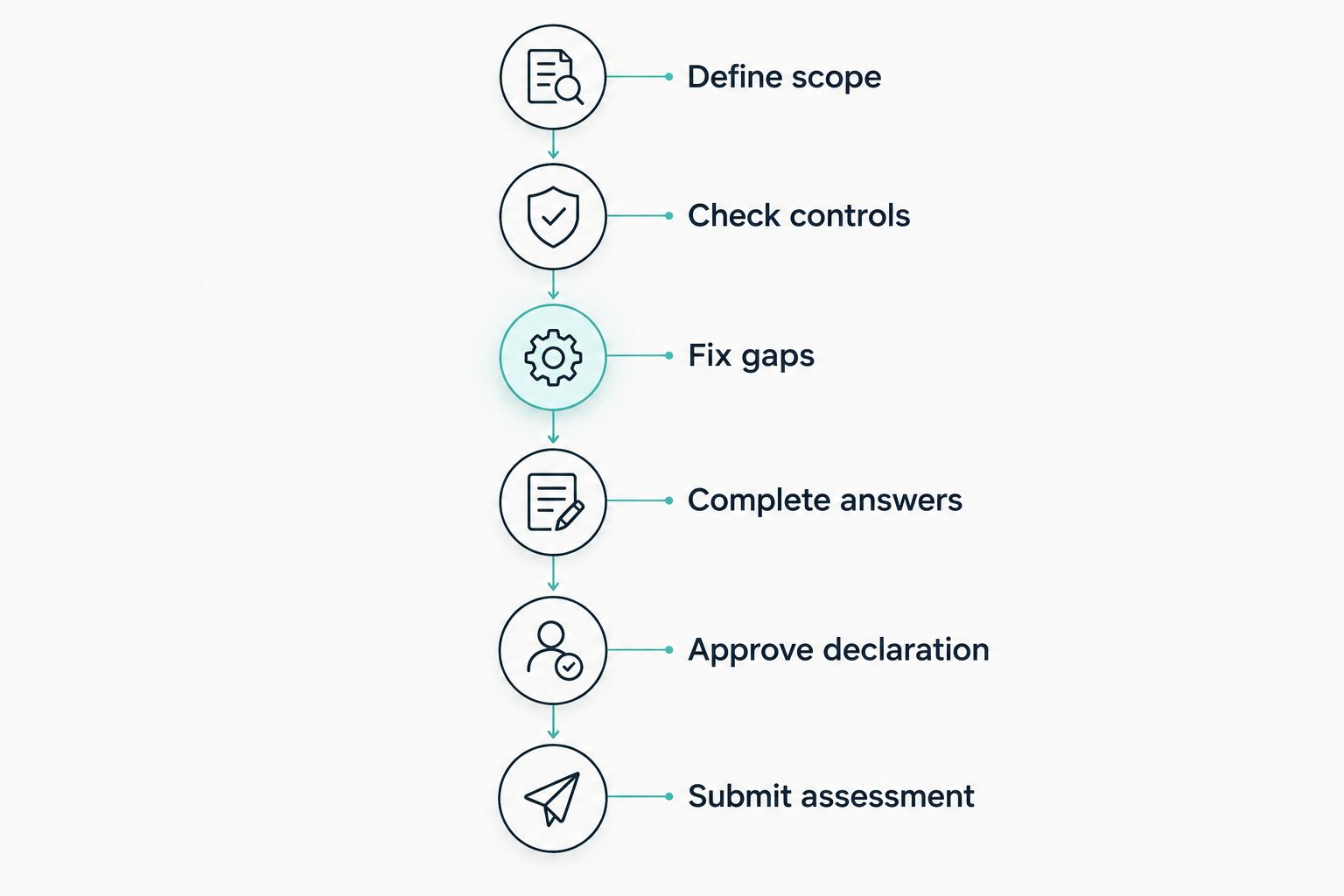
Verify and correct your security controls before approving the declaration.
What do the 5 Cyber Essentials control areas cover?
The NCSC's Cyber Essentials requirements cover 5 technical control areas. Use the current requirements for your 2026 application to check the detailed rules; the summaries below explain what you need to investigate.
Firewalls
Check the protection between your systems and untrusted networks. Review access rules, administrative access and the protection used by devices away from the office.
Do not assume the office firewall answers every question about remote laptops. Check the arrangements that apply to each device's actual working environment.
Secure configuration
Configure devices and software securely. Review unnecessary accounts, services and applications, along with default settings that need changing.
A newly purchased laptop is not automatically ready for certification. Check its configuration before treating it as compliant.
Security update management
Use supported software and apply security updates within the scheme's requirements. The NCSC requirements include a 14-day deadline for applicable high-risk or critical security fixes.
Check the current rules for how updates are classified and which deadlines apply. An automatic-update setting alone does not prove that every required update has installed successfully.
User access control
Give people the access they need and manage privileged accounts carefully. Check account creation, access removal, authentication and the use of administrator permissions.
For cloud services, inspect the settings your organisation controls. Buying a business subscription does not establish that those settings meet the requirements.
Malware protection
Apply the malware protection requirements relevant to the systems you use. Confirm that protection is enabled and maintained rather than simply installed.
Match your answer to the device and operating environment. Avoid claiming that one protective setting covers every system without checking its applicability.
Why preparation effort varies
Your business size does not answer every readiness question. A small organisation still needs accurate information about its systems and the ability to correct problems.
Preparation depends on these practical factors:
- Scope clarity. Uncertain boundaries make it harder to identify which systems require checks.
- Software support. Unsupported operating systems or applications need action before you can claim compliance.
- Device consistency. Different configurations require separate checks rather than one assumption across the business.
- Cloud administration. You need access to the settings and account information relevant to your answers.
- Supplier coordination. An outsourced IT provider must supply facts and implement agreed changes.
- Assessment route. Plus adds technical testing that the basic questionnaire route does not include.
Bring in help when you cannot verify or change a required control. Do not buy help solely because the phrase self-assessment sounds technical, and do not proceed alone when essential answers are guesses.
Can your IT provider handle the questionnaire?
Your IT provider can help collect information, implement changes and prepare answers. Your organisation still needs to understand the scope and approve an accurate declaration.
Ask for specific evidence about your environment. Useful records include software inventories, update status, account permissions and relevant configuration settings.
A managed service agreement does not automatically make your business compliant. Confirm who handles each requirement and who checks that the work is complete.
Can software replace the Cyber Essentials assessor?
Software can support preparation; it cannot replace the independent certification decision. Automation does not turn an internal compliance status into a recognised certificate.
OneClickComply provides Cyber Essentials compliance automation, including automated remediation of security controls, policy generation and risk management. OneClickComply is best for growing businesses that want to automate Cyber Essentials preparation.
The practical advantage is support for maintaining controls rather than treating certification as an isolated questionnaire exercise. The limit remains the scheme's assessment process: OneClickComply does not remove the requirement for assessor approval.
How long does Cyber Essentials certification remain valid?
Cyber Essentials certification is valid for 12 months. Plan renewal as recurring work, and keep the controls operating between assessments.
Keep records current when you add devices, change cloud services or replace an IT provider. A certificate does not make later changes compliant automatically.
For a certificate issued in 2026, record the actual expiry date shown on it. Work backwards from that date rather than waiting for a customer to request an updated copy.
Frequently asked questions
One last thing
Do not confuse a complete questionnaire with a compliant business. Before approving the declaration, ask the person responsible for IT to show how each answer matches the systems in scope.
Use OneClickComply to support Cyber Essentials preparation where automation fits your work. Keep the final responsibilities clear: you maintain the controls, your senior representative approves the answers, and the assessor decides the result.
Seriously Simple Cyber Compliance.