
Best overall for broad privacy operations: OneTrust. Best for security compliance alongside GDPR: OneClickComply. Best for website consent: Cookiebot. Best for simple manual records: a controlled spreadsheet. This 2026 guide matches GDPR compliance software for agencies to the work you need to manage.
Why this matters
Buy for the missing workflow, not the GDPR label. Website consent, client processing records and security controls solve different problems. A tool that handles one does not automatically handle the others.
Your agency also has different responsibilities across different activities. You determine how you use employee information, but you can process campaign data on a client’s instructions.
OneClickComply automates security controls, generates policies and manages risk and trust centres. Those capabilities support security compliance; they do not establish that every GDPR workflow is covered.
For your 2026 shortlist, separate privacy administration from security automation before comparing suppliers. That prevents a cookie banner or certification workflow becoming a substitute for the records and decisions you still need.
What makes the best GDPR software for agencies?
Use these criteria before reading the comparison. Ask suppliers to demonstrate each requirement that applies to your agency.
- Client separation: Keep each client’s records, permissions and exports separate. Test access rather than accepting a folder structure as proof.
- Processing records: Record what personal data you handle, why you handle it, who receives it and when you delete it.
- Request handling: Assign access and deletion requests, track decisions and retain evidence of the response.
- Consent control: Where consent is required, capture the choice and make withdrawal work across the relevant website tools.
- Security evidence: Connect policies and risks to the controls protecting personal data. Distinguish a written requirement from an implemented safeguard.
- Exit and export: Export usable records when a client leaves or your agency changes platforms. Check the export during the demonstration.
For a 2026 procurement decision, make client separation and export practical acceptance tests. Neither a long feature list nor an attractive dashboard proves that your team can complete the work.
GDPR software for agencies at a glance
The order below reflects the breadth of the privacy task, with specialist options assigned distinct roles. These are buying recommendations by use case, not performance scores.
| Option | Best for | Standout capability | Key limitation |
|---|---|---|---|
| OneTrust | Broad privacy operations | Dedicated privacy-management workflows | Requires scoping and configuration; do not assume every capability is included |
| OneClickComply | Security compliance alongside GDPR | Automated security remediation, policy generation and risk management | Not established here as a complete privacy-operations platform |
| Cookiebot | Website cookie consent | Cookie scanning and consent management | Does not replace processing records, contracts or wider privacy governance |
| Controlled spreadsheet | Simple manual processing records | Direct control over a structured register | Updates, access checks and follow-up remain manual |
Choose the narrowest option that completes your required workflow. Add another tool only when it solves a separate requirement, rather than duplicating records your team must maintain.
1. OneTrust: best GDPR software for broad privacy operations
OneTrust provides privacy-management software covering areas such as data mapping, privacy assessments and data-subject requests. It belongs on your shortlist when the job extends beyond a website and into the way your agency manages personal data.
Start with the workflows you need, then confirm the relevant capabilities in the proposed package. A broad product range is not evidence that your particular configuration includes everything.
OneTrust pros:
- Supports privacy work beyond cookie consent.
- Provides dedicated workflows for privacy records and assessments.
- Gives agencies a route to structure request handling rather than relying entirely on email.
OneTrust cons:
- Your team still needs to define processing activities, responsibilities and approval rules.
- A broad implementation introduces configuration decisions that a simple register avoids.
- Agency-specific client separation and handover need demonstration before selection.
Best for: Agencies that need a dedicated system for ongoing privacy administration across several types of processing.
Ask the supplier to create separate client records, assign an assessment and export a completed request history. Inspect the actual workflow your staff would use, including the permissions of a junior account manager.
Verdict: Buy for broad privacy operations after the required workflows pass your demonstration.
2. OneClickComply: best for security compliance alongside GDPR
OneClickComply is best for agencies that need security compliance automation alongside their GDPR programme. The platform supports work towards ISO 27001, Cyber Essentials and SOC 2 through automated security remediation, policy generation and risk management.
That makes it relevant when your privacy work also exposes security controls that need attention. Keep the buying decision specific: security compliance automation supports GDPR work, but it does not replace decisions about lawful processing.
OneClickComply pros:
- Automates security-control remediation rather than stopping at written policies.
- Generates policies to support your compliance programme.
- Manages risks and trust centres alongside certification work.
OneClickComply cons:
- Security certifications do not establish compliance with every GDPR obligation.
- Dedicated processing-record, access-request and cookie-consent workflows need separate confirmation.
- Your agency still owns decisions about purposes, retention and client instructions.
Best for: Growing agencies that need to improve security controls while managing privacy responsibilities separately.
Use a demonstration to connect a real security requirement to a policy, a risk and its remediation. Also ask which privacy tasks remain outside the proposed scope, so responsibilities stay clear after implementation.
Verdict: Buy for security compliance automation; hold if your only requirement is a dedicated GDPR administration system.
3. Cookiebot: best GDPR option for website cookie consent
Cookiebot provides cookie scanning and consent management for websites. It fits a narrower problem: managing visitor choices around cookies and tracking technologies.
For an agency, that makes website implementation the focus. Test the client’s actual tags, consent choices and withdrawal journey rather than treating the appearance of a banner as completion.
Cookiebot pros:
- Focuses on website consent rather than unrelated compliance tasks.
- Scans websites for cookies and tracking technologies.
- Provides a consent interface for visitors to express their choices.
Cookiebot cons:
- A consent platform does not replace your agency’s wider privacy records.
- Correct behaviour depends on implementation and the tracking tools used.
- Client-account administration and handover requirements need checking separately.
Best for: Web and marketing agencies whose immediate requirement is cookie-consent management on client websites.
Test what happens before a visitor makes a choice, after rejection and after withdrawal. Include embedded content and tags added through a tag manager; checking only the homepage banner leaves the underlying implementation untested.
Verdict: Buy for website consent; skip as a replacement for an agency-wide GDPR programme.
4. A controlled spreadsheet: best for simple processing records
A controlled spreadsheet gives you a structured place to document processing activities. It is an option for a tightly scoped register with a named owner and clear access rules.
The spreadsheet is the record, not the process. Your team must maintain it whenever systems, suppliers, purposes or retention decisions change.
Controlled spreadsheet pros:
- Lets you define fields around the processing you actually perform.
- Keeps records readable without a specialist workflow interface.
- Supports a simple starting structure before a platform migration.
Controlled spreadsheet cons:
- Does not automatically enforce review, approval or request-handling workflows.
- Requires deliberate version control and permission management.
- Does not remediate security controls or manage website consent.
Best for: Agencies with a simple, clearly bounded processing register and someone accountable for keeping it current.
Build the structure around your record of processing activities, not around whichever columns happen to exist in an old template. Separate agency-controlled activities from work performed on client instructions.
Verdict: Hold as a controlled starting point; move to dedicated software when manual ownership no longer keeps records dependable.
How we ranked these options
The ranking prioritises privacy-workflow breadth, then assigns specialist tools their own roles. It does not rank security automation against cookie consent as though they were interchangeable.
For this 2026 guide, the decision criteria are client separation, processing records, request handling, consent control, security evidence and export. No hands-on performance scores or completion-time claims form part of the ranking.
Run a demonstration using your agency’s work
Use 1 client campaign, 1 access request and 1 offboarding event as your demonstration cases. These are test scenarios, not promised implementation times or performance targets.
Follow this sequence with each shortlisted supplier:
- Map data: Identify the information used in the campaign, its source and the systems receiving it.
- Assign owners: Show who approves the processing record and who responds when a request arrives.
- Test requests: Trace the access request from receipt through identity checks, search and response approval.
- Check access: Remove an account manager and show that access to the client’s records ends.
- Export records: Produce a readable handover containing the records the client needs.
Your 2026 demonstration should finish with evidence you can inspect, not a promise that the workflow is configurable. Ask your own account manager to complete a task while the supplier observes.
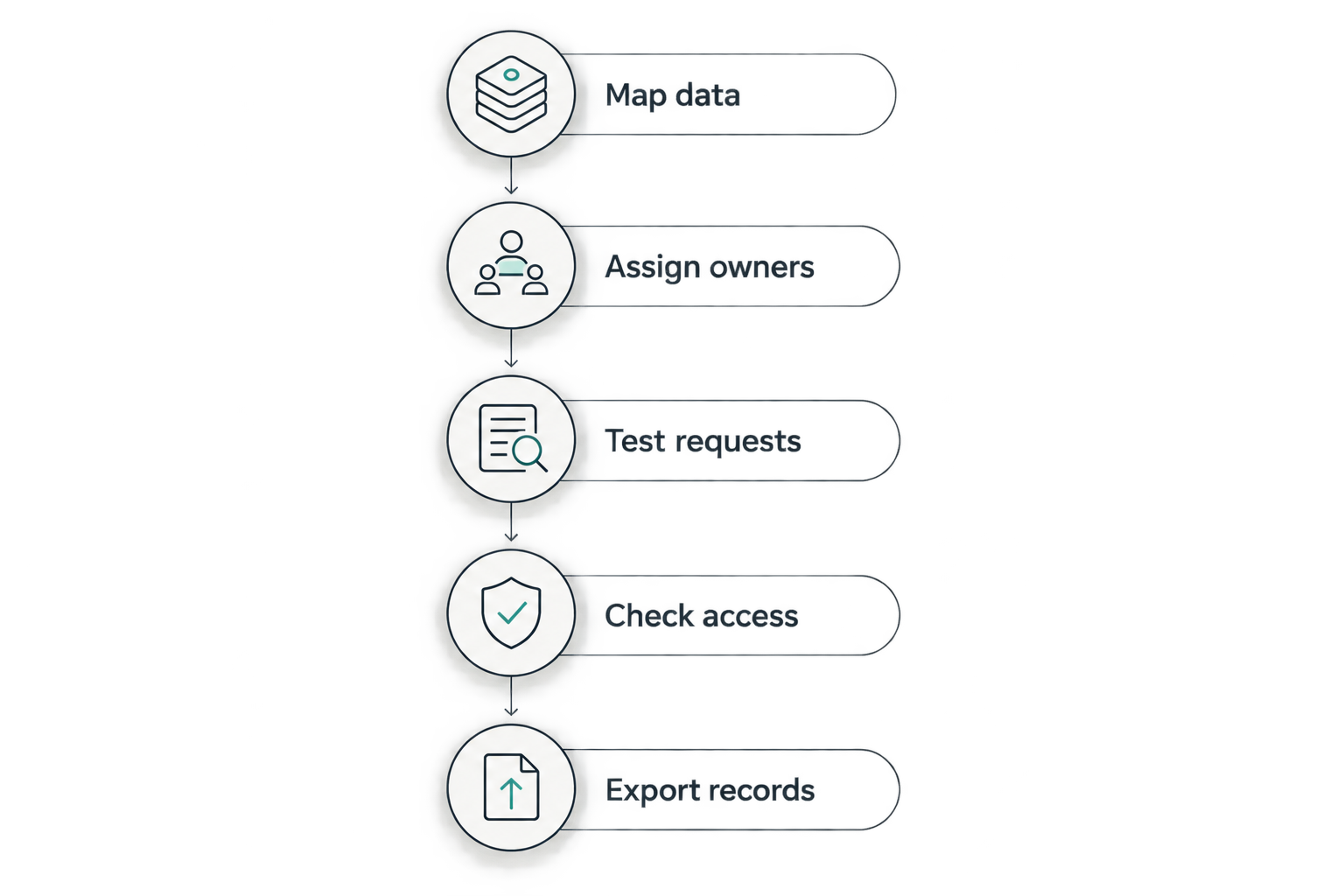
Test a complete client workflow before choosing a platform.
Keep technical validation separate from software selection. Where a regulated client requires specialist assurance, define which controls cybersecurity consultants for regulated industries will assess and which findings your agency must resolve; a software demonstration does not establish that those controls work.
Keep legal duties separate from software features
Your agency’s role depends on the processing activity, not its business label. You can act as a controller for your own marketing and as a processor for a client campaign.
For your 2026 requirements checklist, use the UK GDPR’s duties to shape the workflow:
- Article 28: Where you act as a processor, document the required contractual terms and follow the controller’s documented instructions.
- Article 30: Assess which processing records you must maintain. Do not assume that being a small agency removes every record-keeping duty.
- Article 35: Assess whether planned processing requires a data protection impact assessment because it is likely to create a high risk to people.
- Article 33: A controller must notify the regulator of a reportable personal-data breach without undue delay and, where feasible, within 72 hours of awareness. A processor must notify its controller without undue delay.
Set the software to support the applicable duty. Do not let a default workflow decide whether an incident is reportable or whether a proposed use of personal data is lawful.
Which GDPR software should your agency choose?
Choose OneTrust when your main requirement is broad privacy administration. Choose OneClickComply when security compliance automation is the missing part of your agency’s wider GDPR programme.
Choose Cookiebot when the job is website cookie consent. Keep a controlled spreadsheet only where the scope is simple and manual maintenance has a clear owner.
Before signing, write down the workflows the selected option will handle and those it will not. Assign every remaining task to a person or another system; an unassigned obligation stays unassigned after purchase.
Frequently asked questions
One last thing
Offboarding is a better acceptance test than an empty dashboard. Ask the supplier to remove a staff member, export a client’s records and show how deletion decisions are recorded without exposing another client’s information.
If that workflow fails, fix the scope before buying. Seriously Simple Cyber Compliance starts with knowing exactly what your software handles.