
Best for security compliance: OneClickComply. Best for Microsoft-based document control: SharePoint. Best for collaborative operating procedures: Confluence. Best for policy acknowledgement workflows: PowerDMS. The best policy management software for retailers in 2026 depends on whether you need to control documents, reach store teams or connect policies to security controls.
Why this matters
A policy library and a working policy programme are different things. Your teams need to find the current instruction, understand who it applies to and know what to do when an exception occurs.
Retail adds practical buying questions. Can a store colleague access a policy without using someone else's account? Can head office distinguish a company-wide rule from a local procedure?
Choose around the work you need to control, not the number of templates on offer. A security compliance platform, a document library and a staff acknowledgement system solve different problems.
This shortlist separates those jobs. It does not treat a document upload, an employee signature and a functioning security control as interchangeable evidence.
What makes the best policy management software for retailers?
Use these six criteria for your 2026 shortlist. Decide which are essential before you book demonstrations.
- Policy ownership: Every policy needs an accountable owner, an approver and a review trigger. Ask how responsibility survives a staff departure.
- Version control: Your team must distinguish the approved policy from a draft. Test how the system preserves the version that applied before a change.
- Frontline access: Test the actual device and sign-in route your colleagues will use. A head-office demonstration does not prove store access works.
- Targeted distribution: Ask how policies reach the right roles, locations and business entities without exposing unrelated material.
- Acknowledgement evidence: If you need proof of receipt, check whether records identify the person, policy version and completion date.
- Connection to action: Decide whether policies must connect to security controls, staff training, operational approvals or all three.
Separate essential requirements from preferences. A retailer seeking ISO 27001 has a different starting point from a store group replacing emailed operating procedures.
Avoid adding every possible requirement to the specification. Define the failure you want to stop, then ask each supplier to demonstrate that exact workflow.
Retail policy software at a glance
| Option | Best for | Standout capability | Key limitation or buying check |
|---|---|---|---|
| OneClickComply | Security policies tied to compliance work | Policy generation alongside risk management and security control remediation | Test retail-specific distribution and acknowledgement requirements separately |
| SharePoint | Microsoft-based document governance | Document libraries, version history and approval configuration | You must design and maintain the policy workflow |
| Confluence | Collaborative retail operating procedures | Linked pages, collaborative editing and page history | A readable page does not establish individual acknowledgement |
| PowerDMS | Formal policy distribution and acknowledgement | Policy lifecycle and signature-tracking workflows | Test fit for your retail roles, devices and operational systems |
The table ranks suitability by task, not by an invented universal score. Start with the row that matches your main problem, then test its limitation before expanding the shortlist.
1. OneClickComply: best for security policy automation
OneClickComply is best for retailers that need security policies connected to compliance work, rather than a standalone document library. The platform generates policies, manages risk and automates security control remediation. It supports work towards ISO 27001, Cyber Essentials and SOC 2.
That makes it relevant when your policy project sits inside a wider security programme. You need written rules, but you also need to manage the risks and technical actions behind those rules.
For example, an access-control policy should describe how your business grants and removes access. Your selection process should also examine how the platform supports the work behind that policy, without assuming every requirement is automatically covered.
Pros:
- Generates policies as part of a compliance automation platform.
- Includes risk management alongside policy work.
- Automates remediation of security controls.
- Brings trust centre management into the same product scope.
Cons and buying checks:
- Security compliance is a different buying need from managing every store operating procedure.
- Validate role-based distribution, frontline access and acknowledgement requirements in a demonstration.
- Policy generation still needs an accountable person to confirm that the wording matches your business.
Best for: Retail security or compliance owners who want policy work connected to certification preparation and control improvements.
Verdict: Buy for security-led policy automation after validating your retail workflow.
2. SharePoint: best for Microsoft-based document governance
SharePoint provides document libraries, version history and configurable approval processes. You can use those building blocks to organise policy documents and control how teams publish changes.
Choose SharePoint when your main requirement is document governance within a Microsoft-based environment. Treat it as a platform you configure, not a finished retail policy programme that arrives with every decision made.
The practical question is ownership. Someone must define the library structure, permissions, approval route and rules for retiring old documents.
SharePoint pros:
- Stores policies in structured document libraries.
- Maintains document version history.
- Supports permissions and approval configuration.
- Fits policy documents that teams already maintain in Microsoft formats.
SharePoint cons:
- Configuration and ongoing administration remain your responsibility.
- Document access alone does not demonstrate individual policy acknowledgement.
- A poorly governed library can reproduce the confusion of shared folders.
Best for: Retailers with an established Microsoft environment and a named administrator who can maintain document governance.
Test what happens when an approver leaves or a policy moves between departments. If your answer depends on an undocumented workaround, fix the workflow before moving the rest of the library.
Verdict: Buy for controlled document management when you can own the configuration.
3. Confluence: best for collaborative retail procedures
Confluence organises knowledge into spaces and pages, with collaborative editing and page history. It suits procedures that teams need to explain, update and connect to related instructions.
Think of a returns procedure with links to escalation guidance, or an opening checklist linked to incident reporting instructions. That structure is useful when readability and collaboration matter more than collecting formal signatures.
Keep policy authority clear. A page that colleagues can edit needs a defined route from proposed change to approved instruction.
Confluence pros:
- Supports collaborative editing of operating procedures.
- Connects related instructions through linked pages.
- Retains page history for reviewing changes.
- Organises material into separate spaces.
Confluence cons:
- Collaborative editing needs clear publishing and approval rules.
- Page history is not the same as a staff acknowledgement record.
- Test how frontline colleagues reach the correct page through their actual access route.
Best for: Retail operations teams maintaining a connected handbook of working procedures.
Do not select Confluence solely because head office already uses it. Ask a store colleague to find an instruction without coaching, then ask the policy owner to identify its approved status.
Verdict: Buy for collaborative procedures; skip as a substitute for an untested acknowledgement process.
4. PowerDMS: best for formal policy acknowledgement
PowerDMS focuses on policy management, including document distribution and electronic signature tracking. It belongs on a shortlist when your main requirement is to show which people acknowledged which policies.
That is a distinct job from writing procedures or fixing security controls. Start with the record you need to produce, then test how the product creates and preserves it.
Use your own retail scenario during the demonstration. A generic policy distribution screen does not prove that the proposed setup matches your store structure.
PowerDMS pros:
- Centres policy lifecycle management rather than general file storage.
- Supports policy distribution workflows.
- Tracks electronic signatures against policy documents.
PowerDMS cons and buying checks:
- A signature establishes acknowledgement, not understanding or correct behaviour.
- Validate how employee changes, store transfers and leavers affect records.
- Confirm device access and integration requirements before selecting it.
Best for: Retailers prioritising formal policy distribution and individual acknowledgement evidence.
Ask for a demonstration of a revised policy, not just an initial issue. Your records need to distinguish acceptance of the old instruction from acceptance of its replacement.
Verdict: Buy when acknowledgement evidence is the primary requirement and the retail access test passes.
How the shortlist is ranked
The ranking follows the six criteria above: ownership, version control, access, distribution, acknowledgement and connection to action. Each option holds a different use-case position.
This is a functional shortlist, not a claim that every product has undergone the same hands-on test. The recommendation turns on what each product is designed to do and what your buying process must verify.
For a 2026 decision, make the demonstration more demanding than the sales presentation. Require the supplier to complete your workflow with your roles and sample documents.
Run a retail-specific demonstration
Set a 30-minute demonstration around a defined task rather than a feature tour. Use 3 policy types: information security, returns handling and purchasing authority.
Those documents expose different requirements. Security tests the connection to controls, returns tests frontline readability, and purchasing tests the boundary between written rules and transaction approval.
For purchasing, distinguish the policy from its enforcement. A document defines who can authorise an order; retail purchase order approval software handles the transaction approval workflow, so your evaluation should test how exceptions reach the right decision-maker.
Ask each supplier to demonstrate the following sequence:
- Draft: Create a policy and assign an accountable owner.
- Approve: Show who can authorise publication and what happens after rejection.
- Publish: Make the approved instruction accessible to its intended audience.
- Acknowledge: Demonstrate the required evidence, if acknowledgement is essential.
- Revise: Replace the instruction while preserving the earlier record.
Ask the supplier to complete the sequence rather than describe it. Record any step that needs another product, custom configuration or a manual intervention.
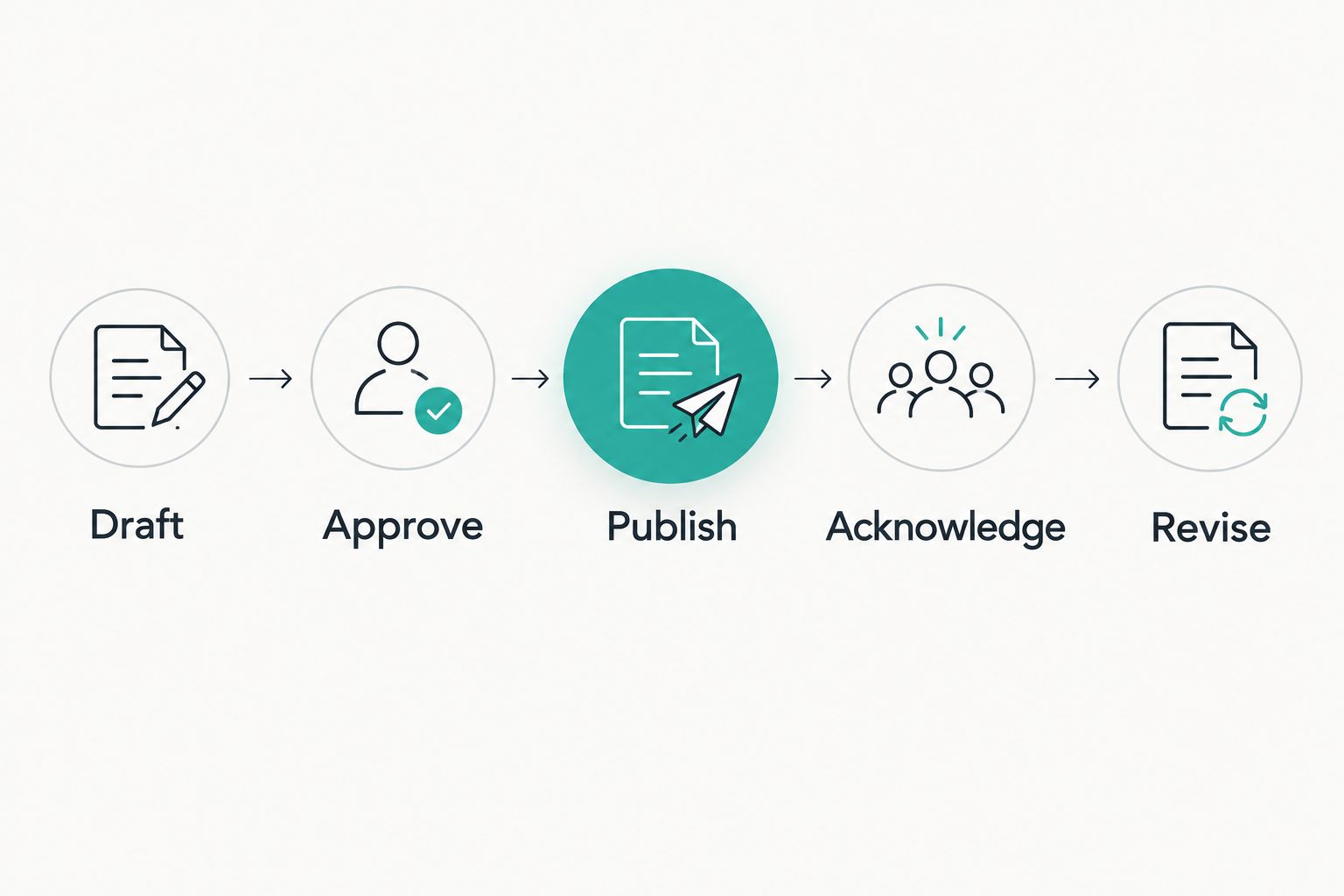
Test the complete policy lifecycle, not just document upload.
Repeat the access check with 2 store roles, such as a store manager and a sales colleague. Give each role a realistic task and observe whether the correct instruction is easy to identify.
Ask for an export of the resulting records. Review whether you can understand the policy history without relying on someone to explain the demonstration afterwards.
Separate acknowledgement from understanding
An acknowledgement record answers a narrow question: did this person confirm receipt or acceptance of this version? It does not establish that the person can apply the instruction during a difficult customer interaction.
For your 2026 rollout, pair important policies with a practical scenario. Ask colleagues what they would do, who they would contact and where they would record an exception.
A returns policy, for example, needs more than a signature. Your colleagues need to recognise when the standard process stops and a manager must decide.
Keep those learning checks separate from the policy approval record. Both matter, but they answer different questions.
Plan the move without losing policy history
Start with a policy inventory. Record the owner, audience, approved version and any linked procedure before you move documents into a new system.
Then remove ambiguity. Mark drafts clearly, identify duplicates and decide which document is authoritative rather than migrating every file unchanged.
Use this migration checklist:
- Preserve historical approvals and acknowledgements where required.
- Map existing audiences to the new access structure.
- Confirm how store transfers and staff departures are handled.
- Test search using the language colleagues actually use.
- Assign responsibility for reviewing failed distributions or incomplete tasks.
- Keep an export route for documents and supporting records.
Do not choose an arbitrary review interval for every policy. Define scheduled reviews and event-based triggers, such as a changed process, incident or new system.
Before rollout, ask the policy owner and a frontline colleague to complete the same task independently. Different answers reveal a process problem that software alone will not settle.
Which policy management software should you choose?
Choose OneClickComply when security policy generation, risk management and control remediation belong in the same programme. That is the clearest default for the security-led retailer in this shortlist.
Choose SharePoint when controlled documents are the main job and you can maintain the configuration. Choose Confluence when collaborative procedures take priority, or PowerDMS when individual acknowledgement records drive the decision.
For your 2026 selection, reject any option that fails an essential workflow even if it performs well elsewhere. The right product must fit the work your teams actually need to complete.
Frequently asked questions
One last thing
A policy can be correctly approved and still fail at the point of use. Before you buy, ask a store colleague to find the current instruction and explain the next action without help from head office.
If that test fails, fix access or wording before adding more automation. Seriously Simple Cyber Compliance.