
Best for cyber compliance: OneClickComply. Best for a shared construction risk register: Microsoft Lists. Best for project action tracking: Smartsheet. Best for a simple standalone register: Microsoft Excel. The best risk register software for construction firms in 2026 depends on whether you need to manage site and project risks, security compliance, or both.
Why this matters
A project risk register and a cyber compliance platform solve different problems. Delayed materials, unsafe access and compromised supplier accounts need different controls, even when you report them to the same directors.
Start your 2026 shortlist by defining the register's purpose. Do not buy a security compliance platform to replace site safety assessments, or assume a project spreadsheet handles certification work.
For UK construction work, the Health and Safety Executive's guidance distinguishes risk assessment and management responsibilities from the software used to record them. Your register supports those responsibilities; it does not replace competent assessment or action.
What makes the best construction risk register software?
Use these criteria before comparing screens or booking demonstrations. Ask each supplier to show the actual workflow, not just a finished dashboard.
- Risk scope: Separate project delivery, health and safety, commercial exposure and information security. Decide which belong in the same reporting view.
- Accountability: Give each risk an owner, an action owner and a review date. Check how the system handles changes in responsibility.
- Scoring consistency: Define likelihood and impact before configuring scores. Keep the original assessment distinct from the assessment after controls.
- Action follow-through: Check how you assign work, identify overdue actions and record why a risk remains open.
- Evidence and history: Ask how you attach supporting records, preserve decisions and export a usable history.
- Practical access: Test the register with the people who will update it. Include project managers, site staff and subcontractor-facing teams where relevant.
For your 2026 buying decision, treat these as acceptance criteria. A tool that fails a critical workflow is not rescued by an attractive summary chart.
Construction risk register software at a glance
The table separates the options by purpose. It is a shortlist by use case, not a claim that every option is a specialist construction platform.
| Option | Best for | Standout feature or approach | Key limitation |
|---|---|---|---|
| OneClickComply | Cyber risk and certification work | Risk management alongside automated security controls and policy generation | Cyber compliance is a different scope from construction safety and project delivery |
| Microsoft Lists | A shared, structured project register | List-based records with configurable columns and views | You must design the risk method and supporting workflow |
| Smartsheet | Project risks linked to delivery actions | Spreadsheet-style work management with reporting and automation | You must configure a construction-specific register |
| Microsoft Excel | A simple standalone register | Flexible worksheets, formulas and tables | Ownership, review discipline and evidence handling need deliberate organisation |
1. OneClickComply: best for construction cyber compliance
OneClickComply combines risk management with security control remediation, policy generation and trust centres. It supports businesses working towards and maintaining standards and schemes including ISO 27001 and Cyber Essentials.
OneClickComply is best for construction firms that need cyber risk management alongside certification work. Use this category when your priority is protecting business information and demonstrating security controls, rather than tracking every site hazard or programme delay.
A useful buying scenario is access to shared project information. Ask how your team would connect an identified security risk to a policy, a control and the work required to address it.
OneClickComply pros:
- Combines risk management with wider compliance work.
- Automates remediation of security controls.
- Generates policies to support compliance programmes.
- Includes trust centres for communicating security information.
OneClickComply buying cautions:
- Treat the platform as a cyber compliance choice, not as evidence that construction safety workflows are covered.
- Keep human responsibility for risk decisions, control acceptance and certification preparation.
Best for: Construction firms prioritising security compliance in their 2026 software purchase.
Verdict: Buy for cyber compliance; skip this category if your only requirement is a site or project risk register.
2. Microsoft Lists: best for a shared project risk register
Microsoft Lists organises information into structured records with configurable columns and views. You can design a register around projects, risk descriptions, owners, assessment fields and review dates.
The advantage is structure. Instead of treating each risk as an unstructured note, you define the information every record must contain and create views around the work your team needs to review.
For example, build separate views for open project risks, actions awaiting review and risks assigned to a named owner. Agree the scoring method before you create the columns.
Microsoft Lists pros:
- Uses structured records rather than a free-form worksheet.
- Supports configurable columns for your risk method.
- Provides different views of the same underlying list.
- Fits a register where teams need a shared set of records.
Microsoft Lists cons:
- You must define the assessment method, responsibilities and escalation rules.
- A list does not supply construction expertise or decide whether a control is adequate.
- Additional workflow requirements need their own configuration and testing.
Best for: Construction teams that need a shared register with clear fields and a defined review process.
Verdict: Buy when structured collaboration is the main requirement; hold if you need a ready-made specialist risk system.
3. Smartsheet: best for linking project risks to actions
Smartsheet is a work management platform with a spreadsheet-style interface, reporting and automation. It suits a risk process built around assigning actions and tracking project work.
Choose this approach when the central question is not simply what the risks are, but who is doing what about them. Keep the risk record and the treatment action distinct so completing a task does not automatically imply that the underlying risk has disappeared.
In a demonstration, ask for a project manager's view and an action owner's view. Both should make sense without someone explaining the whole register.
Smartsheet pros:
- Combines structured work tracking with a familiar grid layout.
- Supports reporting across tracked work.
- Provides automation for configured workflows.
- Suits action-led coordination around project risks.
Smartsheet cons:
- You must configure the register around your construction processes.
- More workflow configuration creates more administration to maintain.
- Work management features do not establish a sound risk assessment method.
Best for: Project teams that want risk treatment actions connected to delivery management.
Verdict: Buy for action-led project coordination; hold if you only need a straightforward list of risks.
4. Microsoft Excel: best for a simple standalone register
Microsoft Excel lets you build a risk register using worksheets, tables and formulas. You control the structure, scoring calculations and presentation.
This is a practical starting point when one accountable owner maintains the register and the review process is simple. Set a clear location for the working file and establish who approves changes.
Do not confuse a detailed spreadsheet with a controlled process. You still need a way to follow up actions, preserve supporting evidence and record decisions.
Microsoft Excel pros:
- Gives you direct control over fields and formulas.
- Supports a straightforward register without a specialist data model.
- Makes it easy to inspect the underlying assessment table.
- Works as a starting format for organising records before migration.
Microsoft Excel cons:
- Formulas and scoring rules need checking and protection.
- File copies create a version-control problem unless you manage them carefully.
- Reviews, escalation and evidence handling need a supporting process.
Best for: A standalone register maintained by one accountable owner.
Verdict: Hold if your current spreadsheet works; move on when coordination and follow-up become the problem.
How these options are ranked
The ranking follows risk scope, accountability, scoring, action tracking, evidence and practical access. Each option occupies a different use-case slot rather than competing for an unsupported overall score.
For a general construction project register, start with the shared-record approach. For security certification, assess a compliance platform separately. For action-heavy project coordination, test work management software against the same acceptance criteria.
Test your shortlist with a real construction workflow
Run a 30-minute demonstration using 5 example risks across 2 projects. These are suggested test parameters, not performance benchmarks.
Use examples that reflect the register you actually need. Keep project delivery and cyber compliance separate where their owners, evidence and controls differ.
Define scope
Choose the risk types before the demonstration. For a project register, examples might include delayed materials, design changes and subcontractor availability; for a cyber register, use access to shared files or loss of a business device.
Assign owners
Create a risk record and assign responsibility. Then change the owner and check what the replacement can see, what work transfers and how the decision is recorded.
Record controls
Describe the existing control and add a treatment action. Require the supplier to distinguish the initial assessment from the assessment after controls.
Review evidence
Attach a supporting record and explain why it supports the control. Check how a reviewer finds that evidence without searching through unrelated files.
Export records
Export the register and inspect the result. Confirm that owners, assessments, actions and decisions remain understandable outside the platform.
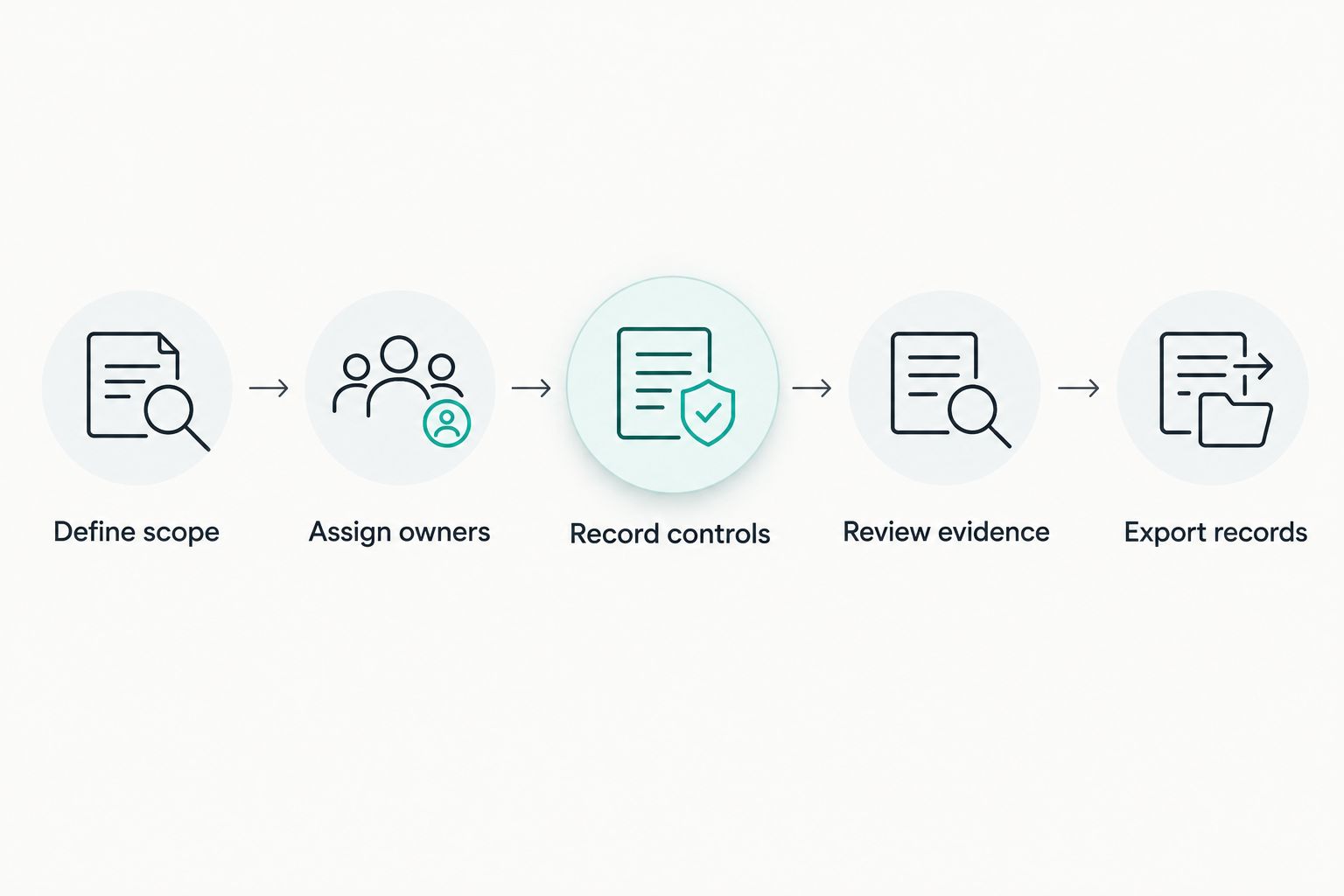
Test the complete risk workflow before choosing the software.
Make this demonstration the deciding test for your 2026 shortlist. If the supplier only shows pre-filled dashboards, return to the records and actions underneath them.
Which risk register software should you choose?
Start with Microsoft Lists for a shared, structured construction project register. Test Smartsheet instead when action coordination is the main problem, and keep Microsoft Excel when a standalone register still meets your needs.
Choose a cyber compliance platform when the work centres on security controls, policies and certification. Do not force operational, safety and security risks into one workflow simply to claim that everything sits in one system.
Before signing, agree who owns the register, who approves its scoring method and who reviews overdue actions. Software supports those decisions; your team still makes them.
Frequently asked questions
One last thing
Do not delete a risk just because the treatment action is complete. Completing an action and deciding that the remaining risk is acceptable are separate decisions.
Build that distinction into your 2026 register from the start. Keep the decision, its owner and the supporting evidence together. Seriously Simple Cyber Compliance.