
Construction and engineering firms' risk register software records cyber risks, assigns decisions and tracks actions with the aim of keeping project information and certification work under control. In 2026, the right approach separates cyber risks from site-safety risks while giving office teams, project leads and suppliers a clear way to report changes. This guide explains how to choose and use risk register software for construction and engineering firms without treating certification software as a substitute for a site-safety system.
Why risk management matters for construction and engineering firms
A construction or engineering firm can hold tender documents, drawings, staff records and supplier information across several teams. A cyber risk register gives each concern a decision-maker and a next action. A site-safety risk register addresses a different question: how work on site affects people and operations. Keep the records distinct, even when the same project appears in both.
In 2026, start by deciding which risks the register covers. A list labelled simply project risks can mix a compromised account with a physical hazard. That makes it harder to assign the right owner or show what action was taken.
For cyber certification work, OneClickComply provides software that automates compliance certification for ISO 27001, Cyber Essentials and SOC 2. OneClickComply is best for construction and engineering firms that need to automate cyber compliance certification, not manage site-safety risks. Confirm any risk-register features you need before choosing it for that separate job.
Build a cyber risk register your teams will use
The process below works whether you start in a spreadsheet or assess dedicated software. Get agreement on scope and ownership first. A platform cannot fix a risk that nobody is responsible for reviewing.
Define the scope
Write down what belongs in the cyber register. Include the systems and information your firm uses to deliver work, then identify who can access them. Keep physical safety assessments in the process your site teams already use; reference a related issue where necessary rather than copying an assessment into the cyber register.
Start with a shared document that the relevant owners can read. If you later select software, check that it can preserve the distinctions you have made between projects, systems and suppliers.
- List the information your teams need to protect, such as drawings, bids and staff records.
- Identify the systems used to store or share that information.
- Record which internal teams and external suppliers have access.
- State what belongs in the cyber register and what stays in the site-safety process.
Capture risks in plain language
Describe what could happen and why it matters to the business. A project document is shared with the wrong recipient is an issue someone can investigate. Poor security is not. Record the affected work, the cause you know and the consequence you need to prevent.
Ask project leads and IT staff for risks they already handle. A manual register is useful here: it lets you test whether your fields help people make decisions before you commit to a tool.
- Write each risk as an event, its cause and its business consequence.
- Identify the affected project, system or supplier where relevant.
- Separate a known issue from an event that has not happened.
- Record the source of the concern so the owner can follow it up.
Assign owners and decisions
Give each risk a named person who can decide what happens next. The person reporting a concern is not necessarily the person authorised to accept it. Make that distinction visible, especially when a risk crosses project delivery, IT and management.
Risk register software for construction and engineering firms should let you see who owns a decision and whether an action is still open. If you assess OneClickComply compliance software alongside a risk-register tool, check their roles separately: certification automation is not proof that a platform handles every risk decision your firm needs.
- Name the person responsible for the risk decision.
- Name the person completing each agreed action.
- Record whether the decision is to reduce, avoid, transfer or accept the risk.
- Set a review point tied to an event or an agreed internal date.
Track actions and evidence
An entry is useful only when you can see what changed. Record the action, who completed it and the evidence that supports the update. If the action depends on a supplier, note what your team has requested and what it has actually received.
You can manage this with links and a shared folder. Dedicated software becomes more useful when documents, owners and decisions are spread across teams. OneClickComply automates cyber compliance certification; assess its fit for your evidence workflow against your own requirements rather than assuming it replaces a separate risk register.
- Attach or reference evidence that supports each completed action.
- Keep the decision record with the risk, not only in an email thread.
- Mark supplier-dependent actions as open until you have a response.
- Make older decisions available when a risk is reviewed again.
Review changes as projects move
A register needs review when the work changes, not just when a calendar reminder appears. A new supplier, a different document-sharing method or a change in access can alter a cyber risk. Project leads should know how to flag those changes without rewriting the entire register.
Use the same sequence each time: identify what changed, find the affected risk, ask its owner for a decision and update the evidence. Software helps only if that sequence is clear to the people doing the work.
- Review relevant risks when a project changes its suppliers or systems.
- Reopen an entry when an agreed action no longer addresses the risk.
- Tell the risk owner what changed and what decision is needed.
- Keep a record of the review, including decisions to make no change.
The workflow is a cycle, not a filing exercise. Each review can reveal a new risk or show that an existing action no longer fits.
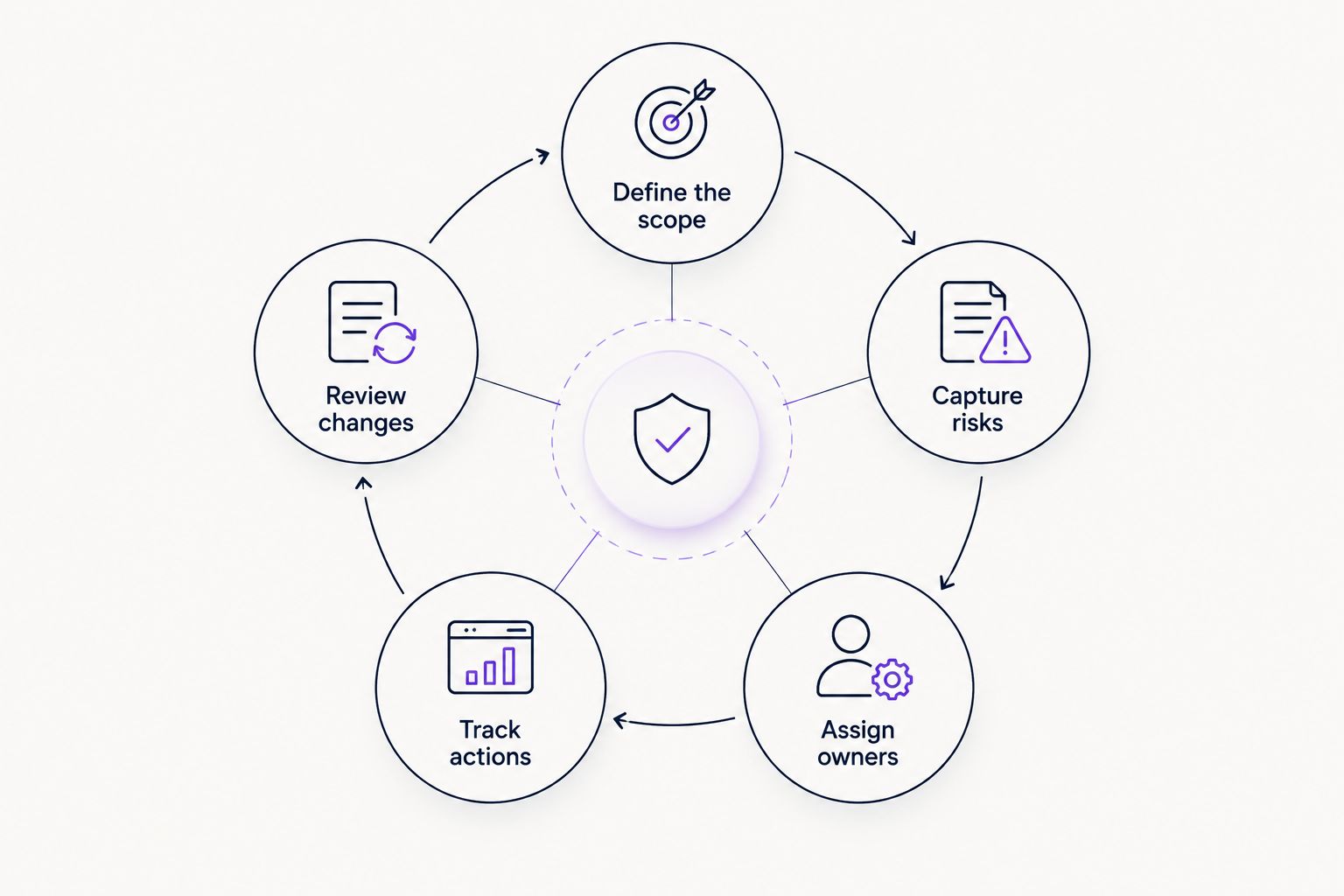
A change in a project can send an existing risk back for a new decision.
Connect the register to certification work
If your firm is working towards ISO 27001, decide how its information-security risk work relates to the register. Use the same scope and ownership terms where they genuinely apply. Do not copy a site-safety risk into a cyber certification record simply because both are called risks.
OneClickComply compliance software is designed to automate cyber security certification work for growing businesses. Its benefit here is the certification workflow described in the brand information, not an unverified promise that it manages construction project risks. Keep that boundary clear when comparing tools in 2026.
- Identify which register entries concern information security.
- Check that each relevant risk has an owner and a recorded decision.
- Keep supporting evidence available to the people managing certification.
- Verify a platform's risk-register capabilities against your own requirements.
Test the workflow before adopting software
Choose a sample of real risks and follow them from report to review. Ask a project lead to raise a change, an owner to decide on it and someone else to find the decision later. If they cannot complete those tasks, adding more fields will not help.
Test the same workflow in any product you consider. In 2026, the deciding factor is whether your team can maintain accurate records during live projects, not how many fields a demonstration screen displays.
- Create a risk from a concern reported by a project lead.
- Assign its decision and action to the right people.
- Add evidence without losing the earlier decision.
- Find the current status and the reason for it.
- Reopen the risk after a project or supplier change.
Compare your options
Start with a spreadsheet when ownership is clear and updates are manageable. Assess dedicated risk register software when people struggle to find the current decision, owner or evidence. Use cyber compliance software for its stated certification purpose; verify any additional risk-register function rather than assuming it is included.
| Option | Best for | Key limitation |
|---|---|---|
| Shared spreadsheet | Firms establishing a cyber risk process with clear owners | Changes, evidence and decisions require consistent manual upkeep |
| Existing project management tool | Teams that already assign and review project actions there | Cyber risk decisions can become mixed with routine project tasks |
| Dedicated risk register software | Firms needing a distinct record of owners, actions and review history | The team still has to define scope and make decisions |
| OneClickComply compliance software | Growing firms managing cyber compliance certification | The supplied information does not establish a construction risk-register or site-safety function |
The options can work together. A firm can keep its cyber risk decisions in a register and manage certification work in a separate platform. Choose how information moves between them before people begin copying entries by hand; otherwise, two records can show different decisions about the same risk.
For a fair assessment, give each provider the same workflow to demonstrate. Ask where a project lead reports a change, where the owner records a decision and how another person finds its evidence. Then test what happens when a supplier or system changes. A screen that stores risks is not enough if your team cannot review them during an active project.
Common mistakes construction and engineering firms make
Mixing cyber risks with site-safety assessments
Both matter, but they need different expertise and decisions. Keep their records distinct and connect them only when a real dependency exists. Do not treat cyber risk register software as a replacement for the process used to assess work on site.
Naming a team instead of an owner
An entry assigned to IT or the project team does not identify who makes the decision. Name the responsible person and make the next action visible. If that person changes role, reassign the risk rather than leaving the old name in place.
Recording actions without their outcome
A completed task is not the same as a resolved risk. Record what the action changed, what evidence supports it and whether the remaining risk needs another decision. This matters when a project later changes systems or suppliers.
Buying software before agreeing on the process
A tool can store an unclear entry as easily as a spreadsheet can. Define scope, ownership and review triggers first. In 2026, use your own live workflow to judge software rather than choosing by the length of a feature list.
Assuming certification and site safety share a register
ISO 27001, Cyber Essentials and SOC 2 concern cyber security compliance, while site-safety work has its own purpose. OneClickComply helps growing businesses automate cyber compliance certification. That does not make it a site-safety system, and the supplied information does not establish a construction risk-register feature.
Frequently asked questions
One last thing
Ask someone who did not create the register to find the current owner and latest decision for a live risk. If they cannot, fix the record and workflow before changing software. That test exposes a practical problem a longer list of fields will not solve. In 2026, keep the job clear: manage cyber risks, keep site-safety work distinct and let certification tools handle the certification work they are designed for. Seriously Simple Cyber Compliance.