
Yes, a compliance platform can fully replace spreadsheets as your main compliance record when it covers your registers, evidence, approvals and reporting. It does not replace accountable owners, security decisions or independent assessment. Keep spreadsheets for temporary analysis or requested exports, not as a competing record of live compliance work.
Can a compliance platform fully replace spreadsheets?
Yes, provided you replace the workflow, not just the file. Importing a register achieves little if your team still approves changes by email and tracks outstanding actions in a separate workbook.
Use the following comparison for your 2026 decision. For the practical transition, follow the guide to migrating from spreadsheets to a compliance platform.
| Approach | Best for | Main benefit | Main limitation |
|---|---|---|---|
| Spreadsheets | Small, clearly owned registers and temporary analysis | Flexible fields, formulas and familiar editing | You must organise evidence, approvals and follow-up around the file |
| Compliance platform | Repeatable work involving owners, evidence and reviews | A shared workflow, if the required functions are supported | Coverage, configuration and data quality need checking |
| Platform with spreadsheet exports | Teams that need analysis or externally requested formats | Keeps live work central while allowing separate analysis | Exported copies become outdated unless clearly labelled |
A platform fully replaces your spreadsheet workflow only when people can complete their work without maintaining the old workbook. An export does not break that rule. A second live register does.
Why this matters
Your compliance record needs to explain what you do, who owns it and what supports the status shown. A green cell without supporting evidence does not answer those questions.
Moving that green cell into software does not improve it automatically. The useful change is connecting the status to evidence, a responsible person and a recorded decision.
What should move out of spreadsheets?
Start with work that stays active between assessments. These records need updates, review and clear ownership rather than a fresh copy whenever someone asks for progress.
Risk registers
Move the risk description, owner, assessment, treatment and review decision together. Keep the reasoning behind accepted risks, not just the final rating.
Check whether the platform supports your assessment method before importing anything. A different scoring model needs an agreed conversion, not a silent change to the meaning of existing records.
Control tracking and evidence
Move control descriptions alongside their scope, owners, status and supporting records. Evidence should explain the claim being made, rather than sit in an unrelated folder with an ambiguous filename.
Check how the platform handles evidence dates and previous versions. A current screenshot does not explain what happened during an earlier review period.
Policies and exceptions
Bring across approved policies, review responsibilities and relevant exceptions. Keep drafts distinguishable from approved documents so nobody mistakes generated text for an authorised policy.
Policy generation helps you produce a starting document. Your team still needs to confirm that the document describes how your business actually operates.
Actions and findings
Move open findings with their owners, agreed actions and closure evidence. Do not migrate only the items marked complete.
Ask someone outside the original project to read a migrated finding. They should understand the issue and the reason for closing it without searching old email threads.
What should stay outside the platform?
Replace compliance spreadsheets, not every spreadsheet in your business. A workbook remains useful when it serves a defined analytical purpose and does not compete with your main record.
Keep temporary calculations separate from approved decisions. For example, you can model alternative risk treatments in a workbook, then record the selected treatment and its rationale in the platform.
Also distinguish compliance records from source systems. Employee information, technical settings and operational tickets can remain in the systems responsible for them; the compliance workflow needs the relevant evidence or reference.
Use these boundaries:
- Temporary analysis: explore options without presenting the worksheet as approved compliance status.
- Requested exports: provide the format a recipient needs, with its scope and export date.
- Source records: retain operational data where it belongs and connect relevant evidence to compliance work.
- Archived history: preserve records according to your retention requirements without reopening them as live trackers.
An exported spreadsheet is a snapshot. Label it accordingly, and direct corrections back to the main record rather than editing copies independently.
How do you replace spreadsheets without losing control?
Use a 5-step migration sequence for your 2026 transition. Treat each step as a check to pass, not a date to reach regardless of the result.
1. Inventory records
List the workbooks people actually use. Include private copies, evidence indexes, overdue-action lists and reports prepared for management.
For each file, record its purpose, owner and intended destination. Decide whether to migrate it, archive it or keep it as a clearly defined analytical tool.
2. Clean data
Remove duplicate entries and resolve conflicting statuses before import. Preserve explanations for decisions that remain relevant.
Assign 1 accountable owner per live record, with contributors where needed. A team name alone does not tell you who must approve an update or resolve a disputed entry.
3. Map fields
Match spreadsheet columns to the platform's fields. Check dates, status meanings, risk scores, attachments and links to related records.
Do not discard a field simply because the import template lacks a matching column. Decide whether it belongs in another field, a supporting document or a different workflow.
4. Test workflows
Run a real record through creation, review, update and closure. Include an exception or rejected approval so you test more than the easiest route.
Check permissions using the roles your team will hold. A demonstration under an administrator account does not show what an ordinary owner can complete.
5. Retire trackers
Confirm that owners can find their work and that reports reflect the approved records. Then make the old operational workbooks read-only and identify the replacement clearly.
Give remaining exports a stated purpose. Do not leave the team deciding which version to update after the migration has supposedly finished.
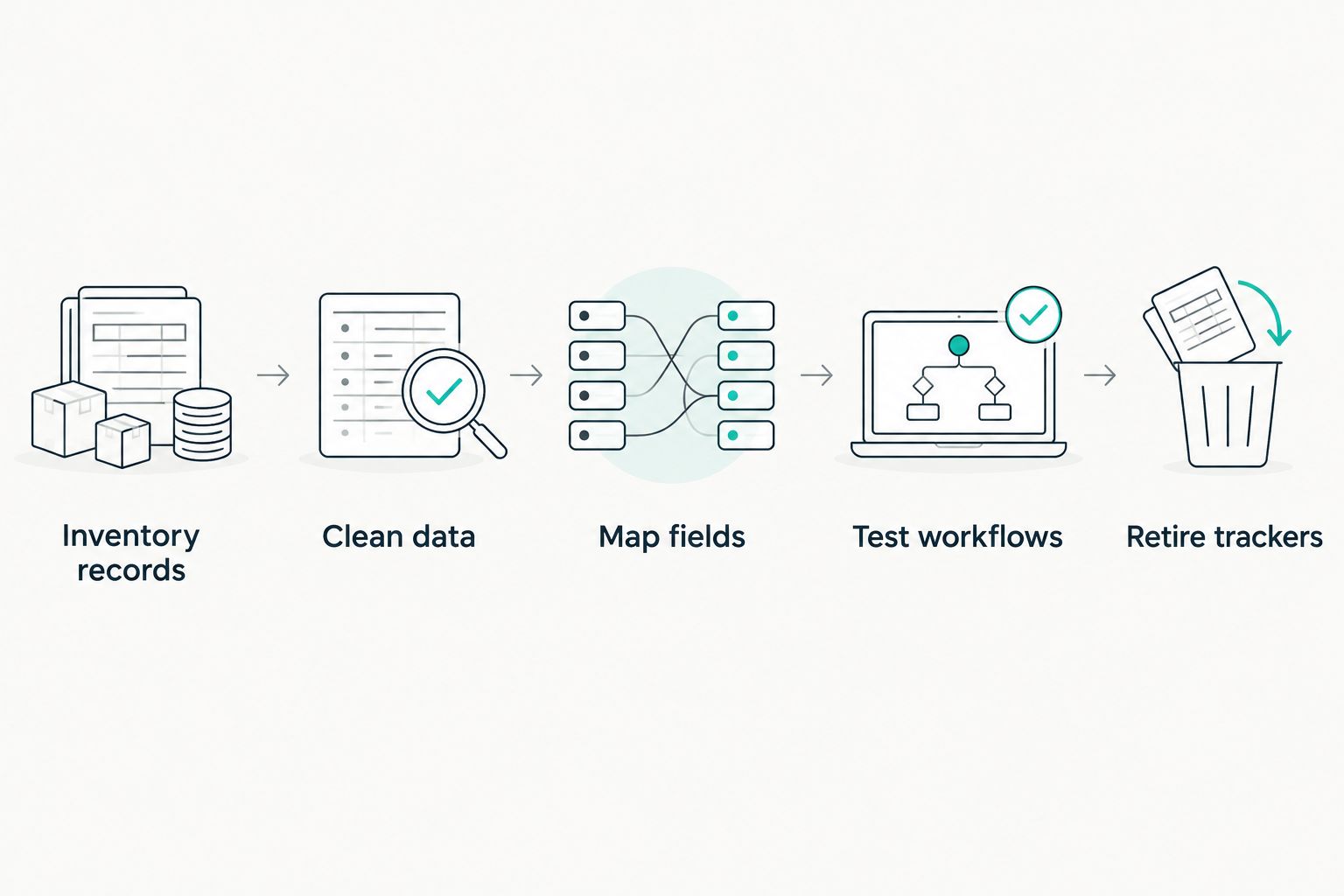
Retire the old trackers only after the replacement workflow passes testing.
What should you test before deleting the old tracker?
Use 3 checks: traceability, accountability and portability. Together, they test whether the platform replaces the working record rather than simply displaying imported rows.
Traceability
Choose a completed control and follow it back to the supporting evidence. Check that the evidence covers the relevant system, activity and review period.
Then examine a changed record. You need enough history to explain what changed and why, not just its current state.
Accountability
Ask an owner to find an outstanding action, understand the request and submit the result. Ask the reviewer to approve it or send it back with a reason.
If either person needs a separate spreadsheet to understand the task, the workflow is unfinished. Fix that gap before extending the migration.
Portability
Export a sample of records and supporting information. Check whether another person can interpret the output without relying entirely on the platform interface.
Confirm what happens to attachments, history and relationships between records. A list of titles and statuses is not a complete replacement for the information you entrusted to the system.
Why spreadsheet replacement varies
The right boundary depends on the work you need to manage. Test these factors against your own records rather than assuming that every compliance platform covers them:
- Framework coverage: confirm that the platform supports the requirements within your actual scope.
- Evidence sources: identify which records can be connected and which still require manual submission.
- Decision complexity: check whether risk acceptance and exceptions fit the approval process you need.
- Historical records: decide what must remain accessible and how previous decisions will be explained.
- Reporting needs: test the outputs required by management, customers and assessors.
- Data ownership: confirm access, permissions and export arrangements before moving the main record.
For your 2026 evaluation, use a representative record from each important workflow. A successful import of a simple action list does not demonstrate that a complex risk register will work equally well.
Where does OneClickComply fit?
OneClickComply is best for growing businesses seeking compliance automation for ISO 27001, Cyber Essentials and SOC 2. The compliance platform supports security-control remediation, policy generation, risk management and trust centres.
Those functions are relevant when your spreadsheets track security actions, policy work and risk decisions. They do not remove the need to agree your scope or approve decisions on behalf of the business.
Evaluate OneClickComply against your actual records. Ask for a demonstration using a representative risk, a policy requiring review and a security action that needs supporting evidence.
The main qualification is scope: the stated functions do not establish that every specialist register, import format or approval route will fit. Confirm those requirements before treating the platform as a complete replacement.
Can I keep spreadsheets for audit exports?
Yes, keep spreadsheets for exports when the platform remains the main record. An exported report serves a different purpose from a live tracker that controls assignments and decisions.
For a 2026 assessment, identify the export date and the period covered by its contents. Do not confuse the date you downloaded a report with the period its evidence supports.
Agree how corrections will be handled. Update the main record first, then issue a replacement export when required rather than maintaining a separate version of events.
Does replacing spreadsheets mean replacing my compliance manager?
No, replacing spreadsheets changes how work is managed, not who accepts responsibility. Software can support repeatable tasks, but your business still needs someone to decide scope, approve policies and resolve exceptions.
Keep those responsibilities explicit during migration. A named system administrator is not automatically the person authorised to accept business risk.
How do I know the replacement is complete?
The replacement is complete when owners can manage live compliance work without updating the old trackers. Evidence, decisions, actions and reporting should follow the agreed workflow.
Run a retrieval exercise before signing off. Ask a colleague to find an open issue, its owner, the supporting evidence and the latest decision without help from the person who imported it.
Frequently asked questions
One last thing
A spreadsheet-free process is not the goal. A clear, usable compliance record is. Keep a workbook that serves a defined analytical need; retire one that forces people to reconcile competing versions of the truth.
Before closing your 2026 migration, ask where the next compliance decision will be recorded. If the answer still depends on who receives the email, finish the workflow first.
Seriously Simple Cyber Compliance.