
You can automate vendor risk management tasks, but not the accountability behind them. Software can collect evidence, send questionnaires, apply scoring rules and track actions; people still need to judge exceptions, approve sensitive access and accept the remaining risk.
Can vendor risk management be fully automated?
Automate the process, not the responsibility. A completed questionnaire or calculated score does not establish that a supplier is suitable for your business.
The practical boundary is between applying an agreed rule and deciding whether that rule fits the situation. Software can route a supplier to enhanced review when declared access meets your criteria. A responsible person must decide what that access means for your customers, operations and contractual commitments.
| Vendor risk task | What you can automate | What still needs review | Main limitation |
|---|---|---|---|
| Supplier intake | Collect standard details and assign an owner | Confirm the service and intended use | Incomplete intake creates an incomplete assessment |
| Evidence collection | Request documents and flag missing items | Check relevance, scope and exclusions | Possessing a document does not validate its contents |
| Questionnaires | Send questions, collect responses and route gaps | Challenge ambiguous or conflicting answers | A supplier's answer remains a claim until supported |
| Risk scoring | Apply documented scoring rules | Review assumptions and unusual dependencies | A score reflects the model, not every business consequence |
| Remediation | Assign actions, send reminders and track progress | Confirm that the fix addresses the finding | Closing a ticket does not prove effectiveness |
| Approval | Route decisions and record sign-off | Accept, reject or condition the relationship | Approval requires delegated authority |
| Ongoing review | Schedule checks and flag recorded changes | Assess the impact of those changes | Monitoring only covers the information available |
Start with a defined vendor risk assessment process. Automating an unclear process simply repeats the uncertainty across more suppliers.
Why this matters
You want less chasing, not less scrutiny. Automation is useful when it removes administration while preserving the evidence and decisions that explain why a supplier was approved.
For your 2026 programme, separate workflow completion from risk acceptance. A record marked complete should mean that the required work is finished, not that every uncertainty has disappeared.
This distinction also helps procurement. A clear approval route tells the business which suppliers can proceed, which need conditions and which remain blocked.
Which approach should you use?
Choose the approach by the decisions you need to control. Do not choose it by how many tasks a platform claims to remove.
| Approach | Best for | Advantage | Drawback | Recommendation |
|---|---|---|---|---|
| Manual review | Defining a new process or investigating unusual suppliers | Gives reviewers room to investigate context | Requests, reminders and records need active coordination | Keep it for judgement-heavy work |
| Rules-based automation | Repeatable intake, routing and evidence administration | Applies the same documented workflow consistently | Poor rules repeat poor decisions | Use it where inputs and outcomes are clear |
| Automation with human approval | Supplier relationships involving exceptions or material dependencies | Combines repeatable administration with accountable decisions | Requires available reviewers and clear authority | Use it as the default operating model |
Automation with human approval is the strongest default for vendor risk management. You retain a person who can challenge the evidence without making that person chase every attachment.
Manual work still has a place. A supplier with an unusual operating model needs investigation, not a forced fit into a standard questionnaire.
What can you automate without removing oversight?
Intake and ownership
Use a standard intake form to capture the service, business owner, intended data use and required access. Configure routing around those facts rather than the supplier's name alone.
Make missing information visible. Do not allow an empty field to behave like an answer confirming that no risk exists.
A useful intake record also identifies who can explain the business need. Security reviewers should not have to guess why a supplier requires access.
Evidence requests and reminders
Automate document requests, reminders and review-date notifications where your chosen system supports them. Keep the request specific enough that the supplier understands what evidence you need.
For evidence received in 2026, record the period it covers as well as the upload date. A newly uploaded report can still describe an earlier operating period.
Check the organisation, service and locations covered. A certificate belonging to another group entity does not automatically answer questions about the service you intend to buy.
Findings and follow-up
Turn each unresolved finding into an assigned action. Record the evidence needed for closure and the person responsible for checking it.
Automate reminders and escalation against your agreed deadlines. Keep closure separate from the supplier's statement that the work is done.
If a supplier cannot complete an action, route that exception to someone authorised to decide. Do not let repeated reminders substitute for a decision.
What should stay with a person?
Keep human review wherever the outcome depends on context, authority or conflicting evidence. These decisions need a reason that another person can understand later.
- Business criticality: Decide how an outage would affect your service and whether an alternative exists.
- Evidence relevance: Check whether a report covers the actual service, entity and systems involved.
- Conflicting answers: Resolve differences between a questionnaire, contract and supporting documents.
- Contract exceptions: Decide whether proposed terms meet your requirements and involve legal review where needed.
- Residual risk: Approve the risk that remains after agreed controls and actions.
- Relationship exit: Confirm how you will remove access, recover information and manage service continuity.
An automated recommendation can support these decisions. It should not hide who made them.
A risk score is an input to approval, not the approval itself. Require a written rationale when a reviewer overrides the normal route or accepts an unresolved finding.
Why the level of automation varies
The same workflow does not suit every supplier relationship. Configure your process around these factors:
- Data access: The information a supplier receives changes the evidence and review you need.
- System privileges: Administrative access requires different scrutiny from a service with no connection to your systems.
- Service dependency: A supplier supporting an essential operation needs a clear continuity and exit assessment.
- Evidence quality: Incomplete, outdated or contradictory material needs investigation rather than automatic acceptance.
- Contractual requirements: Customer commitments and agreed supplier terms affect approval conditions.
- Process maturity: Automation needs defined owners, rules and escalation routes to apply.
For your 2026 supplier register, record these factors explicitly. A single label such as low risk is less useful than an explanation of the access, dependency and evidence behind it.
Avoid treating supplier size as a substitute for this assessment. Review the relationship you are creating, not just the organisation selling the service.
How do you build an automated workflow with approval gates?
Use the following sequence as a starting design. These are process steps, not a promised implementation schedule.
- Define scope. Record the service, business owner, data involved and intended access before assessment begins.
- Set rules. Document which answers trigger extra evidence, specialist review or an approval condition.
- Collect evidence. Request relevant material and retain its source, scope and review status.
- Review exceptions. Route missing evidence, contradictions and unresolved findings to named reviewers.
- Record decisions. Capture the approver, rationale, conditions and triggers for reassessment.
The sequence keeps administration moving without allowing an incomplete record to become an unchallenged approval. Build a visible stop when a required decision is missing.
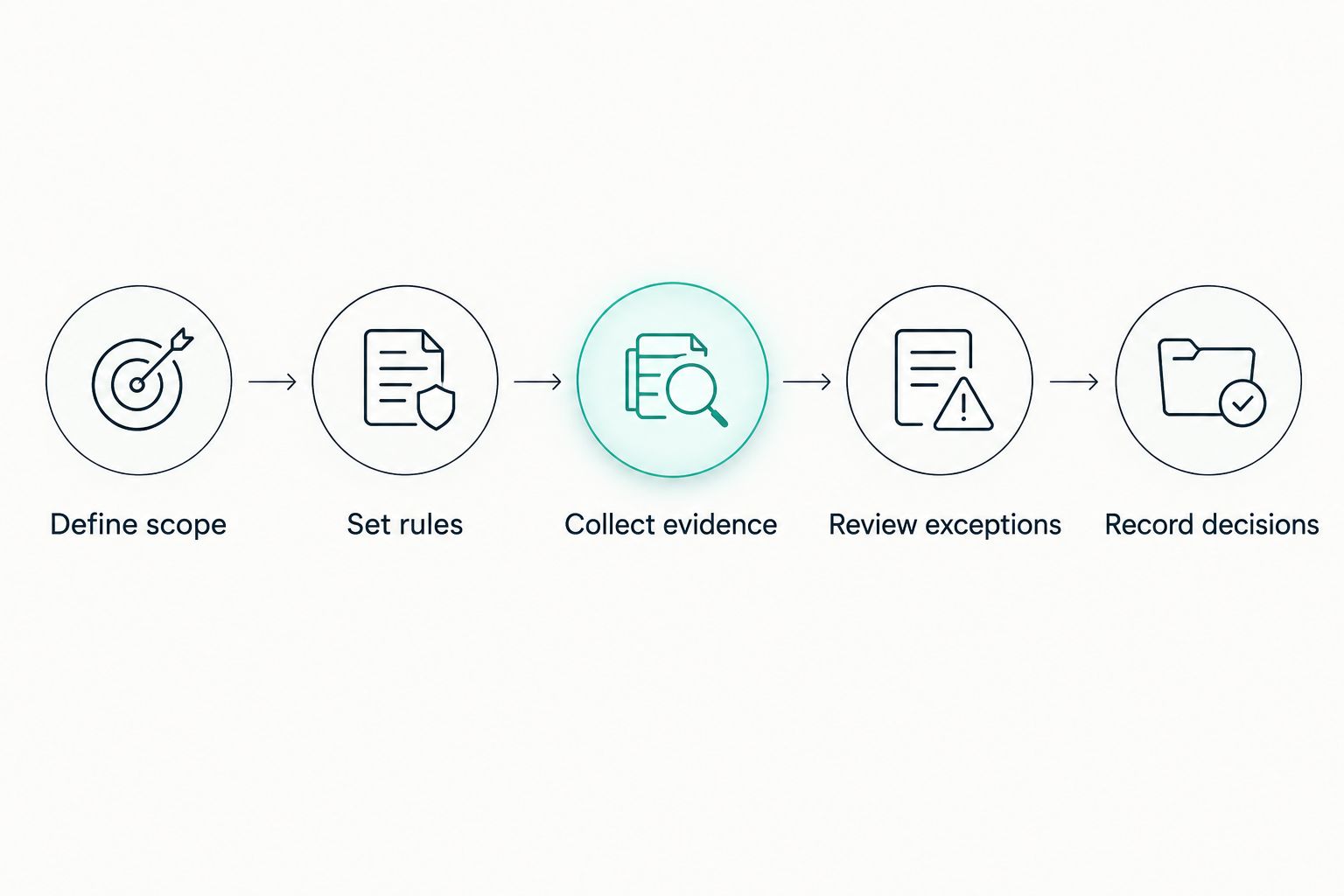
Automate the movement of work while retaining a clear approval gate.
After approval, keep the relationship under review. Reassess when the service changes, access expands, relevant evidence expires or a reported incident affects your assumptions.
For your 2026 workflow, define those triggers before switching on reminders. A notification needs an owner and a required response to become useful work.
Test the failure paths before rollout
Run a pilot with supplier records that represent different situations. Include complete evidence, missing evidence, contradictory answers and a changed service scope.
Check that the workflow behaves as intended:
- Missing evidence remains visible and prevents inappropriate progression.
- A changed answer reaches the correct reviewer.
- An override records an authorised person and a reason.
- A closed action retains the supporting evidence.
- A departed employee does not leave approvals without an owner.
- A supplier's offboarding record includes access removal and outstanding obligations.
Do not judge the pilot only by whether requests were sent. Check whether a reviewer can reconstruct the decision without searching through separate inboxes.
Where does OneClickComply fit?
OneClickComply is best for growing businesses that want compliance automation alongside risk management. The platform supports ISO 27001, Cyber Essentials and SOC 2 programmes through security-control remediation, policy generation, risk management and trust centres.
That makes OneClickComply relevant when you want supplier-related decisions to sit within a wider compliance programme. It does not remove your need to define acceptable risk or appoint an authorised approver.
Assess OneClickComply compliance automation against your actual workflow. Ask for a demonstration using your evidence requirements, approval conditions and exception routes rather than assuming that general risk management covers every supplier-specific task.
How do you know whether automation is working?
Measure the work your team actually performs. Establish a baseline before rollout, then compare the same activities after the workflow is in use.
Useful measures include review turnaround, time spent chasing evidence, overdue actions and assessments reopened because information was incomplete. Keep each measure's definition consistent so the comparison means something.
For your 2026 reporting, separate supplier response time from your team's review time. Otherwise, a delay waiting for evidence can look like an internal approval bottleneck.
Also inspect decision quality. Faster approval is not progress if reviewers cannot explain the evidence, conditions and remaining risk.
Can software approve low-risk vendors automatically?
Software can route a vendor through a pre-approved path when the inputs meet your documented rules. A responsible owner still needs to approve the policy defining that path and its exceptions.
Use explicit eligibility conditions. If required information is missing or the service changes, stop automatic progression and request review.
Does automated monitoring replace supplier reassessment?
Automated monitoring does not replace supplier reassessment. Alerts show changes in the information being monitored; reassessment determines what those changes mean for your relationship.
Review the monitoring coverage as well as the alerts. Silence does not establish that every relevant supplier condition remains unchanged.
Can certification replace a vendor questionnaire?
Certification can support a vendor assessment, but it does not answer every relationship-specific question. Check the certified scope against the service, data access and obligations involved.
Use existing evidence to avoid unnecessary questions. Keep targeted questions for the gaps that affect your decision.
Frequently asked questions
One last thing
Test what happens when evidence is missing, not just when everything is complete. That is where you see whether the workflow protects a decision or merely moves a record towards approval.
Choose a process that makes the next action clear and keeps an accountable owner in place. Seriously Simple Cyber Compliance.