
Instead of manually collecting Datadog screenshots, set up Datadog continuous compliance monitoring to capture monitor status, scope, configuration and follow-up evidence in a controlled evidence library. This 2026 workflow uses an API collector you configure, not an assumed native connection to OneClickComply.
Why this matters
A Datadog monitor answers a technical question. Compliance evidence must also explain which systems the check covers, who owns it and what happened when it failed.
A healthy monitor is evidence about its configured check, not proof that your business is compliant. An uptime check, for example, does not demonstrate that privileged access has been reviewed.
OneClickComply is best for growing businesses that need compliance automation alongside technical monitoring. The platform supports security-control remediation, policy generation and risk management; this guide keeps the Datadog collection workflow separate from those capabilities.
For your 2026 evidence plan, define the claim before building the connection. Start with a narrow statement, such as showing that an agreed production-monitoring check operated and that your team reviewed exceptions.
Before you start
- Datadog access: Use an account that can inspect the selected monitors, plus API credentials with the permissions needed to read them. Confirm the Datadog site associated with your organisation; credentials sent to the wrong site will not establish the intended connection.
- A collector and destination: Prepare a scheduled job, secure credential storage and an evidence repository your collector can write to. Assign an engineer to implement the job and a control owner to review its output.
- An agreed scope: Identify existing monitors, production systems, control owners and evidence-retention requirements. A multi-alert monitor can have different states for different groups, so preserve group-level results rather than recording only a reassuring headline status.
Do not start with automated remediation. Prove that collection, access restrictions and exception routing work before allowing a workflow to change production systems.
Choose the collection pattern
Use scheduled collection as the baseline for this workflow. Add alert-driven collection when you need an evidence record tied to an exception.
These patterns serve different purposes. Neither removes the need to review monitor coverage or investigate missing data.
| Collection pattern | Best for | Advantage | Limitation |
|---|---|---|---|
| Scheduled collection | Periodic coverage and configuration records | Captures evidence even when no alert fires | Snapshots alone do not reconstruct every intervening state change |
| Alert-driven collection | Exception response and follow-up | Captures context around a notification | Silence does not prove that collection or monitoring worked |
Keep monitoring and compliance responsibilities distinct. Datadog supplies technical monitoring information. OneClickComply provides compliance automation, but an accountable owner still decides whether evidence supports a control.
Evidence scope
Define the evidence contract
- Open Monitors, then Manage Monitors in Datadog. Select an existing monitor that checks an in-scope system and record its monitor ID, purpose and owner.
- Write the control claim in plain English. State what the monitor demonstrates and what it does not: service availability evidence is not automatically security-event monitoring evidence.
- Define the fields your collector must save. Use the record labels below as your own evidence schema, not as claimed Datadog interface labels.
| Evidence field | What to record | Why it matters |
|---|---|---|
| Monitor reference | Organisation, site and monitor ID | Identifies the source without relying on a changeable name |
| Scope | Service, environment and monitored groups | Shows which systems the evidence covers |
| Observation time | Source timestamp where supplied, plus collection time | Separates the event from the collection attempt |
| State | Returned monitor and group states | Preserves exceptions and unknown conditions |
| Configuration | Query, thresholds and relevant monitor options | Explains what the check actually evaluated |
| Ownership | Control owner and response owner | Makes review and follow-up accountable |
| Follow-up | Investigation, corrective action and verification references | Connects a finding to its resolution |
Keep the original response alongside the readable record, subject to your data-handling rules. A summary helps reviewers, while the source response helps resolve questions about transformation or omitted fields.
Expected result: A reviewer can identify the system, check, observation and owner without asking the engineer who built the collector.
Set the collection boundary
Limit the first deployment to a deliberately small set of monitors. Use explicit monitor IDs or a documented selection rule, then compare the returned set against your approved inventory.
For example, start with 3 monitors as an implementation exercise. This is a suggested test scope, not an audit requirement or a claim about typical deployments.
Treat exclusions as decisions. Record why a non-production service, retired monitor or third-party system sits outside the evidence boundary.
Scheduled collector
Configure source access and collection
- Store the Datadog API key and application key in your approved secret store. Use the correct Datadog site and grant only the read permissions required by your selected API operations.
- Configure the job to retrieve each selected monitor through the Datadog API. Preserve returned status, relevant group information and configuration; do not substitute a dashboard screenshot for the underlying record.
- Set a collection schedule that matches the claim. As an initial engineering example, use a 24-hour interval for a daily configuration snapshot, then assess whether your monitoring evidence needs more frequent observations or event history.
- Record every collection attempt, including failures. Capture the request time, outcome and enough error context to investigate without logging credentials.
A daily snapshot is not evidence of uninterrupted monitoring throughout the day. State the limitation in the control description and use additional history where the claim requires it.
Build separate checks for source health and collector health. A working Datadog monitor does not tell you whether the evidence-writing job has stopped.
Expected result: Each scheduled run produces either a traceable evidence record or a visible collection failure. Missing output never becomes a passing result.
Preserve timestamps and configuration
Use a consistent timezone, preferably UTC, across the collector and destination. Keep the source timestamp separate from the time your job fetched the record.
Save configuration changes as new evidence rather than overwriting the previous configuration. Otherwise, a reviewer cannot tell which query or threshold applied to an earlier result.
For the 2026 evidence period, define the review window explicitly. Do not let a dashboard's current time filter silently determine the period your evidence appears to cover.
Evidence destination and validation
Configure storage and control mapping
- Write records to a restricted destination with a documented retention rule. Separate raw responses from reviewer-facing summaries, while keeping a reference between them.
- Map each record to the specific control it supports. Include the scope statement, owner and collection method; do not attach the same technical result to unrelated controls without an explanation.
- Give each observation a stable identity based on the source, monitor, group and observation time. Make repeat processing safe so a retried job does not create misleading duplicates.
- Keep review status separate from technical status. A monitor returning a healthy state does not mean a control owner has reviewed the evidence.
If you want the records in OneClickComply, confirm the supported intake method before implementing the destination writer. Do not assume a native Datadog connector or a particular import interface.
Expected result: You can retrieve the source record, its control mapping and its review history without depending on the current Datadog screen.
The wider guide to automating audit evidence collection explains where this collection process fits within an evidence programme. Keep the technical collection boundary separate from the decision to accept evidence.
Test the full evidence chain
Run 3 test cases before relying on the workflow: a successful collection, a simulated source-access failure and a replay of an already processed record. Use a non-production test fixture for failure testing rather than disrupting a live check.
Confirm that successful collection preserves the source information. Confirm that failed collection creates an operational exception and that replay does not inflate the evidence history.
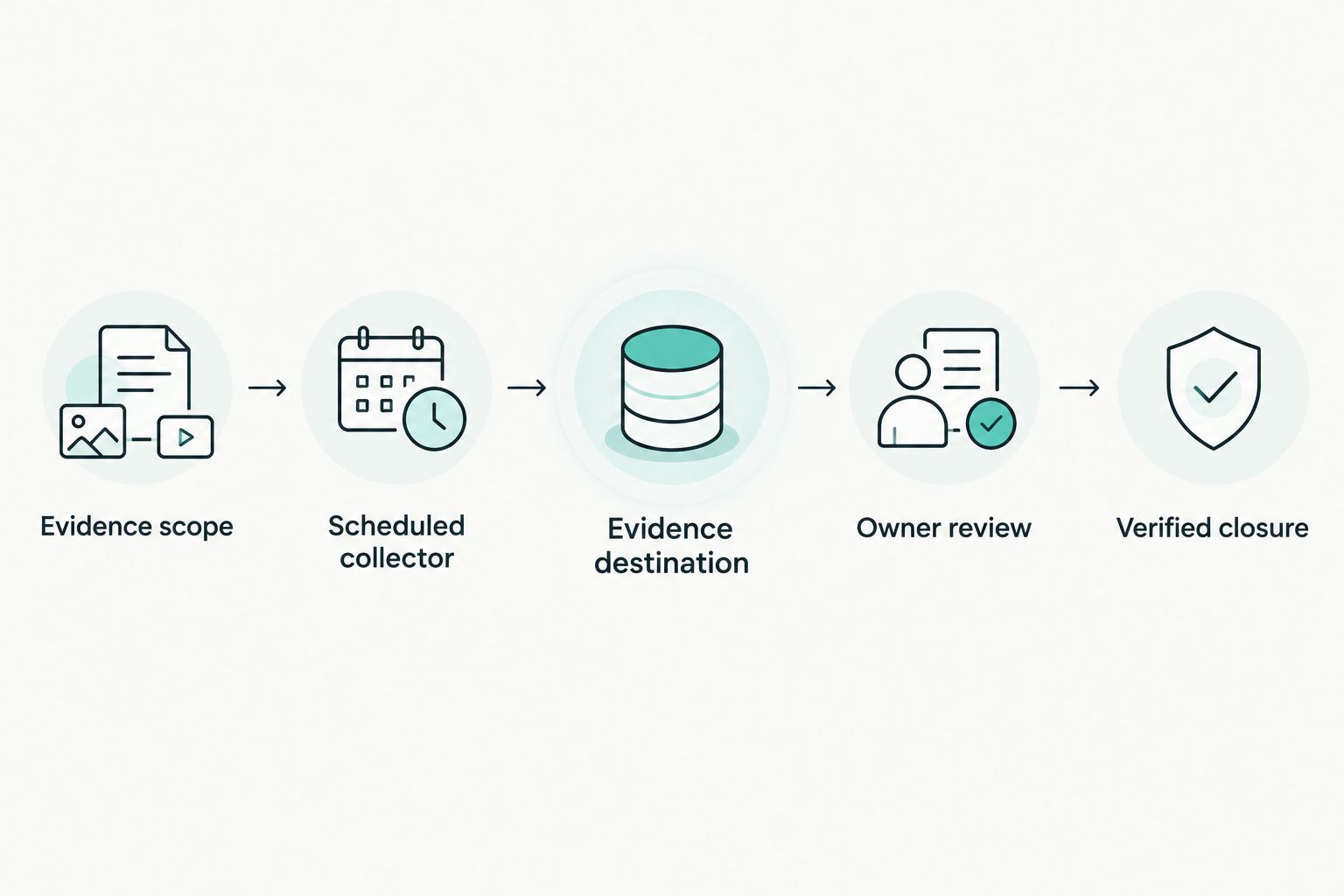
Collection produces a record; review determines whether that record supports the control.
Exception review and closure
Configure owner review
- Route failed checks, unknown states and collection failures to named owners. Keep technical monitoring exceptions distinct from evidence-pipeline failures so the right person investigates.
- Require a short review record: what happened, affected scope, action taken and any approved exception. Preserve the underlying observation rather than replacing it with the reviewer's interpretation.
- Link the corrective action to a subsequent verification record. Close the exception only when the owner has checked the outcome against the original control claim.
A recovery notification is useful technical evidence. It does not, by itself, explain the cause, the affected period or whether a longer-term fix is needed.
Expected result: An exception has an owner, a documented response and a traceable closure decision. The original finding remains visible after closure.
Capture evidence whenever a monitor alerts
Add an alert-driven variant after scheduled collection works. Use Datadog's Webhooks integration to send monitor notifications to a receiving service you control, then let that service retrieve and store the relevant source context.
Configure this as a separate path:
- Prepare a receiving endpoint with appropriate authentication, restricted access and request validation.
- Configure a webhook notification destination in Datadog and include it in the selected monitor's notification routing.
- Preserve the incoming notification, identify its monitor and retrieve supporting details through your collector.
- Link subsequent recovery information and owner review to the same exception history.
Treat a notification as a prompt to collect evidence, not as the whole evidence record. A monitor's state can change between the notification and the follow-up API request, so preserve both timestamps and both observations.
For your 2026 workflow, retain scheduled collection alongside notifications. The scheduled path checks the approved monitor set even when no alert arrives; the notification path adds exception context.
Troubleshooting
The collector cannot authenticate
Check that the configured Datadog site matches your organisation. Then check the API key, application key, granted permissions and whether the credentials have been revoked.
Keep secrets out of diagnostic output. Record the error response without exposing credential values.
The record looks healthy but a group is failing
Inspect group-level states and the monitor's scope. Update the transformation so it preserves relevant groups rather than flattening them into one summary.
Recheck the affected records. Do not silently relabel previously incomplete evidence as complete.
Collection retries create duplicate records
Use the stable observation identity defined in your evidence contract. Separate the history of collection attempts from the evidence observation itself.
A retry is a new attempt to process data, not necessarily a new technical event.
Evidence disappears between review periods
Check source retention, destination retention, deletion permissions and the collector's schedule. Preserve required records before the source's accessible history ends.
Set retention from your evidence and data-protection requirements. Do not invent a universal retention period for every framework.
No alerts arrive and the evidence library stays empty
Check notification routing and receiving-service logs, then verify the scheduled collector independently. Test an authorised non-production notification path.
No notifications is not a health check. The workflow needs evidence that collection itself is operating.
Customise your workflow
Expand by control purpose, not by collecting every available monitor. Add another service only when you can explain its scope, owner and evidence value.
For each addition, repeat the same checks:
- Does the monitor evaluate the stated condition?
- Does the collector preserve exceptions and missing data?
- Can the owner retrieve the record for the required period?
- Does corrective action produce verification evidence?
Review the monitor inventory when systems change. A collector that reliably processes an outdated scope still produces incomplete coverage.
Use your 2026 rollout review to decide which steps need automation and which need judgement. Automate collection and routing; keep risk acceptance and evidence approval accountable.
Frequently asked questions
One last thing
Test a broken evidence pipeline before trusting a healthy dashboard. A collector that fails visibly gives you something to fix; a collector that fails silently leaves a gap disguised as a quiet period.
Keep the workflow narrow, traceable and owned. Seriously Simple Cyber Compliance.