Instead of collecting commit screenshots by hand, build a GitHub SOC 2 evidence workflow that captures merged pull requests, approvals, test results and deployment records. Use a webhook receiver to assemble each change record, then store it against your change-management control for the 2026 audit period.
Why this matters
A commit records a code change. It does not, by itself, establish that someone approved the change, tests passed or the approved code reached production.
OneClickComply is best for growing businesses seeking to automate SOC 2 compliance management. OneClickComply provides compliance software; the workflow below uses GitHub webhooks and a receiver you configure separately. Do not treat this guide as confirmation of a native connector.
For your 2026 evidence library, connect each change to the control it supports. A useful record lets a reviewer follow the decision without reconstructing it from scattered screenshots.
SOC 2 is an independent attestation, not a certificate issued by GitHub or a software platform. Agree evidence requirements with your auditor before building the collection process.
Before you start
- Access: Repository administration access to configure webhooks and rules, plus permission to create an approved GitHub App or other collection credential. Use an organisation-approved owner for the connection.
- Materials: Your repository scope, production branch names, change-management policy, audit-period boundaries and evidence destination. You also need an HTTPS receiver capable of validating webhook signatures and retrieving GitHub records.
- Gotcha: A closed pull request is not necessarily merged. Filter on the payload's merged status, then retrieve approvals and checks; the closure event alone is incomplete evidence.
Start with 1 repository as a pilot. Define what counts as a production change before extending collection across your organisation.
The webhook handles new activity after setup. Historical evidence needs a separate backfill, and collection must cover the whole agreed 2026 audit period.
Repository scope and approval rules
- Define the change population. List repositories that build, configure or deploy your in-scope service. Include infrastructure code where it changes production behaviour, and record why excluded repositories sit outside the audit scope.
- Identify the production path. Record the branch, release process and deployment system for each repository. Merging into the default branch is not proof of deployment unless your actual process makes that connection.
- Inspect repository rules. Open Settings, then Rules and Rulesets where your repository uses rulesets. Check the target branches and the rules that govern pull requests, reviews and status checks.
- Align rules with policy. Use Require a pull request before merging and Require status checks to pass where those rules implement your documented process. Set required approvals according to your policy, not a supposed universal SOC 2 minimum.
- Record bypass permissions. Identify accounts or roles allowed to bypass the rules. Document the emergency-change process and how those changes receive review afterwards.
Expected result: You have a written scope and a recorded baseline showing which changes require approval, which checks matter and who can bypass the normal path.
Capture the baseline with its collection timestamp and repository identity. A current screenshot cannot establish which rules applied to a change made earlier in the audit period.
Rule features depend on repository ownership and your GitHub plan. Confirm the settings available in your environment before making them part of your control design.
Webhook trigger
- Open the webhook configuration. In the pilot repository, select Settings, then Webhooks, then Add webhook.
- Set the destination. Enter your receiver's HTTPS address in Payload URL. Choose application/json in Content type so the receiver can process structured event data.
- Protect the connection. Add a strong, separately stored value in Secret. Configure the receiver to validate the signature in the
X-Hub-Signature-256header against the raw request body before accepting an event. - Select the events. Choose Let me select individual events and enable Pull requests and Pull request reviews. Keep Active selected, then select Add webhook.
- Filter the merge event. In your receiver, accept a pull-request event as a merged change only when
actionisclosedandpull_request.mergedistrue. Also check the repository and target branch against your scope. - Inspect the delivery. Return to the webhook and open Recent Deliveries. Confirm that a test event reaches the receiver and that signature validation succeeds.
Expected result: A merged pull request produces an accepted event for an in-scope repository and branch. An unmerged closure does not create a completed change record.
Keep credentials and webhook secrets out of logs and evidence files. Store the delivery identifier, event type, receipt timestamp and processing outcome instead.
A successful HTTP response confirms delivery, not completed evidence collection. Queue accepted events and monitor the later retrieval and storage stages separately.
Evidence record assembly
The receiver turns an event into an evidence record. It must retrieve supporting data rather than assume the webhook contains everything the auditor needs.
- Create a stable identity. Key the change record by repository identity and pull-request number. Store webhook delivery identifiers separately so a redelivery does not create a duplicate change.
- Retrieve the change details. Use GitHub's API to collect the pull-request title, author, base branch, merge timestamp, relevant commit identifiers and source references. Include the linked work item when your process requires one.
- Retrieve reviews and checks. Collect review decisions, reviewer identities and timestamps. Retrieve the relevant check runs and commit statuses for the revision evaluated before merging, rather than only inspecting the latest branch state.
- Evaluate the approval sequence. Check whether approval covered the final relevant revision and whether later changes required renewed approval under your policy. Preserve dismissed reviews and exceptions instead of hiding them.
- Connect deployment evidence. Retrieve the release or deployment record from the system that actually deploys your service. Link it to the tested code revision or build artifact; mark it unresolved when that relationship is missing.
- Store the complete record. Save the supporting records, collection timestamp, source references, control mapping and exception status in your approved evidence destination. Restrict who can edit or delete the stored evidence.
Expected result: Each merged change has a traceable record covering the request, review, checks and production outcome. Missing elements become visible exceptions.
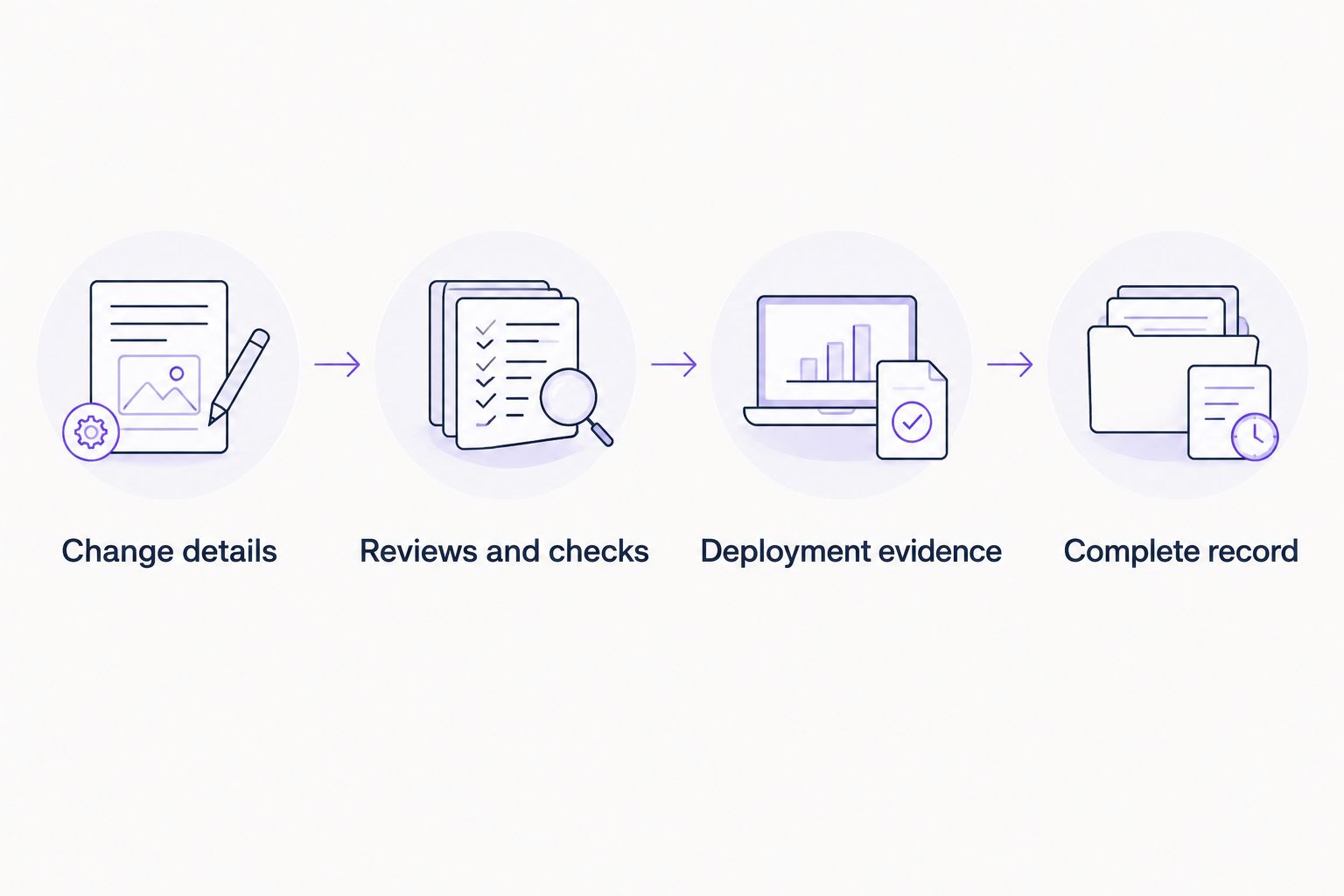
A merge event starts collection; supporting records establish what happened.
For your 2026 evidence schema, preserve timestamps in UTC and retain the original source identifiers. Give each record an owner who can explain the change or resolve an exception.
Keep evidence collection read-only wherever possible. Use the minimum permissions required to retrieve your selected records, and separate those permissions from access used to administer repository rules.
An evidence platform does not remove the need to define this mapping. OneClickComply provides SOC 2 compliance automation; verify the supported ingestion method before choosing it as the destination for this custom workflow.
Validation and reconciliation
- Test 3 sample changes. Use an ordinary approved merge, a pull request closed without merging, and a permitted emergency or bypass change. Confirm that the receiver classifies each correctly.
- Inspect record completeness. Check identities, timestamps, approvals, required checks, deployment linkage and the control mapping. Compare the stored record with the original GitHub activity.
- Test repeated delivery. Redeliver an event from Recent Deliveries. Confirm that the receiver processes it safely without duplicating the change record.
- Backfill the audit period. Query merged pull requests within the agreed boundaries and retrieve their supporting records. Separate merge dates from deployment dates so your population matches the control being tested.
- Schedule reconciliation. As a starting configuration, run 1 reconciliation job per day to compare in-scope merged changes with stored records. Adjust that schedule to your change volume and evidence requirements.
Expected result: Your pilot catches incomplete records, rejects irrelevant closures and survives repeated delivery. Reconciliation identifies changes missing from the evidence library.
Do not rely on automatic webhook retries to restore completeness. Keep an explicit retry queue for processing failures and a reconciliation job for events that never reached it.
Before expanding the 2026 rollout, review the pilot with your engineering owner and auditor. Resolve disagreements about the change population now, not during sample selection.
Capture evidence whenever a pull request is updated
Merged-change collection answers what entered the main change path. Review-event collection answers how approval developed before the merge.
Use the Pull request reviews events already selected to preserve review activity as it happens. Keep an evolving record for each open pull request, then assemble the final evidence record when it merges.
| Workflow | Best for | Advantage | Limitation |
|---|---|---|---|
| Merged-change collection | A defined population of completed changes | Clear inclusion point and straightforward reconciliation | Requires retrieval of supporting review history |
| Review-event collection | Tracking approval changes before merge | Preserves review decisions as events occur | Captures activity that never becomes a merged change |
For the review variant, validate signatures and repository scope exactly as you do for merge events. Store each review event with its identifier, action and timestamp, then associate it with the pull request.
Use the merge record as the completed change record, not the latest approval notification. A later commit, dismissed review or changed check result can alter the evidence you need to retain.
Both variants need historical backfill. Neither webhook configuration reconstructs events that happened before it was enabled.
Troubleshooting
No event reaches the receiver
Check that the webhook is active, the selected event covers the action and the endpoint is reachable over HTTPS. Inspect Recent Deliveries for the response and delivery details, then fix the endpoint before redelivering.
Signature validation fails
Check that both sides use the same secret. Validate against the exact raw request body before JSON parsing; parsing and serialising it again can change the bytes used for validation.
Approvals or checks are missing
Check credential permissions and access to the specific private repository. Confirm that your retrieval code handles pagination and requests the relevant revision, then leave the record incomplete until the missing data is resolved.
Stored records appear more than once
Separate event identity from change identity. Deduplicate deliveries using the delivery identifier, and update the existing repository-and-pull-request record when a new supporting event arrives.
A merged change has no deployment record
Check whether deployment happens outside GitHub or uses a build artifact rather than the merge commit directly. Collect evidence from that system and preserve the artifact relationship; do not label the merge itself as production deployment.
Customise your workflow
Expand repository coverage only after the pilot produces complete, explainable evidence. Reuse the record structure, but document different branch, approval and deployment paths rather than forcing every team into one pattern.
Add exception ownership, credential-expiry monitoring and evidence-access reviews. Keep source code and sensitive content out of the evidence library unless they are necessary for the audit request.
For the broader collection model, use the guide to automate evidence collection for audits. Apply the same controls to other evidence sources: clear scope, source identity, collection timestamps and reconciliation.
When evaluating OneClickComply for SOC 2 compliance management, check how your records enter the platform, how exceptions remain visible and how evidence is exported for audit review. Automation handles collection tasks; your team still owns the control and its exceptions.
Frequently asked questions
One last thing
An approval is not the same as approval of the code that shipped. Preserve the relationship between the reviewed revision, successful checks and deployed artifact; that relationship makes the record useful.
For your 2026 workflow, prioritise that traceability over collecting more screenshots. Seriously Simple Cyber Compliance.