
Yes. A spreadsheet is enough for an ISO 27001 risk register in 2026 if you control access, apply a consistent assessment method, assign risk owners and retain evidence of treatment and approval. ISO 27001 does not require dedicated risk software, but a completed workbook alone does not demonstrate that you manage risk effectively.
Is a spreadsheet enough for ISO 27001 risk registers?
A spreadsheet is acceptable; an unmanaged risk process is not. Your choice must support repeatable assessments, accountable decisions and records that demonstrate what happened.
The comparison below separates the file format from the work around it. Start with a clear method for building a cyber security risk register, then choose how to maintain it.
| Decision point | Spreadsheet | Dedicated risk software |
|---|---|---|
| Best for | A process your owners can maintain through controlled manual work | A process that needs structured coordination across owners and evidence |
| Assessment method | You define scales, formulas and instructions | Check whether the system supports your method without distorting it |
| Ownership | Named fields supported by assigned responsibilities | Check assignment, reassignment and escalation features |
| Evidence | References to controlled records stored elsewhere | Check evidence linking, permissions and export options |
| Approvals | Retained decisions in the workbook or another controlled record | Check whether approvals retain approver, date and decision |
| Main advantage | Flexible structure that your team can inspect directly | Workflow features can reduce manual coordination |
| Main limitation | You must maintain the surrounding controls yourself | Configuration and ongoing ownership remain necessary |
Neither option earns certification by itself. An auditor assesses your management system and its implementation, not whether your risk register looks sophisticated.
Why this matters
Your register connects security concerns to business decisions. It should explain what matters, who owns it, what you will do and why the remaining exposure is acceptable.
A neat dashboard cannot repair an unclear assessment method. Equally, a plain workbook can support a sound process when you maintain the decisions and evidence behind every entry.
For your 2026 programme, judge the approach by whether another authorised person can follow the reasoning without asking the spreadsheet's creator to explain it.
What does ISO 27001 actually require?
ISO/IEC 27001 sets requirements for risk assessment, risk treatment and documented information. It does not prescribe a particular spreadsheet template or software product.
The relevant requirements include:
- Clause 6.1.2 — risk assessment: establish risk criteria, identify information security risks and owners, analyse risks and evaluate them consistently.
- Clause 6.1.3 — risk treatment: select treatment options, determine necessary controls, prepare a treatment plan and obtain risk-owner approval of the plan and acceptance of residual risk.
- Clause 7.5 — documented information: control the information your management system requires, including access, changes and retention as applicable.
- Clauses 8.2 and 8.3 — operation: perform risk assessments at planned intervals or when significant changes require them, implement treatment and retain documented results.
These requirements provide the comparison criteria. A workbook needs supporting arrangements where it cannot handle the work itself; software needs configuration and people who use it properly.
Do not confuse the register with the Statement of Applicability. They serve connected but different purposes: the register records your risks and decisions, while the Statement of Applicability documents necessary controls, inclusion justifications, implementation status and exclusions from Annex A.
When should you keep a spreadsheet?
Best for: teams that can maintain a controlled register without losing decisions, evidence or accountability. Keep the spreadsheet when the process works in practice, not simply because everyone recognises the format.
A spreadsheet gives you direct control over fields and calculations. You can adapt the structure to your assessment method and inspect the logic without translating it into a vendor's workflow.
That flexibility also creates work. Protect formulas, define permitted values and control changes to the assessment scales; otherwise, an innocent edit can change how you prioritise risks.
Before keeping the workbook, confirm that you can:
- Identify the authoritative version and prevent uncontrolled copies becoming working registers.
- Explain each risk rating using documented assessment criteria.
- Name the risk owner and the person responsible for each treatment action.
- Retrieve treatment evidence and retained approvals.
- Show when a review occurred and what changed.
- Continue the process when the usual register administrator is absent.
Keep the spreadsheet if these controls operate reliably. Do not replace a working process solely to make the register look more formal.
When should you move to risk software?
Best for: teams whose risk process depends on repeated chasing, disconnected evidence or difficult handovers. Move when those coordination problems prevent you from maintaining reliable records.
The strongest reason to change is a specific operational failure. Examples include treatment actions marked complete without evidence, approvals buried in messages or different teams editing incompatible copies.
Software can bring tasks, records and review activity into a structured workflow. Its limitation is equally clear: features do not guarantee that your risk descriptions, ratings or acceptance decisions are sound.
For a 2026 selection, ask vendors to demonstrate your actual process:
- Record a risk using your assessment criteria.
- Assign ownership and a treatment action.
- Attach supporting evidence with suitable access restrictions.
- Retain the approval and residual-risk decision.
- Export the records you need to retain.
Choose software only after the demonstration resolves your stated problem. A long feature list is not evidence that the platform fits your operating model.
Why the right choice varies
The spreadsheet-versus-software decision depends on how your risk process operates. Review these factors against your current workflow rather than using an arbitrary employee or risk-count threshold.
- Assessment consistency: decide whether owners can apply the same criteria without informal explanations or competing scoring methods.
- Ownership: consider how you assign risks, hand over responsibilities and distinguish risk owners from treatment-action owners.
- Evidence management: establish whether supporting records remain accessible, current and connected to the relevant decision.
- Change control: check how you preserve previous assessments and explain changes to ratings, treatments and acceptance.
- Review discipline: examine whether planned reviews and significant changes trigger reassessment rather than a last-minute update.
- Retrievability: test whether an authorised colleague can reconstruct a decision without searching across private messages and personal folders.
Use these factors in your 2026 review. A larger register with disciplined ownership can be easier to manage than a short register with unclear decisions.
How do you test whether your spreadsheet still works?
Trace a live risk from identification to its latest review. Use your existing records, not a demonstration entry prepared for the exercise.
Find the decision
Ask the risk owner to explain the risk, its business consequence and the basis for its rating. The explanation should match the recorded criteria, not depend on what someone remembers from a meeting.
Follow the treatment
Find the chosen response, the action owner and the supporting evidence. Distinguish an action that someone scheduled from a control they implemented and checked.
Reconstruct the approval
Identify who approved the treatment plan and accepted the residual risk. Retain the decision in a controlled record; a status cell without supporting context does not explain the approval.
Repeat without the administrator
Ask another authorised colleague to retrieve the same records. If the process depends on the administrator interpreting filenames or private messages, fix that dependency before adding more risks.
Use the results to separate configuration problems from tool limitations. Missing owners need an ownership decision; they do not automatically need a platform migration.
How should penetration test findings enter the register?
A technical finding and a business risk are not interchangeable. Assess what the finding means within your scope before creating a new register entry or changing an existing one.
For example, a weakness affecting access to customer information needs context about exposure, existing safeguards and business consequences. Copying a technical severity label into your business risk score skips that assessment.
When managing penetration test findings, link remediation work to the relevant risk and retain verification evidence before recording the treatment as complete. Closing a task does not establish that the underlying exposure has been reduced.
Keep the following distinctions visible:
- Finding: the observed technical weakness.
- Risk: the potential information security consequence in your business context.
- Treatment: the chosen response and assigned work.
- Verification: evidence that the change addresses the weakness.
- Acceptance: the risk owner's decision about what remains.
A spreadsheet can reference these records. Software can organise the relationships when it supports the required workflow, but neither format removes the need to assess the finding properly.
How do you move without losing your risk history?
Preserve the reasoning, not just the latest rows. Your migration should retain the connection between assessments, treatments, evidence and approvals.
Use this sequence:
- Clean records. Remove duplicate entries and clarify vague descriptions without erasing their history.
- Confirm owners. Resolve missing responsibilities before importing unresolved work.
- Map fields. Preserve assessment criteria, treatment status, evidence references and acceptance decisions.
- Test records. Check a representative selection against the source, including attachments and permissions.
- Archive source. Retain the previous register under your document-control arrangements and identify the new authoritative record.
Do not change scoring scales silently during migration. If you adopt a new method, explain the change and reassess affected risks instead of treating converted scores as equivalent.
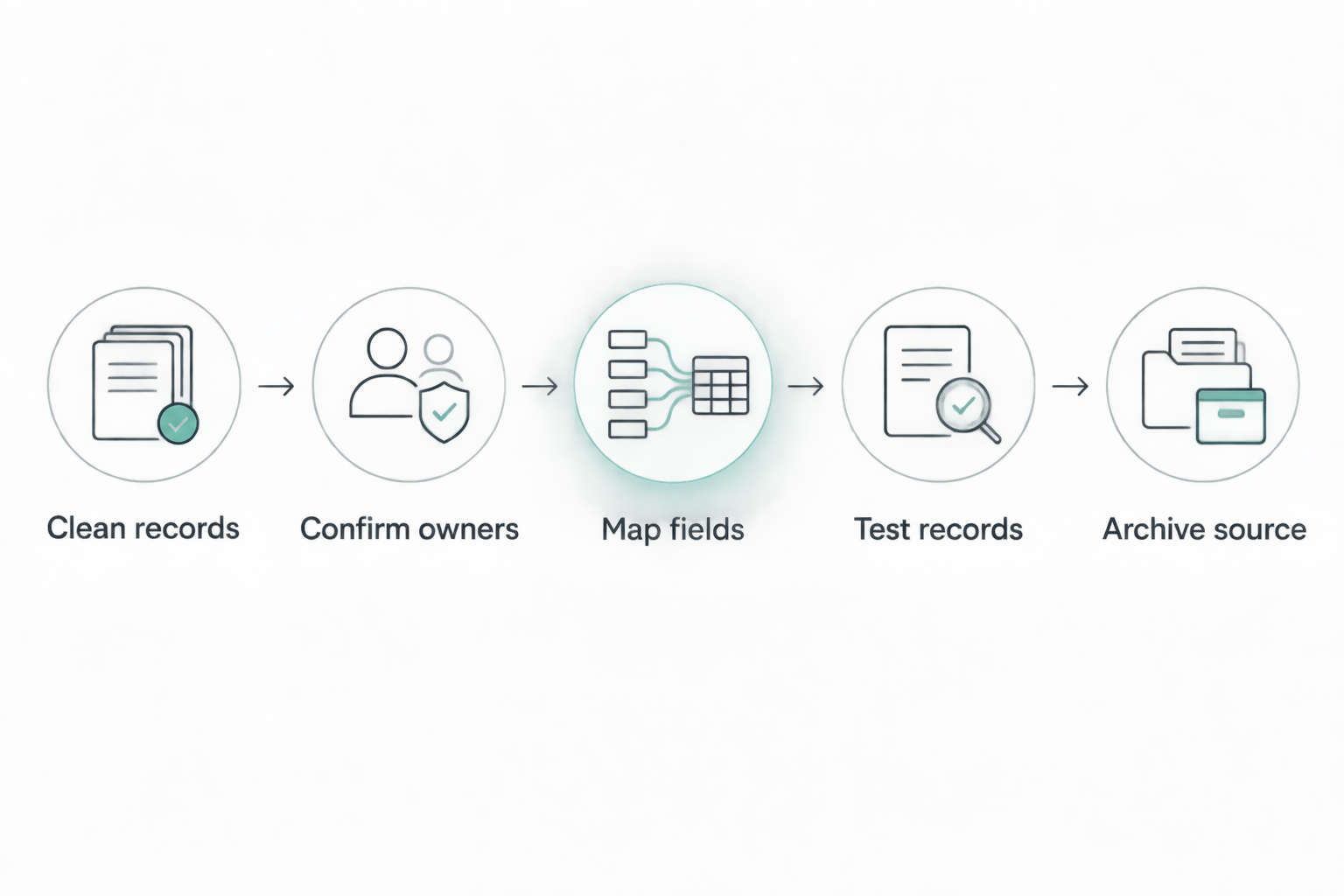
Preserve assessment history and approvals when you move the register.
Where does compliance automation fit?
OneClickComply is best for growing businesses seeking ISO 27001 compliance automation rather than a standalone spreadsheet. The platform manages risk, generates policies and auto-remediates security controls.
OneClickComply connects this choice to a broader compliance programme rather than treating the risk register as an isolated document. That makes the relevant question whether you need those wider functions alongside risk management.
The boundary remains clear: OneClickComply does not remove your responsibility to define assessment criteria, assign owners or approve risk decisions. Confirm that its risk workflow fits your method before replacing your existing register.
Frequently asked questions
One last thing
Test a risk marked as accepted, not just an open treatment action. Find the recorded rationale, the authorised owner and the evidence supporting the decision.
For 2026, that is a practical test of either format: can you explain why the remaining risk is acceptable today? Fix the decision process first, then automate the work around it.
Seriously Simple Cyber Compliance.