
Instead of manually exporting Okta records for every audit, build an Okta compliance evidence integration that collects access changes, checks current permissions and records review decisions. This 2026 workflow uses a read-only collector and an evidence repository; it does not assume a native connector between Okta and your compliance platform.
Why this matters
An access list shows who has permissions now. It does not explain who approved those permissions, when they changed or whether a reviewer challenged them.
Continuous access control evidence needs three things: current state, change history and a recorded decision. Okta supplies identity and access records. Your workflow must connect those records to the control owner, approval and review outcome.
OneClickComply provides compliance automation, policy generation and risk management. Treat the Okta collection method as a separate implementation decision: confirm supported ingestion, authentication and evidence mapping before building it.
For your 2026 evidence plan, define what each record proves. A successful sign-in proves an authentication event occurred; it does not prove every permission held by that user was appropriate.
Before you start
- Access and materials: Have an authorised Okta administrator, an approved collector runtime, protected credential storage and an evidence destination with restricted access. Prepare your in-scope applications, control owners and access policy.
- Receiving method: Confirm whether your destination accepts API ingestion, structured file imports or attachments. Agree the record format and retention rules before collecting personal data.
- The gotcha: System Log events are not a complete access inventory. Pair change events with current-state collection, and check application-side permissions where Okta does not hold the full entitlement record.
Use a dedicated collection identity. Grant only the read permissions required for the records you intend to collect, and keep remediation credentials out of this workflow.
Choose the collection pattern
Both patterns below need an owner and a way to detect collection failures. Choose by the control you need to evidence, not by which connection is easiest to create.
| Collection pattern | Best for | Advantage | Limitation |
|---|---|---|---|
| Scheduled collection | Periodic access reviews and baseline inventories | Captures a repeatable view of current access | Changes between snapshots need separate event collection |
| Event-led collection with reconciliation | Tracking access changes between reviews | Connects individual changes to follow-up actions | Events alone do not establish the full current access state |
Use event-led collection with scheduled reconciliation when you need both change history and current access evidence. Start with scheduled collection when your immediate task is establishing a reliable baseline.
Evidence scope and baseline
Define the evidence contract before you configure the connection. This stops a successful data transfer being mistaken for a working control.
- Write the control statement in plain English. For example: access to in-scope applications requires approval, and access owners review permissions against business need.
- List the applications, groups and privileged roles included. Identify local application accounts and other access paths outside Okta.
- Assign a control owner and a collection owner. The control owner decides whether access is appropriate; the collection owner keeps records arriving.
- Define the evidence fields: source organisation, stable user identifier, application or group identifier, event time, collection time, record type and review reference.
- Capture an initial inventory of users, relevant group memberships, application assignments and administrative access using the appropriate Okta read APIs.
- Compare a sample against Directory, People and Groups in the Okta Admin Console. Inspect application assignments under Applications as part of that check.
Do not use email addresses as your only record keys. Keep the stable source identifiers so a name or address change does not split one person’s history.
Expected result: You have a dated baseline, a defined population and named owners. A reviewer can tell what the evidence covers without asking the person who built the collector.
Set a collection schedule
For an initial 2026 implementation, use these as proposed operating settings, not certification requirements:
- Run a current-state reconciliation every 24 hours.
- Re-read a 15-minute overlap when restarting event collection, then remove duplicates by event identifier.
- Validate the workflow with 3 test events: an approved assignment, an approved removal and an approved group membership change.
Adjust those settings to your risk, event volume and documented review requirements. Never label a daily snapshot as real-time monitoring.
Read-only source connection
Separate authentication from control evaluation. A credential that reads evidence should not also grant or remove access.
- Create an approved service-to-service authentication method for the collector. For OAuth-based collection, grant only the scopes needed, such as
okta.logs.read,okta.users.read,okta.groups.readandokta.apps.readwhere those records are in scope. - Assign the service identity the necessary administrative permissions. OAuth scopes and administrative authority must both allow the intended operation.
- Store authentication material in your approved secret store. Keep it out of source code, evidence attachments and execution logs.
- Test each required read operation independently. Verify users, memberships, assignments and System Log collection rather than accepting one successful request as a complete connection test.
- Open Reports, then System Log, in the Okta Admin Console. Compare a known event’s time, actor, target and outcome with the collector’s copy.
- Record the credential owner, approved permissions and rotation procedure in your operational documentation.
Check the service identity’s permissions after configuration changes. An apparently healthy runtime can still lose access to one evidence source.
Expected result: The collector reads the agreed records without write permissions. A known System Log event matches its source, and secrets do not appear in stored evidence.
Collection, normalisation and storage
Preserve the source record before turning it into a compliance result. A summary without its underlying event is harder to investigate or challenge.
- Collect System Log records using pagination. Follow the returned pagination information rather than assuming the first response contains every matching event.
- Preserve source fields such as
uuid,published,eventType,actor,targetandoutcome, together with the source organisation identifier. - Store a checkpoint only after the destination has durably accepted the records. On restart, re-read the overlap window and deduplicate using the organisation identifier and event
uuid. - Collect current-state records separately. Store the snapshot time and collection status so reviewers can distinguish an empty result from a failed request.
- Keep original records alongside normalised evidence. Link each normalised item back to its source record and collection run.
- Restrict access to the evidence repository. Apply your retention policy and avoid copying unnecessary personal data into broad-access review tasks.
The collection sequence is: Read records, Store originals, Map controls, Review exceptions. Each stage needs a clear success condition before the workflow advances.
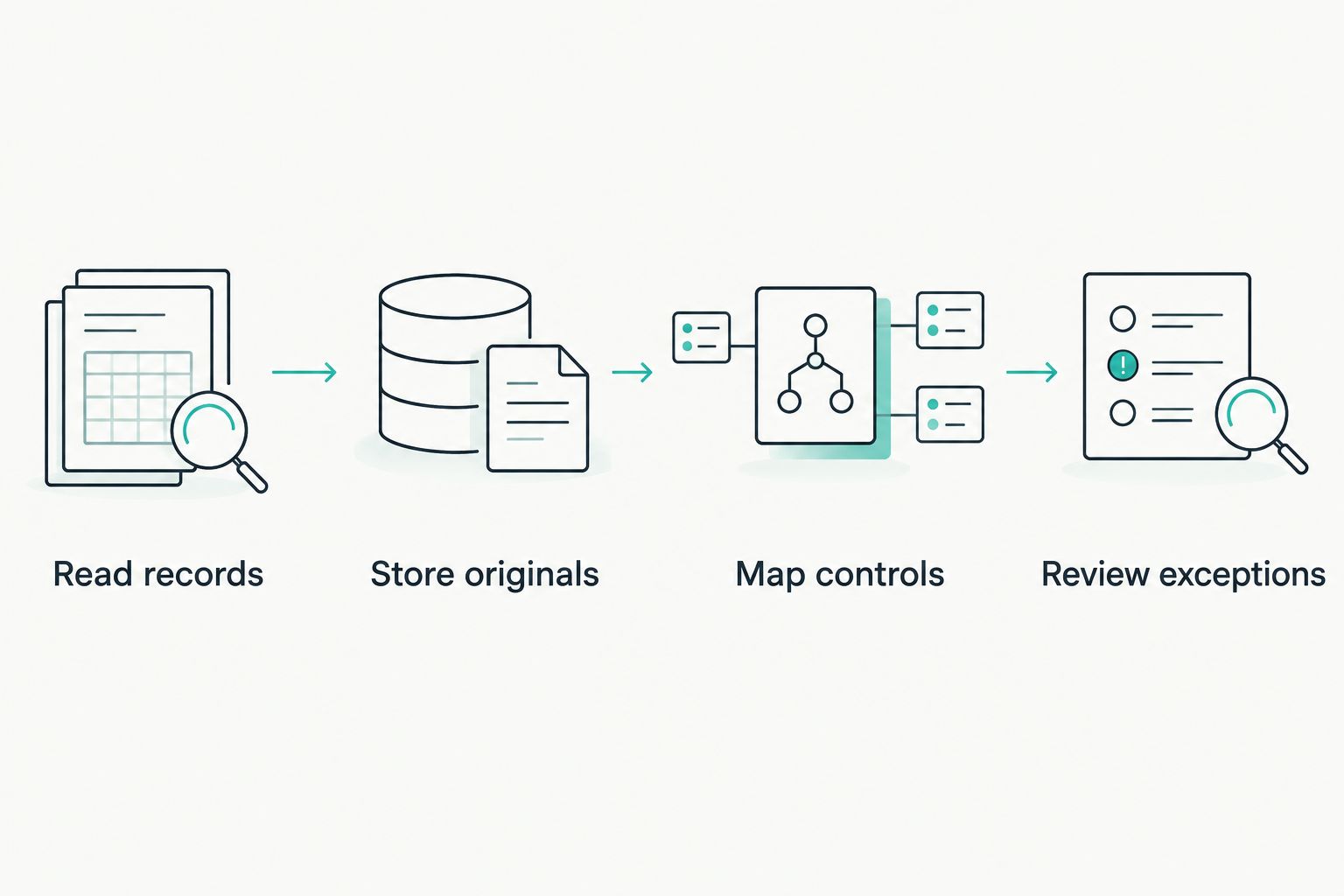
Keep original records before creating control summaries or review tasks.
Expected result: Replaying the same collection window does not create duplicate evidence. A failed destination write does not advance the checkpoint and silently lose records.
Control mapping and review queue
Turn collected records into questions an owner can answer. Do not mark a control effective simply because records arrived.
- Map each record type to a specific assertion. An assignment record supports who has access; an approval record supports authorisation; a removal event supports that a change occurred.
- Attach the relevant policy and approval reference. Where approval sits outside Okta, join the records using stable identifiers and a documented matching rule.
- Create exceptions for missing approvals, unexplained privileged access and mismatches between expected and observed assignments. Route uncertain matches for review rather than treating them as confirmed failures.
- Give each exception an owner, due date and recorded disposition. Distinguish access removed, access justified and investigation still open.
- Re-collect the affected state after remediation. Preserve the original finding, the action taken and the verification result.
- Save the review decision with its reviewer and timestamp. Keep rejected access and approved exceptions visible in the audit history.
For your 2026 review, distinguish approval policy from approval execution. Automated role-based access approvals still need recorded eligibility rules and an exception route; a role match alone does not explain why a person belongs in that role.
Expected result: A reviewer can trace access from request to approval, assignment, review and removal where applicable. Collection health and control effectiveness remain separate results.
OneClickComply supports compliance automation and risk management. Keep your implementation boundary explicit: confirm how these records enter the platform and how reviewers access the underlying evidence before treating the workflow as operational.
Variant: collect evidence whenever access changes
Use the same evidence model for change-led reviews. This variant supplements the scheduled baseline rather than replacing it.
- Select the relevant System Log event types for assignments, removals and group membership changes. Confirm each selection against a controlled example in your own organisation.
- Poll for those events with a saved checkpoint. Use an event delivery mechanism only after confirming that it supports the event types you need.
- When a relevant event arrives, collect the affected user’s current access context. Preserve the event and the subsequent state as separate records.
- Match the change to its approval. Open a review task when approval is absent or the change falls outside your documented rules.
- Reconcile against the full scheduled inventory. Investigate changes that appear in one collection route but not the other.
This pattern is best for investigating changes between review dates. Its limitation is coverage: an Okta event does not establish that an application removed a separate local account or invalidated every existing session.
For 2026 acceptance testing, use authorised test accounts and reversible changes. Record the expected event, observed event, evidence destination and reviewer outcome for each test.
Troubleshooting
Authentication succeeds, but records are missing
Check both OAuth scopes and the service identity’s administrative permissions. Then test the specific record type that failed; access to user records does not establish access to every other source.
Check collection filters as well. A narrow application or event filter can exclude valid records while the request still succeeds.
Repeated runs create duplicate evidence
Use the source organisation identifier and event uuid as the event deduplication key. Do not deduplicate by timestamp alone, because separate events can share a timestamp.
Keep overlapping reads. Fix duplicate handling rather than removing the overlap that protects restart recovery.
Evidence has unexplained time gaps
Check pagination, checkpoint updates and failed collection runs. Respect rate-limit responses and retry guidance; do not repeatedly restart the same request without controlling retries.
Backfill available records where possible. Record any unrecoverable gap explicitly instead of presenting the period as fully monitored.
A removed user still appears to have access
Distinguish Okta assignment state from application-side access. Check provisioning results, local accounts and the application’s session behaviour before closing the removal task.
Keep the exception open until the relevant application-side check supports closure. An identity change is not evidence of every downstream effect.
The dashboard is green, but reviewers cannot verify it
Check whether the summary links to source records, collection times and review decisions. A pass label without supporting evidence is a reporting output, not a complete review record.
Give reviewers access to the necessary evidence without exposing credentials or unrelated personal data.
Customise your workflow
Expand only after the first control passes its acceptance tests. Add privileged access reviews, leaver checks or application-specific entitlement checks as separate evidence types with their own owners.
Keep evidence collection read-only even when you add automated remediation elsewhere. Separate permissions make it easier to inspect what changed and which process changed it.
OneClickComply’s compliance automation includes security control remediation, policy generation and risk management. Those capabilities do not remove the need to define your Okta collection scope, ingestion method and review responsibilities.
Discuss the supported evidence route through the contact page before committing to a connector design. Bring your source list, record format, retention requirements and acceptance tests.
Frequently asked questions
One last thing
Test a stopped collector, not just a successful run. Confirm that monitoring detects the interruption and that recovery preserves the evidence history.
A quiet review queue can mean no exceptions. It can also mean no collection. Prove the difference before relying on the result.
Seriously Simple Cyber Compliance.