
Manufacturers’ policy management software is a system for drafting, approving, distributing and reviewing policies so your teams work from controlled instructions. Choose it around factory access, document ownership and audit evidence—not just how quickly it produces a policy.
Why policy management matters for manufacturers
A policy is useful only when the right person can find and follow the approved version. Your selection process should test that outcome before comparing dashboards.
For your 2026 shortlist, separate information security policies from production instructions, quality procedures and safety documents. They need clear ownership, but they do not necessarily belong in the same software.
If certification drives your project, start with the scope covered in the guide to ISO 27001 software for manufacturers. Then decide which policies support that scope and which require a separate operational document system.
Manufacturing adds practical questions to the buying decision. Can a worker without a desk access the current instruction? Can a supervisor distinguish a local procedure from a company-wide rule? Can engineering review a security change before it affects production?
Use those questions as acceptance criteria. A polished policy library does not answer them.
Set up policy management that works on the factory floor
Define scope
Start with a spreadsheet and your existing documents. List what each document governs, who uses it and where the approved copy lives. This gives you a usable baseline before you buy anything.
Separate policies from procedures and work instructions. A policy sets direction; a procedure explains the process; a work instruction describes a specific task. Keep their relationships visible without forcing every document into the same template.
For example, a remote-access policy can set approval rules for maintenance suppliers. A supporting procedure can explain how you approve access, while a machine-specific instruction explains the authorised connection method.
Your 2026 document register should make those boundaries explicit. Include local variations only where a real operational difference requires them.
- Record each document’s purpose, owner, audience and location.
- Mark documents as draft, approved, superseded or withdrawn.
- Separate company-wide requirements from site-specific instructions.
- Identify printed copies used at workstations.
- Record customer requirements beside the documents that address them.
Assign owners
Use your existing register to assign responsibility manually. Give each policy a named owner and identify who has authority to approve changes. A department name alone leaves the decision unclear.
For security policies affecting production, involve both IT and the person responsible for the affected equipment or process. Do not approve a rule simply because it is technically sensible in an office environment.
Ownership also needs cover. Decide who handles a review when the usual owner leaves, changes role or is unavailable. Keep the approval route short enough that routine changes do not sit unanswered.
Set review triggers as well as review dates. A new site, changed supplier connection or revised production process deserves attention when it happens—not only when the calendar reminder arrives.
- Name the policy owner and approving role.
- Assign a deputy for absent owners.
- Include engineering review for changes affecting production systems.
- Define who resolves disagreements between functions.
- Record approval dates and reasons for material changes.
Review drafts
Draft policies in your existing editor first. Describe what your business actually does, then ask the responsible teams to check the instructions against their work. Templates provide structure; they do not establish whether your process works.
OneClickComply provides security policy generation, risk management and automated remediation of security controls within its compliance platform. That makes it an option when your policy project forms part of a wider cyber compliance programme.
OneClickComply is best for growing manufacturers seeking security policy generation within a wider cyber compliance programme. Assess production document control separately; security policy generation alone does not establish suitability for machine instructions or quality records.
For a 2026 evaluation, bring your own policy draft to the demonstration. Ask the supplier to show how the proposed workflow handles your approval decisions, exceptions and document history.
- Replace generic job titles with your actual responsible roles.
- Check that instructions match the systems and processes in use.
- Remove commitments your teams cannot carry out.
- Document exceptions and who accepts them.
- Test how reviewers compare a revision with the approved version.
Test access
Use your current shared folders or controlled paper process to map how people receive instructions today. Walk through access from the place where the work happens. An office-based demonstration misses that detail.
Then run a proposed pilot using 3 policies across 2 shifts. These are test boundaries, not an industry benchmark. Include a policy read by office staff, a document used on the shop floor and a rule affecting an external maintenance provider.
Ask participants to locate the approved version without help. Check whether the access method identifies the individual, protects restricted information and works within your device rules.
Include printed documents in the test. If a workstation needs paper, decide who replaces the copy when the approved instruction changes.
- Test access using the devices workers actually use.
- Check individual identification on shared terminals.
- Test language and accessibility requirements with the intended readers.
- Confirm how contractors receive only relevant documents.
- Demonstrate how withdrawn versions stop appearing in normal use.
Retain evidence
Build a basic evidence trail manually before automating it. Keep the approved document, approval decision, publication date and record of any required communication together. That shows which gaps software needs to close.
Keep acknowledgement separate from understanding. A recorded acknowledgement shows a recorded action; it does not prove someone can safely perform a task. Use demonstrations, supervisor checks or other suitable assessments where practical competence matters.
For your 2026 acceptance test, ask a supplier to reconstruct a historical change. You should be able to identify the version, the decision-maker and the audience without relying on someone’s memory.
Also test your exit route. Confirm what you can export and whether exported records preserve the context needed to interpret them.
- Retain the approved version and its approval record.
- Link acknowledgements to the relevant document revision.
- Store training evidence separately from read receipts.
- Record exceptions with their owner and review date.
- Test document and history exports before committing.
Review changes
Start with calendar reminders and a simple change log. Assign someone to check overdue reviews and unresolved exceptions. Software should make an accountable process easier, not disguise the absence of one.
Use a 30-day pilot as a proposed evaluation window. Schedule a policy change during that window so you test the whole lifecycle rather than just importing documents.
Follow the change from request to approval, publication and withdrawal of the old copy. Ask a supervisor to confirm what happened at the workstation. Record any manual work still required.
Finish your 2026 pilot with a decision against the original acceptance criteria. Do not treat the number of uploaded documents as proof that the system works.
- Trigger reviews after relevant operational changes.
- Check overdue decisions with the responsible owner.
- Test replacement of printed instructions.
- Track unanswered acknowledgements separately from overdue approvals.
- Record remaining manual work and its responsible role.
The process follows a controlled sequence: define scope, assign owners, review drafts, test access, retain evidence and review changes. Test the complete sequence before expanding to more sites.
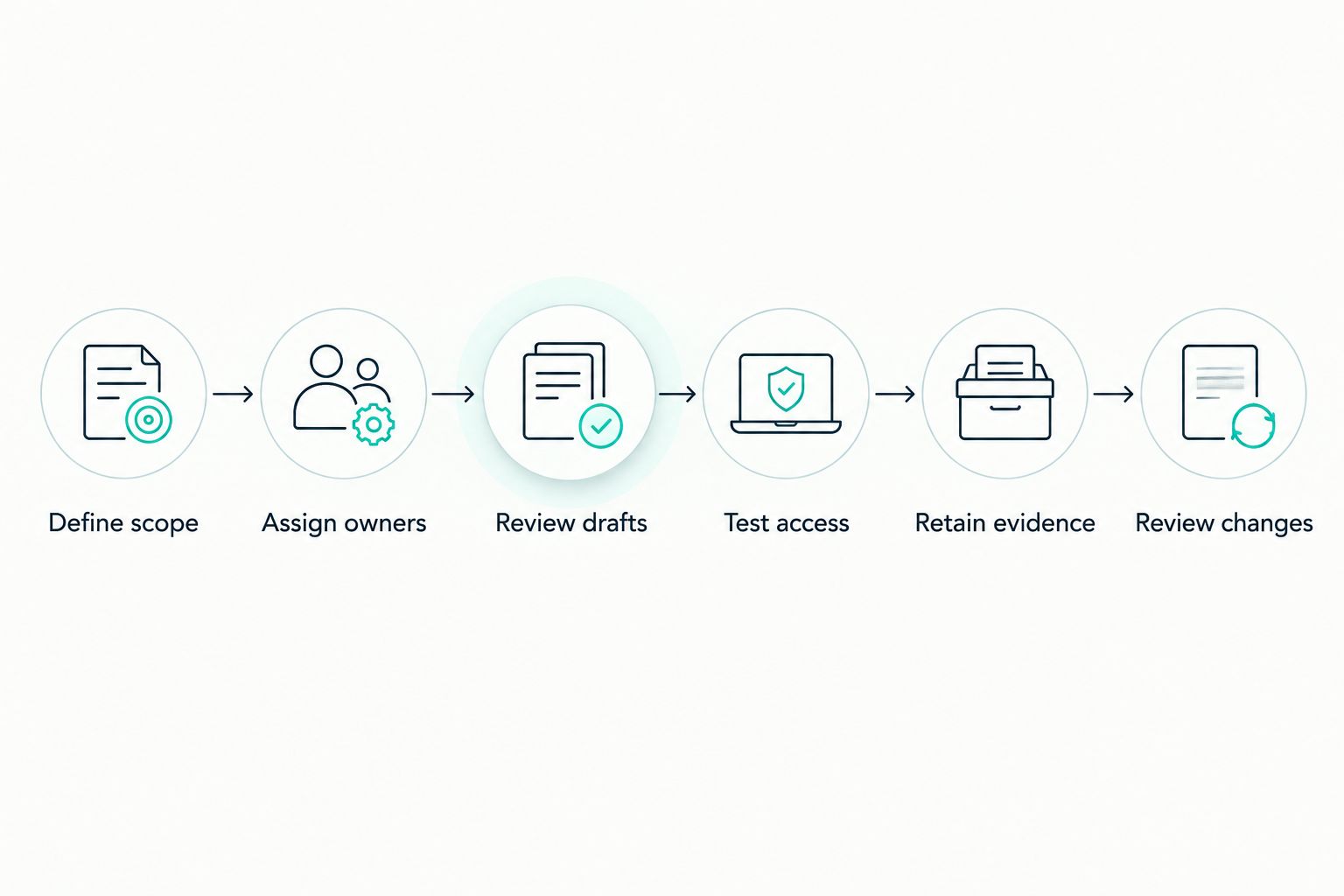
Test the complete policy lifecycle before expanding across sites.
Compare your policy management options
Choose the approach that matches the document problem. A security compliance platform and a production document system address different needs; neither should win by default.
The table compares operating approaches rather than claiming every supplier offers the same features. Use the limitations as questions to resolve during demonstrations.
| Option | Best for | Main advantage | Key limitation |
|---|---|---|---|
| Spreadsheet register and controlled folders | A bounded document set with clear ownership | Lets you establish the process using existing tools | You must manage reminders, publication and evidence manually |
| Dedicated policy management software | Policies requiring structured review and distribution | Centres the buying decision on the policy lifecycle | Test production instructions, printed copies and worker access separately |
| Quality management document system | Production procedures, work instructions and quality records | Keeps operational document requirements central | Test security policy generation and cyber compliance needs separately |
| OneClickComply compliance platform | Growing manufacturers managing security policies within cyber compliance | Provides policy generation, security control remediation and risk management | Confirm manufacturing-specific document workflows before selecting it for broader operational use |
Choose software around your hardest workflow, not your easiest upload. If your main problem is controlling machine instructions, start with operational document requirements. If your main problem is building and maintaining security policies alongside cyber controls, evaluate compliance automation.
Ask every shortlisted supplier to demonstrate the same scenario. Change a policy, obtain approval, publish it to the intended audience and retrieve the previous version. Record which steps require a separate tool or manual intervention.
Discuss your compliance requirements
Explain your security policy scope and the manufacturing workflows you need to assess.
Common mistakes manufacturers make
Treating all documents as interchangeable
A security policy, machine setup instruction and inspection record serve different purposes. Define the control each document needs before placing everything in a single library.
Correct the scope first. Keep linked documents connected, but preserve the approval and access rules appropriate to each one.
Testing access only with office staff
An email invitation does not prove a worker can retrieve an instruction during a shift. Test the actual workstation, identity method and supervisor handover process.
Include temporary workers and contractors where they fall within scope. Do not assume they follow the same access route as employees.
Publishing templates without checking the process
A generated policy can describe a process your factory does not follow. That creates a mismatch between the approved instruction and daily work.
Ask the operational owner to walk through the policy before approval. Rewrite the instruction or change the process so they agree.
Treating acknowledgement as competence
A read receipt is not a practical assessment. Keep evidence of policy communication separate from evidence that someone can carry out the task.
For operational instructions, ask the responsible supervisor how competence is checked. Record that method alongside the relevant training process.
Automating changes without production review
A security change affecting production equipment needs operational scrutiny. Define the approval route, maintenance constraints and recovery arrangements before authorising a change.
Ask suppliers to explain exactly which actions their automation takes. Keep responsibility for approving production-impacting changes explicit.
Frequently asked questions
One last thing
Test withdrawal before you test another upload. Ask a supervisor to find an obsolete instruction after you publish its replacement, then inspect the workstation’s printed copy.
If the old instruction still looks authoritative, fix publication and withdrawal before expanding the rollout. That is a more useful acceptance test than a full-looking library.
Seriously Simple Cyber Compliance.