
Instead of manually chasing sales owners for questionnaire details, use Salesforce security questionnaire automation to turn a ready opportunity into an assigned security review. Start with a Salesforce Flow that creates the hand-off task, then connect drafting and status updates only after you verify the receiving system’s integration requirements.
Why this matters
A sales opportunity identifies the deal. It does not prove that a security answer is accurate or approved for disclosure. Your workflow must connect those responsibilities without treating a change in deal stage as permission to send confidential material.
OneClickComply is best for growing businesses that need compliance automation across policies, security controls, risk and trust centres. Use OneClickComply for that compliance context; confirm Salesforce connectivity and questionnaire-specific functions separately before designing around them.
For your 2026 workflow, separate three outcomes: a request reaches security, an answer receives approval, and sales receives permission to share it. Automate the hand-offs, not the decision that an unsupported answer is true.
Before you start
- Salesforce access: Have an administrator prepare the fields and permissions, plus a sandbox or other suitable test environment. Confirm that your Salesforce configuration supports the Flow features you intend to use.
- Request materials: Prepare a questionnaire location, customer deadline, product scope, approved answer library and named security reviewer. Store sensitive attachments in an access-controlled location.
- The integration gotcha: Creating a Salesforce task does not create or complete a questionnaire in another platform. Verify the destination’s supported connection, authentication, request format and return identifiers before adding that hand-off.
Choose your initial implementation deliberately. These are workflow options, not claims that a particular compliance platform supports a connector.
| Workflow option | Best for | Advantage | Limitation |
|---|---|---|---|
| Salesforce Flow task hand-off | Teams establishing a repeatable intake process | Creates an assigned review task from opportunity conditions | Does not draft answers or transfer questionnaire content |
| Connected questionnaire workflow | Teams with a verified receiving-system interface | Can pass request details and return progress | Requires integration configuration, permissions and failure handling |
| Controlled manual intake | Exceptions that need investigation | Lets security resolve unclear scope before processing | Requires someone to transfer and track the request |
Start with the task hand-off. Add a connected questionnaire workflow after the intake rules work reliably.
Request fields and ownership
Create a clear intake record before building the trigger. The field names below are proposed custom labels for your organisation, not existing Salesforce questionnaire features.
- Ask your administrator to add an Opportunity checkbox labelled Security Review Required.
- Add fields labelled Questionnaire Location, Questionnaire Due Date and Security Review Owner. Use a URL, date and user lookup respectively.
- Add a checkbox labelled Security Request Created. Reserve changes to this field for the workflow and authorised administrators.
- Add a picklist labelled Security Review Status. Define the proposed values Requested, In review, Approved and Needs information.
- Decide who maintains each value. Sales owns request details; security owns answer approval and disclosure decisions.
Do not use the opportunity owner as the security reviewer by default. The deal owner needs visibility, but the reviewer needs authority to check the answers.
For the 2026 rollout, document what makes a request ready: a valid questionnaire location, a deadline and a named reviewer. An opportunity reaching a particular stage is not enough.
Expected result: Your test opportunity contains the questionnaire location, deadline and security owner. The request-created checkbox remains unticked until the hand-off succeeds.
Salesforce trigger configuration
Use an after-save record-triggered flow to create the related task. Keep the first version focused on intake rather than external delivery.
- Open Setup, search for Flows, then select Flows and New Flow.
- Select Record-Triggered Flow and choose Create.
- Set Object to Opportunity. Under Trigger the Flow When, select A record is created or updated.
- Under Set Entry Conditions, select All Conditions Are Met (AND). Require Security Review Required to equal true and Security Request Created to equal false.
- Add readiness conditions so the questionnaire location, due date and security owner are not blank. Select the custom fields your administrator created rather than typing guessed field identifiers.
- Under When to Run the Flow for Updated Records, select Only when a record is updated to meet the condition requirements.
- Under Optimize the Flow for, select Actions and Related Records. Select Done.
These entry rules prevent unrelated opportunity edits from starting another review. The request-created checkbox supplies an additional guard once the task exists.
Do not add a second flow with overlapping intake conditions. Assign one automation responsibility for creating the request, even if other flows maintain sales data.
Expected result: A complete opportunity qualifies when security review becomes required. A record without a deadline or reviewer does not qualify.
Task creation and request tracking
Create the internal review task first. This baseline works without asserting that your questionnaire platform has a native Salesforce connection.
- Add a Create Records element. Give it a descriptive label such as Create Security Review Task.
- Select Task as the object to create. Set Subject to a clear request title, such as Security questionnaire review.
- Map Assigned To ID to the user selected in Security Review Owner. Map Related To ID to the triggering Opportunity’s Id.
- Map Due Date Only to Questionnaire Due Date. Include the questionnaire location and product scope in Description, without copying confidential answers into the task.
- Add Update Records after successful task creation. Update the triggering Opportunity: set Security Request Created to true and Security Review Status to Requested.
- Add fault handling to the record operations. Route failures to an administrator through an approved notification mechanism, and leave failed requests eligible for controlled recovery.
- Select Save. Name the flow clearly, then use Debug with a test record before selecting Activate in the intended environment.
Expected result: A qualifying opportunity produces an assigned task with the correct deadline and record relationship. The opportunity records that the hand-off exists.
Keep the process visible through these named checkpoints: Ready request, Assigned review, Approved response, Sales update. Approval remains a separate decision after task creation.
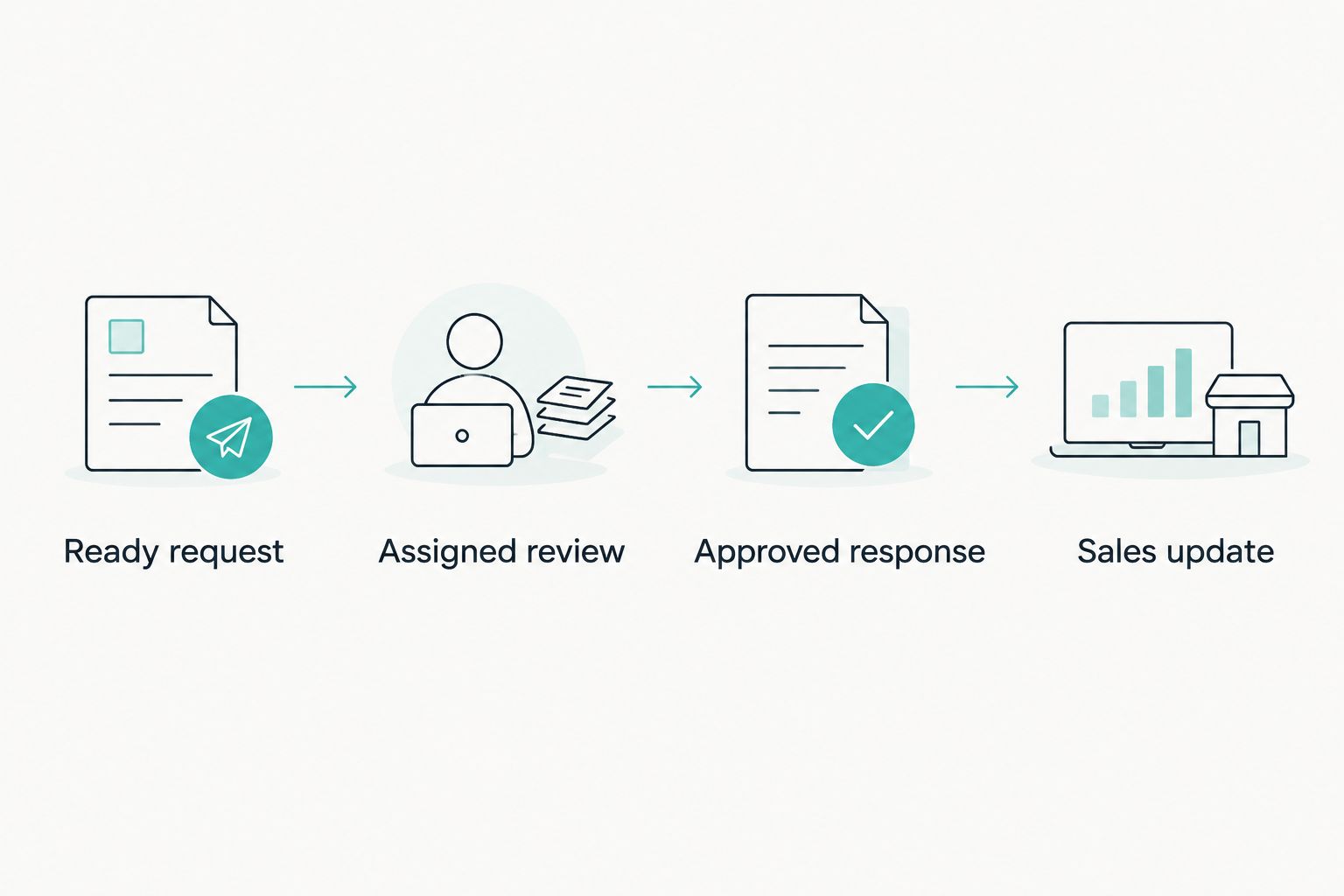
Creating the review task starts the process; approval controls what sales can share.
Approval controls and acceptance tests
Keep draft preparation inside the authorised review process. A completed task is not proof that every answer is approved, and an approved answer is not permission to share every supporting document.
- Require reviewers to match each answer to the relevant product, customer scope and supporting evidence.
- Route missing or conflicting answers to Needs information. Do not replace uncertainty with an affirmative answer.
- Record the reviewer, approval date and response version in your chosen review system. Return only the necessary status and reference to Salesforce.
- Allow customer delivery only after approval. Keep that delivery action separate from the opportunity intake trigger.
For your 2026 acceptance test, use at least 3 test opportunities: one complete request, one incomplete request and one request already marked as created. This is a recommended test set, not a performance benchmark.
Run 2 consecutive edits against the complete request. Confirm that the second edit does not create another task. Then test 1 failed hand-off by removing a required permission in the test environment and checking the recovery path.
Expected result: Complete requests progress once, incomplete requests stay out, and failures remain visible. No test sends unapproved questionnaire content to a customer.
Update an existing questionnaire when the request changes
A second workflow becomes necessary when sales changes the deadline, product scope or questionnaire version after intake. Update the existing request; do not silently create another one.
For a connected workflow, store the receiving system’s request identifier against the opportunity or a related request record. Use that identifier to find the existing review. The exact fields and actions depend on the verified destination interface.
Configure the update path around meaningful changes:
- A new deadline updates scheduling, not answer approval.
- A revised questionnaire creates a new reviewable response version.
- A changed product scope requires the reviewer to reassess affected answers.
- A closed or withdrawn opportunity prompts a cancellation decision rather than deleting review history.
Reopening an approved response must remove its ready-to-share status until the changed material receives approval. Otherwise, sales sees an approved label attached to content nobody has checked.
Connection permissions and return updates
When assessing AI integration services for Salesforce, require a field-level data map, restricted credentials and a defined return path. The integration needs to identify the correct request and report failure; it does not need unrestricted access to customer records.
Separate processing status from approval status. A receiving system reporting that drafting has finished must not automatically set Security Review Status to Approved.
For the 2026 connected variant, agree which system controls each field before enabling return updates. Salesforce can own the customer deadline while the review system owns approval. Prevent both systems from repeatedly overwriting the same value.
Expected result: Changes reach the existing review, response versions remain distinguishable, and drafting completion never substitutes for security approval.
Troubleshooting
The flow creates duplicate review tasks
Check for overlapping flows and entry rules that run on every opportunity edit. Confirm that successful task creation sets Security Request Created, and retain the updated-record setting that runs only when conditions become satisfied.
For connected requests, add duplicate protection at the receiving end too. Repeating an outbound operation after a timeout must not create another questionnaire simply because Salesforce did not receive the first acknowledgement.
Nothing happens when sales requests a review
Inspect the opportunity’s readiness fields and the flow’s active version. A missing deadline, reviewer or questionnaire location should block the trigger under this design.
Use Debug in the test environment to inspect the path. Do not remove the readiness conditions just to make the flow run; fix the incomplete request.
The task fails to save
Check the assigned user, required Task fields, validation rules and the permissions used by the flow’s execution context. Confirm that the user lookup maps to Assigned To ID, not to an email address or display name.
Read the fault details before retrying. Correct the underlying record or permission issue, then confirm whether a task already exists.
The questionnaire link opens for sales but not security
Check access in the source document system using the reviewer’s account. Salesforce record access does not grant access to an independently stored questionnaire.
Grant the intended reviewer access without making the document public. Store a stable reference rather than a temporary download link.
An old answer appears in a new response
Check the answer’s product scope, evidence source and approval version. A previously accepted answer can still be wrong for a different service or changed control.
Return the affected section to review. Do not treat a matching question as proof that its previous answer remains valid.
Customise your workflow
Expand intake after the baseline passes its tests. Add separate request records when an opportunity needs multiple questionnaires, and keep each response’s deadline, owner and approval history distinct.
OneClickComply’s compliance automation covers policy generation, security-control remediation, risk management and trust centres. Those functions address the underlying compliance work; confirm the supported method for using that material in your questionnaire process.
Do not describe Salesforce intake automation as end-to-end questionnaire completion. The former assigns and tracks work. The latter also requires supported drafting, evidence handling, approval and delivery.
Use the Zapier to no-code compliance automation workflow to extend your planning beyond Salesforce. Verify each connection before enabling it, and keep the same ownership rules across every system.
Frequently asked questions
One last thing
Your most valuable test is an unrelated opportunity edit after the review task already exists. If that edit creates another request or releases an answer, the workflow has crossed a boundary it should preserve.
Make that test part of your 2026 release checklist. Keep OneClickComply’s compliance work, Salesforce request tracking and human approval connected but distinct. Seriously Simple Cyber Compliance.