
Insurance companies’ trust centre software is a controlled hub for sharing security and compliance evidence with the aim of helping partners assess your business. This 2026 guide explains how to protect sensitive documents, separate evidence by entity and choose a workflow that your compliance team can maintain.
Why trust centre software matters for insurance companies
A trust centre should answer a partner’s security questions without exposing information that partner does not need. Start with the documents your own business already shares, rather than filling a portal with everything your compliance team holds.
An insurer, broker and underwriting business need different descriptions of their services and responsibilities. Your evidence should identify the legal entity, systems and activities it covers; a group-level statement is not a substitute for that detail.
For your 2026 shortlist, separate evidence management from evidence presentation. The guide to ISO 27001 software for insurance companies covers the wider compliance workflow behind the documents you share.
A trust centre also has a clear boundary: it presents approved information. It does not make an untested control effective, expand a certificate’s scope or replace a partner’s own assessment.
Build a trust centre your team can maintain
Use the following steps to define your requirements before evaluating software. Each step works with an existing document repository and spreadsheet; automation becomes useful once you know what the process must do.
Define your audience
Start manually. Review a suggested sample of 10 recent requests from customers, brokers, distribution partners or other counterparties, and record what each requester actually needed.
Separate requests about your organisation from requests about a particular service. A partner assessing a claims service needs evidence relevant to that service, not an unexplained collection of documents from across the group.
Build your 2026 requirements around recurring questions. Treat unusual requests as exceptions for review rather than expanding public disclosure to accommodate every possible enquiry.
Best for: insurance teams establishing what their trust centre must answer. The advantage is a focused document set; the limitation is that a small sample will not capture every future request.
- Record the requester’s organisation and business purpose.
- Group questions by service, legal entity and subject.
- Identify documents repeatedly requested together.
- Separate routine questions from specialist reviews.
- Assign an owner to each recurring answer.
Classify your evidence
Use a spreadsheet to list each proposed document, its owner, its scope and its approval status. Do not upload files simply because they already sit in a compliance folder.
Adopt a suggested model of 3 access tiers: public summaries, approved partner documents and restricted review material. These are design choices, not a regulatory prescription; adjust them to your information classification policy.
A high-level security overview belongs in a different category from a detailed penetration test report. Policyholder records, claims files and personal information should not become supporting material for a general security enquiry.
Best for: insurance businesses that need different disclosure levels for different counterparties. Classification gives reviewers a clear decision rule, but your team must maintain it when documents change.
- Public summaries: approve only information suitable for unrestricted disclosure.
- Partner documents: define who can authorise each release.
- Restricted material: require a separate review before sharing.
- Record the entity and service each document covers.
- Remove personal data and unnecessary technical detail.
Connect approved evidence
You can manage approved documents in an existing repository and use a register to track publication. That approach keeps the initial process simple, but every replacement and withdrawal still needs an owner.
OneClickComply is best for growing insurance businesses that want trust centre management alongside compliance automation. OneClickComply combines trust centre management with policy generation, risk management and automated remediation of security controls.
Assess OneClickComply against your actual evidence workflow. Ask the demonstration team to show how your approved material would be managed; do not assume that a particular integration, permission model or approval process is included.
The platform’s broader compliance scope fits teams seeking more than document sharing. If you only need to distribute an occasional approved file, compare that requirement with your existing repository before adopting a wider platform.
- Identify the approved source for each published document.
- Keep drafts separate from released versions.
- Record approval dates and accountable owners.
- Test how replacement documents reach reviewers.
- Confirm which actions still require your team’s approval.
Control partner access
Begin with a written access register. Record who requested information, what you approved and which documents they received; this exposes the decisions software must support.
Then test the proposed platform with realistic insurance scenarios. Use a broker requesting a security summary, a distribution partner reviewing a service and an internal reviewer checking material for a separate group entity.
For your 2026 evaluation, make access withdrawal a required demonstration. Removing a link does not retrieve a document that someone has already downloaded, so your disclosure policy must account for both access and copying.
Best for: insurance groups sharing different evidence with different partners. Controlled access supports deliberate disclosure, but permissions alone cannot govern every subsequent use of a downloaded file.
- Verify the requester’s identity and business purpose.
- Approve documents individually or through defined evidence packs.
- Check separation between legal entities and services.
- Test access removal using a reviewer account.
- Ask what access and download activity is recorded.
- Confirm how confidentiality terms fit your process.
Test the review journey
Run a suggested 30-day pilot before moving your full evidence library. Use a small set of approved documents and named reviewers, with clear rules for handling confidential material.
Write down a baseline using your current process. Track staff handling time, clarification requests and document corrections; report what you observe rather than assigning a promised saving to the software.
A polished page is not the acceptance test. The reviewer must find relevant evidence, understand its scope and reach the right person when a question remains unanswered.
Best for: teams comparing a proposed trust centre with an existing workflow. A pilot reveals practical gaps, but a limited document set does not prove that every service or entity is ready.
- Ask reviewers to locate evidence without coaching.
- Check whether document titles explain their scope.
- Replace an approved document during the pilot.
- Withdraw a reviewer’s access and verify the result.
- Record unanswered questions and route them to owners.
Maintain the evidence
Use calendar reminders and an owner register first. Give every published item a review trigger, such as a policy update, service change, audit outcome or change in the legal entity it covers.
Your 2026 operating plan should explain what happens when evidence becomes inaccurate. Pause sharing, correct the source, obtain approval and then publish the replacement; do not leave a misleading statement visible while ownership is debated.
Measure the work your team controls. Request handling time, overdue reviews and corrections help you assess the workflow without treating page visits as proof of compliance.
Best for: insurance teams maintaining an ongoing partner assurance process. Clear ownership supports reliable updates, but software cannot decide whether a changed statement remains accurate without accountable review.
- Assign a primary owner and backup for each document.
- Define review triggers and escalation routes.
- Keep withdrawn versions out of the active library.
- Review outstanding access when relationships change.
- Record corrections and their approval history.
- Check that public claims still match current evidence.
The process follows a simple sequence: define the audience, classify the material, connect approved sources, control access, test the journey and maintain the evidence. Keep that sequence visible when suppliers demonstrate their software.
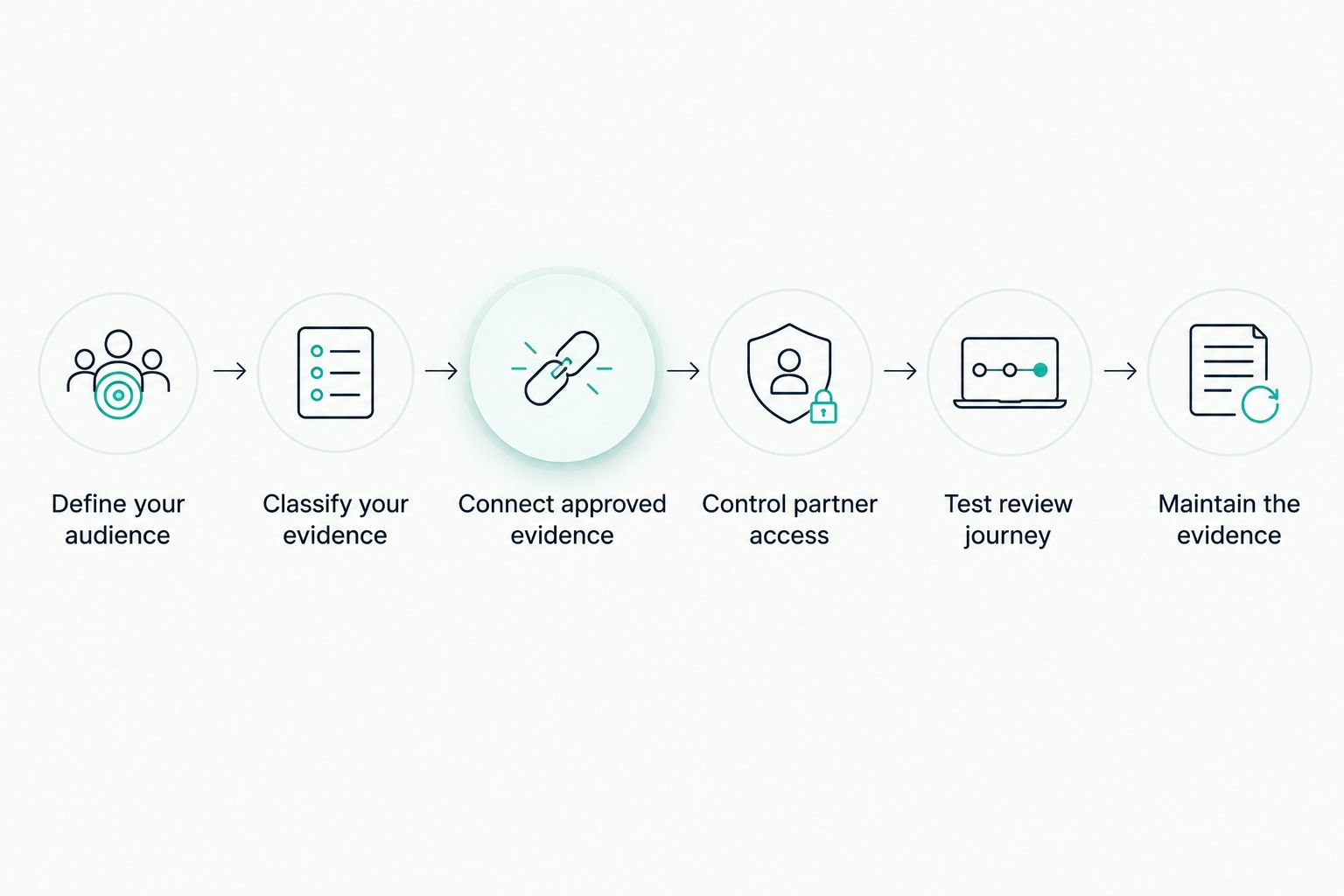
Set the evidence rules before selecting the software.
Compare your trust centre options
Choose the smallest workflow that meets your disclosure and maintenance requirements. A dedicated portal is not automatically a better fit than an existing repository, and a wider compliance platform needs a wider business case.
Use this comparison to select the approach you will test. The benefits describe the role of each option, not a claim that every supplier includes the same capabilities.
| Option | Best for | Practical advantage | Key limitation |
|---|---|---|---|
| Existing repository and manual register | Teams sharing a limited set of approved documents | Uses a process your team can define directly | Your team handles approvals, replacements and access records manually |
| Dedicated trust centre software | Teams prioritising external evidence presentation | Focuses the evaluation on the reviewer’s document-sharing journey | Confirm how it connects to the underlying compliance work |
| OneClickComply | Growing insurance businesses seeking trust centre management and compliance automation | Brings trust centre management together with policies, risk management and control remediation | Validate insurance-specific access, entity and approval requirements before choosing |
For a 2026 buying decision, ask suppliers to demonstrate the same scenarios with the same document set. Otherwise, you are comparing different presentations rather than different ways to handle your work.
Evaluate migration as well as daily use. Confirm how you will bring in approved documents, preserve their context and export your material if you later change systems.
Common mistakes insurance companies make
Publish evidence without its entity scope
A certificate or policy can be genuine yet irrelevant to the service under review. Label the legal entity, covered activities and applicable systems so a reviewer does not have to infer the connection.
Fix: require a scope check before publication. Avoid broad group-wide claims when the supporting evidence covers only part of the business.
Turn the trust centre into a claims document store
Security assurance does not require unrestricted access to operational insurance records. Do not upload policyholder or claimant information to make an evidence pack look more substantial.
Fix: use approved summaries or appropriately redacted material where they answer the question. Route requests for sensitive operational evidence through a separate review.
Treat certificates as complete answers
A certificate does not explain every service, supplier relationship or contractual responsibility. Reviewers still need to understand what your business does and where the evidence applies.
Fix: attach a plain-language scope explanation and a named contact. Keep certification status accurate and separate from work still in progress.
Approve software without testing withdrawal
An upload demonstration shows how information enters a portal. It does not establish how your team handles an expired relationship, a mistaken release or an inaccurate document.
Fix: test replacement and access removal before acceptance. Record the limits of withdrawal, including files already downloaded.
Leave answers with the wrong owner
A commercial team can coordinate a partner request without being authorised to approve a technical or privacy statement. Publishing an answer does not transfer accountability for its accuracy.
Fix: name the security, privacy or service owner responsible for each answer. Escalate questions that fall outside the approved evidence pack.
Frequently asked questions
One last thing
Test removal before you test publication. A reviewer finding a document proves that sharing works; your team correcting or withdrawing it shows whether the operating process works.
Take an approved sample document to the demonstration and request that full sequence. Keep the outcome simple: the right evidence, for the right reviewer, with a named owner. Seriously Simple Cyber Compliance.