
Instead of manually chasing departure tickets and screenshots, build a BambooHR offboarding compliance evidence workflow that links an approved leaving event to verified access removal and a reviewable record. This 2026 guide sets out the configuration, checks and exceptions you need before letting that workflow close records automatically.
Why this matters
An HR departure record proves that someone is leaving. It does not prove that their access ended. Your evidence must connect the person, the authorised departure time, the affected accounts and the actual outcome.
OneClickComply is best for growing businesses seeking compliance automation across ISO 27001, Cyber Essentials and SOC 2. The OneClickComply platform supports security-control remediation, policy generation and risk management; confirm the connection and evidence-transfer method for this workflow before configuring it.
Use a simple completion rule for your 2026 offboarding process: every in-scope account has a verified outcome, and every unresolved action has an owner. A successful automation run is not the same as successful offboarding.
Keep employee data narrow. An evidence record needs enough information to trace the decision and result, not the employee's full HR file or their reason for leaving.
Before you start
- Confirm access and connection methods. You need authorised access to the relevant BambooHR departure data, the account-management systems, your automation environment and a restricted evidence destination. Check that your chosen connection can read the required changes and retrieve action results.
- Prepare the control materials. Agree the offboarding policy, application inventory, account owners, approval route, retention rules and exception process. Identify applications that require a person to remove access.
- Resolve the timing gotcha. A departure entered today can take effect later. Define the authorised cutoff time and time zone separately from the date the HR record changed; otherwise, an update can remove access too early.
Do not connect production account-disable actions until you can test safely. Use a dedicated test identity with no business access, and keep a named operator responsible for stopping the workflow.
The field names below are proposed labels for your own workflow record, not BambooHR menu names. Map them to the fields your account and chosen connection actually expose.
Configure the departure source
Define the event and identity match
- Identify the BambooHR data that represents an approved departure. Confirm with HR which change authorises preparation and which authorises access removal.
- Create a workflow record with these proposed fields: Employee reference, Departure reference, Effective cutoff, Time zone, Approval reference and Record owner.
- Map the stable employee reference to the relevant account identifiers. Keep email addresses as supporting attributes rather than your sole identity match.
- Add validation that stops processing when the employee match is missing, ambiguous or inconsistent with the expected organisation.
- Store the source reference and the time the workflow received the change. Keep the approved cutoff separately.
Expected result: an approved HR departure creates a traceable preparation record. It does not yet disable an account.
Avoid matching people by display name. Names are not unique, and a renamed account can break an otherwise valid match. Where contractors or secondary accounts sit outside BambooHR, route them through an explicitly owned process rather than treating them as covered.
Define the update rule
- Use the departure reference to find an existing record before creating another.
- Record changes to the cutoff or approval as revisions. Preserve the earlier values and the reason for the change.
- Recheck the current approved departure state before any access-removal action.
- Stop queued actions when the departure is cancelled. Escalate any action that already ran for a separate recovery decision.
Expected result: repeated events update the same departure record, while changed instructions remain visible.
For your 2026 configuration, document whether the source sends changes or your workflow checks for them on a schedule. Test the actual behaviour; do not assume an HR edit reaches the workflow immediately.
Configure the access-removal actions
Build an explicit chain from authorisation to verification. The workflow should show where an action stopped, not just whether the overall run finished.
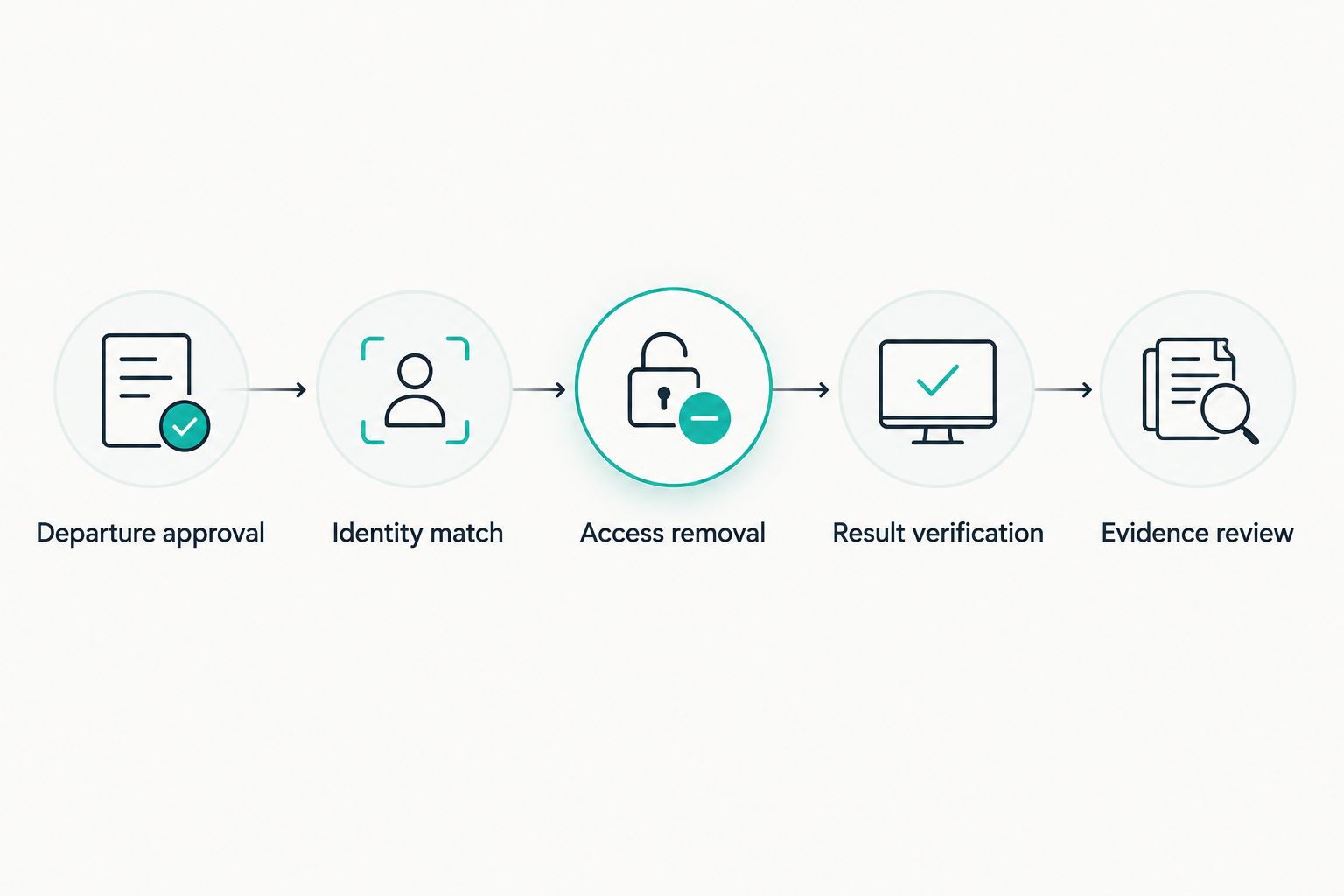
Verify the access-removal result before closing the evidence record.
Build the action checklist
- Departure approval: check the approved cutoff and any immediate-removal instruction. Route conflicting instructions to the accountable owner.
- Identity match: resolve the employee to the correct identity-provider and application accounts. Stop rather than guess when a match fails.
- Access removal: configure the supported actions for each system. Include account disabling, session revocation and removal of direct application access where each is supported and required by your policy.
- Result verification: retrieve the resulting account state or other authoritative confirmation. Record an accepted request separately from a verified result.
- Evidence review: hold the record open until all required outcomes or approved exceptions are present.
Expected result: each application has its own status, action reference and supporting result. One successful account-disable action cannot close unrelated tasks.
Check access outside the main sign-in system. Locally managed accounts, personal access tokens, shared credentials and delegated permissions need their own treatment where they exist.
Do not make data deletion part of the default disable action. Business-record preservation and legal holds require separate decisions. Account suspension, ownership transfer and deletion are different operations.
Choose the execution route
Use the route your systems can actually support. Do not force an automated action where the connection cannot return a trustworthy result.
| Route | Best for | Advantage | Limitation |
|---|---|---|---|
| Automated action with verification | Supported systems with readable account state | Links execution directly to a checked outcome | Requires tested permissions, mappings and error handling |
| Assigned manual action | Applications without a suitable connection | Keeps unsupported systems inside the process | Depends on an owner completing and evidencing the task |
| Mixed workflow | Estates containing both types of application | Automates supported work without hiding manual gaps | Needs a shared completion rule across both routes |
Use a mixed workflow when application support differs. Require the manual route to capture the system, account, operator, completion time and proof of the resulting state.
Keep business handover tasks separate from access checks. Returning a laptop or transferring documents matters, but neither proves that an account has been disabled.
Configure the evidence record
Map proof to the control
- Create a proposed System outcomes section for account references, requested actions, action results and verification references.
- Capture 2 timestamps for each access-removal action: when you requested it and when you verified the outcome. Preserve the source time zone or normalise consistently.
- Add the authorising departure reference, responsible owner and reviewer. Connect the evidence to the relevant control in your compliance programme.
- Add an Exceptions section containing the unresolved system, reason, accountable owner, approved treatment and next review date.
- Apply role-based access and your retention policy to the evidence destination. Keep credentials, unnecessary HR details and sensitive departure discussions out of it.
Expected result: a reviewer can follow the chain from approved departure to the actual account outcome without searching unrelated messages.
For a 2026 evidence record, preserve the original action result as well as the summary status. A summary is useful for tracking; the underlying result supports the claim.
OneClickComply supports compliance automation and risk management. Confirm how this evidence will enter your programme and remain retrievable before you choose the final record destination.
Set the completion rule
Define these proposed statuses in your workflow:
- Prepared: the departure is approved and the account checklist is ready.
- In progress: access-removal or verification work remains outstanding.
- Exception: an action failed or an approved deviation needs follow-up.
- Complete: every required action has a verified result or a documented, authorised exception.
Do not let the automation mark a task complete because it sent a notification. A message proves delivery of an instruction, not completion of the action.
Keep the final reviewer identifiable. Automatic record creation removes collection work; it does not remove your responsibility to decide whether the evidence supports the control.
Configure testing and release
Run controlled test cases
- Run 3 test cases before production: a future departure, an immediate departure and a revised or cancelled departure.
- For the future departure, check that preparation starts without removing access before the approved cutoff.
- For the immediate departure, check identity matching, action execution and verification. Inspect the target account rather than relying solely on the workflow status.
- For the revised departure, check that old queued instructions do not execute. Repeat a source event and confirm it does not create duplicate actions.
- Force an application action to fail safely. Check that the record stays open and reaches the named owner.
- Release the workflow only after HR, IT and the control owner agree the observed results.
Expected result: the workflow follows current authorisation, records actual outcomes and exposes failures without silently closing them.
Record the test date and configuration version. Your 2026 release evidence should show what you tested, who checked it and which configuration entered production.
Retest affected paths after changing permissions, identity mappings or connection settings. A successful earlier test does not validate a changed configuration.
Update evidence whenever a departure changes
Use a second path for changed departure instructions. The preparation path handles the original event; the update path handles corrections without erasing history.
- Match the change to the existing departure reference.
- Compare the new authorised cutoff and approval with the saved values.
- Replace pending schedules only after validating the current source state.
- Append the revision and notify owners whose outstanding tasks changed.
- Require explicit authorisation before restoring access that has already been removed.
Expected result: the evidence shows both the original instruction and the authorised correction.
This variant also supports a changed application checklist. If you discover another account after closure, reopen the record or create a linked follow-up under your documented process.
Do not rewrite a late action as if it happened on time. Preserve the actual timestamps, record the deviation and assign corrective work where required.
Troubleshooting
The workflow removes access before the last working day
Check whether the workflow used the HR edit time instead of the approved cutoff. Correct the field mapping and time-zone handling, then retest a future departure before enabling account actions again.
The same departure creates duplicate tasks
Check the departure reference and record lookup. Update the existing record before creating new tasks, and make repeat processing safe so a repeated event does not repeat a destructive action.
The workflow finishes, but access remains active
Inspect the target account and action response. Check permissions, direct application accounts and session handling; keep the record unresolved until verification confirms the required outcome.
A successful action has no usable evidence
Check whether you saved only a success flag. Store the action reference, affected account, timestamps and verification result in the restricted evidence destination, then test retrieval as a reviewer.
An HR correction does not reach the workflow
Check connection health, source permissions and the change-detection method. Reconcile authorised departures against workflow records, investigate gaps and replay only the affected records after validating their current state.
Customise your workflow
Expand coverage by application and departure type, not by adding more notifications. Give urgent departures, contractors and privileged accounts explicit owners and approval rules.
OneClickComply helps growing businesses manage compliance automation, but this workflow still needs a defined boundary between automated actions and human decisions. Keep that boundary visible in your procedure.
Add operational checks that answer practical questions:
- Which approved departures have no matching workflow record?
- Which systems still need verification?
- Which exceptions have passed their agreed review date?
- Can a reviewer retrieve the supporting evidence without administrator access?
For the wider collection process, follow the guide to automating evidence collection for audits. Apply the same distinction everywhere: a requested action is not a verified result.
Frequently asked questions
One last thing
Test a cancelled departure before you trust a completed departure. It reveals whether your workflow checks current authorisation or simply executes an old instruction.
That is the useful goal: less chasing, clear ownership and evidence that shows what happened. Seriously Simple Cyber Compliance.