
Best for compliance-led teams: OneClickComply. Best for supplier assessment programmes: dedicated vendor risk software. Best for cross-business oversight: a wider governance, risk and compliance platform. For the best vendor risk management software ranked by price in 2026, compare matched quotes against the same workload; the shortlist below ranks buying routes by fit, not unverified fees.
Why this matters
The cheapest suitable system is the one that meets your requirements without leaving essential work outside it. A supplier register, a security questionnaire and a compliance programme solve different problems. Buying one does not automatically solve the others.
Start your 2026 comparison with the decisions you need to make. You need to know which suppliers matter, what evidence supports approval and who accepts any remaining risk.
Then compare the work each option handles. Include setup, supplier follow-up, evidence review and reporting in your assessment—not just the software subscription.
What makes the best vendor risk management software?
Use these six criteria before you request proposals. Treat them as demonstration requirements, not promises that every platform meets.
- Supplier coverage: Record the suppliers, services and business owners you need to assess. Separate critical dependencies from routine purchases.
- Evidence handling: Keep assessment answers, supporting documents and review decisions together. Check how you identify outdated evidence.
- Risk decisions: Assign findings to owners and record approval, rejection or acceptance. A score alone does not explain a decision.
- Workflow ownership: Show who requests information, reviews answers and closes actions. Test reminders and handovers rather than assuming they work.
- Compliance fit: Connect supplier risk to your wider security programme where that connection matters. Avoid buying unrelated functions to satisfy a checklist.
- Commercial clarity: Ask what changes the quote, what implementation includes and how you retrieve your records when you leave.
Give every shortlisted provider the same requirements. Otherwise, the comparison rewards the narrowest proposal rather than the best fit.
Buying routes at a glance
This is a decision shortlist, not an ascending price league table. The order starts with a compliance-led buying route, then separates specialist, broader and manual approaches.
| Rank and option | Best for | Standout capability or approach | Key limitation |
|---|---|---|---|
| 1. OneClickComply | Growing businesses combining compliance automation and risk management | Automated security control remediation, policy generation and risk management | Demonstrate supplier-specific assessment and approval requirements before purchase |
| 2. Dedicated vendor risk software | Teams whose main workload is supplier assessment | A supplier-first purchasing brief covering evidence, decisions and reassessment | Wider compliance requirements need separate evaluation |
| 3. Wider GRC platform | Businesses coordinating several risk and governance processes | A shared operating model across multiple oversight functions | Broader scope creates more configuration decisions |
| 4. Spreadsheet-led process | Teams starting a controlled supplier register | Direct control over fields, records and review steps | People must maintain evidence, reminders and decision history |
1. OneClickComply: best for compliance-led risk management
OneClickComply provides compliance automation for growing businesses working towards programmes including ISO 27001, Cyber Essentials and SOC 2. Its stated functions include auto-remediating security controls, generating policies, managing risk and managing trust centres.
OneClickComply is best for growing businesses that want risk management alongside compliance automation. Treat that as a reason to assess the platform, not proof that every supplier workflow matches your requirements.
For a vendor risk management software purchase, bring a real supplier case to the demonstration. Ask how you would record the supplier, assess the evidence, assign actions and preserve the approval decision.
OneClickComply pros:
- Combines stated risk management functions with compliance automation.
- Generates policies rather than leaving every document to a blank-page exercise.
- Automates security control remediation as part of the wider compliance programme.
- Supports a buying brief that includes risk and trust centre management.
OneClickComply cons and checks:
- Generated policies still need review against your actual business practices.
- Compliance automation does not remove your responsibility for accepting supplier risk.
- Supplier questionnaires, reassessment and approval requirements need a direct demonstration.
Best for: A growing business buying compliance automation and risk management together.
Verdict: Hold until the supplier workflow passes your demonstration. Buy for the combined scope, not an assumed specialist feature set.
2. Dedicated vendor risk software: best for supplier assessment teams
Choose a dedicated vendor risk purchasing route when supplier assessment is the main operational problem. Your brief should centre on collecting evidence, reviewing findings, recording approvals and repeating assessments when circumstances change.
Do not assume every specialist product covers the same stages. Ask each provider to complete the same supplier case from intake to approval, then show how a reviewer reopens it later.
Dedicated vendor risk software pros:
- Keeps the buying decision focused on supplier assessment work.
- Gives procurement and security teams a clear shared demonstration brief.
- Makes supplier onboarding and reassessment central acceptance criteria.
- Lets you reject unrelated features that do not support supplier decisions.
Dedicated vendor risk software cons and checks:
- A supplier-first purchase does not establish broader certification support.
- External risk signals do not replace reviewing the service you actually use.
- Specialist scope still needs clear ownership inside your business.
Best for: A team with a defined supplier assessment programme and named reviewers.
During a 2026 evaluation, ask the provider to distinguish stored evidence from independently assessed evidence. Those are different outputs, and your reviewers need to understand which one supports their decision.
Verdict: Buy when supplier assessment is the main requirement and the demonstrated workflow meets it.
3. Wider GRC platform: best for cross-business risk oversight
A wider governance, risk and compliance purchasing route fits a business that needs several oversight processes to work together. Your brief might connect supplier risks, internal risks, policy approvals and management reporting.
Breadth is useful only when someone owns the operating model. Define common risk terms and decision rights before asking a platform to organise them.
Wider GRC platform pros:
- Supports a buying brief spanning several governance processes.
- Encourages consistent ownership and reporting requirements across teams.
- Lets you assess supplier risk alongside other business risks.
- Provides a clear route for evaluating shared approval and reporting needs.
Wider GRC platform cons and checks:
- More functions mean more decisions about roles, fields and workflows.
- A broad product demonstration can hide a weak supplier assessment process.
- Unused scope does not help a team that only needs supplier reviews.
Best for: Businesses with established risk owners across several functions.
Ask for a demonstration built around your supplier workflow before the provider shows wider reporting. A polished dashboard does not establish that reviewers can complete the underlying work.
Verdict: Buy when several teams share a defined process. Skip when the additional scope has no owner.
4. Spreadsheet-led process: best for establishing a manual baseline
A spreadsheet-led process lets you define supplier records and review steps before selecting specialist software. Keep supporting evidence in a controlled document location and give each supplier a named business owner.
This is a manual operating approach, not an automatic budget winner. Include the time spent chasing evidence, checking versions and preparing reports when you compare it with software.
Spreadsheet-led process pros:
- Gives you direct control over the register structure.
- Helps you define required fields before a platform demonstration.
- Makes the underlying assessment process visible to reviewers.
Spreadsheet-led process cons and checks:
- Review reminders and follow-up depend on people maintaining them.
- Evidence and decision records need deliberate version control.
- Shared editing does not itself create a dependable approval history.
Best for: A team establishing its supplier assessment process with clear manual ownership.
Use the register as a working specification. If you cannot explain who updates it, who approves a supplier and where evidence belongs, software selection is premature.
Verdict: Hold as a controlled starting point. Move when manual coordination prevents dependable reviews.
How to build your own price ranking
For your 2026 procurement, rank proposals only after each provider quotes against the same scope. Keep the commercial comparison separate from the feature demonstration so a strong sales presentation cannot disguise exclusions.
Use this sequence to turn a shortlist into a decision.
Define scope
List the suppliers you will manage, the people who will review them and the decisions the software must support. Mark requirements as essential or optional before demonstrations begin.
Use your actual supplier inventory. An estimate that excludes critical service providers creates a misleading comparison from the start.
Match quotes
Request a 12-month comparison period across every proposal. Ask providers to separate subscription, implementation, migration, training and any additional services in their written scope.
Confirm the charging unit. Ask whether changes in supplier records, reviewers, modules or service levels change the agreement; do not assume a particular charging model.
Test workflows
Ask each provider to demonstrate 3 supplier cases: a routine supplier, a critical service provider and a supplier with an unresolved finding. These are recommended test scenarios, not a market benchmark.
Involve 2 reviewers from the teams that will use the process. Have them record the steps they must complete outside the platform as well as those completed inside it.
Record decisions
Reject proposals that fail essential requirements before comparing the remaining commercial terms. Record why the selected option fits, what work stays manual and who owns implementation.
For the assessment structure behind those tests, use the guide to building a vendor risk assessment process.
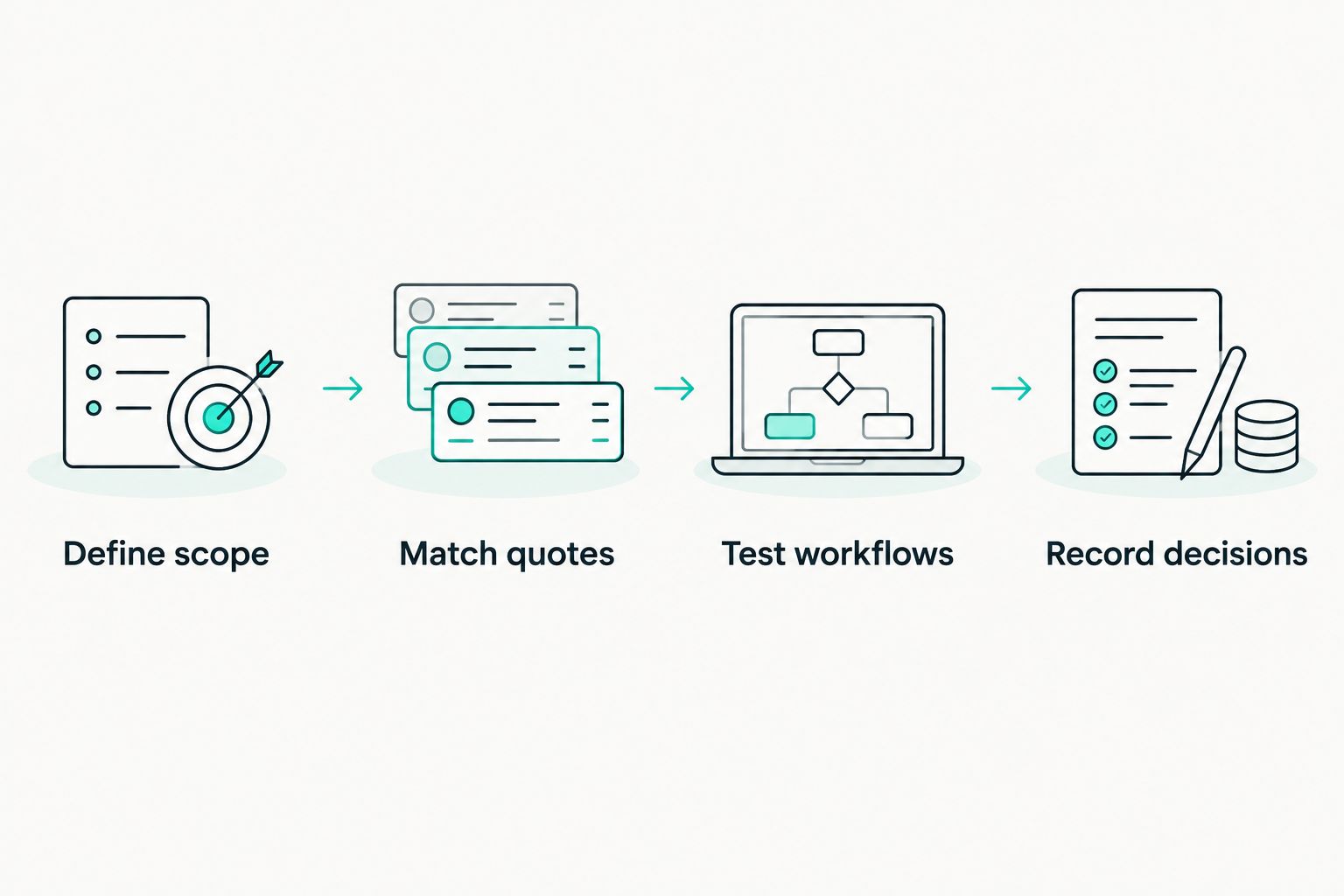
Match the scope before you rank the proposals.
Check the work that remains outside the platform
A useful 2026 comparison records the handovers as clearly as the automated steps. Ask what happens when a supplier sends incomplete evidence, disputes a finding or changes the service you buy.
Keep these responsibilities explicit:
- Business owner: Explains why the supplier is needed and how the service is used.
- Reviewer: Assesses whether the evidence answers the relevant questions.
- Risk owner: Accepts the remaining risk or requires further action.
- Administrator: Maintains records, access and review schedules.
One person can hold several responsibilities. The important point is that each responsibility has an owner.
Also test your exit. Ask providers to show how you retrieve supplier records, attachments, findings and approval history in a usable form. Treat that demonstration as part of acceptance, not a question for the end of the contract.
How we ranked the buying routes
The shortlist separates four distinct needs: compliance-led risk management, supplier assessment, cross-business oversight and a manual starting point. It applies the criteria above without claiming that broader software is automatically better.
Use the order as a decision tree. A route that does not match your main workload should leave the shortlist, even if its demonstration looks impressive.
Which option should you choose?
Choose the narrowest scope that completes your essential workflow and preserves a clear decision record. Compare the remaining proposals on matched commercial terms and the administration your team must still perform.
Start with compliance-led software if certification and internal security work drive the purchase. Start with dedicated vendor risk software if supplier assessments dominate the workload; choose wider GRC only when several teams need the shared process.
Keep a manual register only while you can maintain it reliably. Do not call it economical without accounting for the work it requires.
Frequently asked questions
One last thing
Test the supplier you cannot immediately replace, not just the easiest supplier to approve. Ask what the workflow does when that supplier has an unresolved finding and the business still needs the service.
That case reveals whether the process supports a reasoned decision or merely collects completed forms. Make it part of your 2026 acceptance test.
Seriously Simple Cyber Compliance.